Auto-Tune vs Melodyne vs ACE Studio: Which Vocal Tool Do You Actually Need? (2026)
Search for "vocal software" and three names keep coming up: Antares Auto-Tune Pro 11, Celemony Melodyne 5 and ACE Studio. They often get lumped together as "vocal tools," but they actually do three completely different jobs — correction, editing and generation. Mix them up and you end up buying Melodyne when what you wanted was the hard-tune sound, or Auto-Tune when you do not even have a singer.
In this guide, the Beat Lab editorial team sorts out the roles, strengths and limits of all three — Auto-Tune for real-time tuning and hard-tune, Melodyne for surgical post-recording editing, ACE Studio for AI vocal generation — with a one-minute decision table and the combo workflows pros actually use. Prices were verified on each official site on July 21, 2026. For deep dives, see our Auto-Tune Pro 11 review, Melodyne 5 review and ACE Studio review.
The Verdict: One-Minute Decision Table
In a hurry? Find the row that matches what you want to do.
| Your goal | Use this | Why |
|---|---|---|
| Use hard-tune or an always-on tuned sheen as a "sound" / tune live or on stream in real time | Auto-Tune Pro 11 | A real-time correction effect — insert it and it works as you sing. Retune Speed 0 + Classic Mode is the genre-defining hard-tune recipe |
| Fix off notes and sloppy timing in a recorded vocal so nobody can tell | Melodyne 5 | Note-based offline editing of pitch, timing, vibrato and sibilants. Unmatched for transparent repair |
| No vocalist — you want AI to sing your topline and finish a vocal track | ACE Studio | Generates vocals from MIDI + lyrics with 160+ royalty-free AI voices. No recorded voice needed; stacking harmonies is trivial |
| Start as cheap as possible | Melodyne essential or ACE Studio free | Melodyne essential is a $99 one-time purchase; ACE Studio starts free (both verified July 2026) |
Table by the Beat Lab editorial team, based on official information verified July 21, 2026. If you share or quote it, please link back to this page.
Three Different Jobs: Correction, Editing, Generation
A kitchen analogy makes the relationship obvious. Auto-Tune is the seasoning — an effect you apply in real time to a vocal (recorded or live) to set the flavor. Melodyne is the knife — you open a finished recording and fix the bad spots note by note. And ACE Studio is the garden — it grows the ingredient itself, generating a vocal from MIDI and lyrics before any singing exists.
So "which one is best?" is the wrong question. What decides the tool is whether you have a vocal in hand, and what you want to do with it. Here is each one's territory and where it stops.
Auto-Tune Pro 11: King of Real-Time Tuning and Hard-Tune
Where it shines
- Real-time correction: Auto Mode works the moment you insert it — monitoring while tracking, live shows, streaming. Of the three tools, only Auto-Tune does this
- Hard-tune: Retune Speed, Flex-Tune and Humanize at 0 plus Classic Mode gives you the T-Pain-lineage robotic sound that has become part of the genre itself
- Built-in harmonies: Pro 11's Harmony Player generates up to four harmony voices from the lead inside the plugin — a huge time-saver for melodic rap hooks
Where it stops
- Timing and rhythm repair is not its territory (Graph Mode does offer pitch and time editing, but Melodyne's note editing is far deeper)
- It needs a vocal. It is a correction effect — the input is a human voice
Pricing: $459 perpetual, Auto-Tune Unlimited subscription at $24.99/month or $174.99/year, and the lighter AutoTune 2026 at $300 (all verified July 2026). Our Auto-Tune Pro 11 review covers the perpetual-vs-subscription math and a settings cheat sheet from natural to full robot.
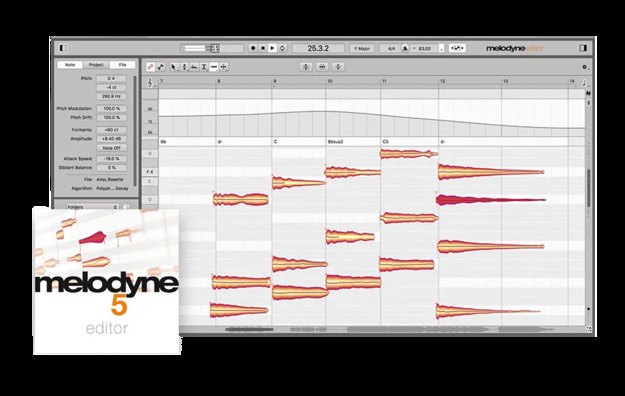
Melodyne 5: The Standard for Surgical Post-Recording Editing
Where it shines
- Transparent repair: it displays your recording as notes and lets you fix only the ones that are off — pitch center, drift and vibrato separately. Nothing beats it for edits nobody can hear
- Timing editing: drag a note's position or stretch its length directly. Rhythm repair is territory Auto-Tune simply does not cover
- Beyond vocals: the DNA algorithm (editor and up) reaches single notes inside piano or guitar chords, and the Percussive Pitched algorithm even retunes 808s
Where it stops
- It is offline editing by design — no live or streaming use, and hard-tune is possible but not its natural language
- Note-by-note work takes longer than a set-and-forget effect
Pricing: four editions — essential $99, assistant $249, editor $399, studio $699 (verified on Celemony's official web shop, July 21, 2026). Upgrades cost only the difference in list price, and there is a fully functional 30-day trial. See our Melodyne 5 review for which edition you actually need.
ACE Studio: A Vocal Track Without a Vocalist
Where it shines
- AI vocal generation: type MIDI and lyrics into the piano roll and one of 160+ royalty-free AI voices sings it — breaths, vibrato and all. Multiple languages are supported. "No singer" stops being a reason to shelve a vocal track
- Stacking harmonies and doubles: because it is generative, you can clone the line, change the voice and stack as many parts as you want in seconds
- A whole toolbox: voice cloning (an AI model of your own voice), a voice changer, 40+ AI instruments (sax, trumpet, string sections), a Stem Splitter, and tighter DAW integration via ACE Bridge in 2.0 — covered in our ACE STUDIO 2.0 feature review
Where it stops
- It is not a repair tool for recorded human vocals — that is Auto-Tune / Melodyne territory
- Getting a convincing performance takes some MIDI craft: velocities, pitch curves and phrasing are a new skill to learn
Pricing is subscription-based: the Artist plan works out to $20.73/month billed yearly and Artist Pro to $27.5/month (verified on the official pricing page, July 21, 2026). It is a rent-to-own model — subscribe for two years and the license becomes perpetual. You can start free, and paid plans carry an official 7-day 100% money-back guarantee.
▶ Sneak Peek: New AI Instruments in ACE Studio 2.0 (official ACE Studio channel)
Side-by-Side Comparison Table
| Aspect | Auto-Tune Pro 11 | Melodyne 5 | ACE Studio |
|---|---|---|---|
| Role | Correction (real-time effect) | Editing (post-recording, note-based) | Generation (AI vocals & instruments) |
| Input | A human vocal (mic/recording) | Recorded audio | MIDI + lyrics (no vocal needed) |
| Hard-tune | ◎ The standard (Classic Mode) | △ Possible, not its language | △ Add the effect after generating |
| Transparent repair | ○ With careful settings | ◎ Note-level precision | — (nothing recorded to repair) |
| Timing repair | △ Partial via Graph Mode | ◎ Move/stretch notes directly | ◎ It is MIDI — fully flexible |
| Harmonies | ◎ 4 voices via Harmony Player | ○ Edit duplicated tracks | ◎ Unlimited stacked AI voices |
| Live / streaming | ◎ Its home turf | × Offline by design | × A production tool |
| Entry price | $459 perpetual (sub from $24.99/mo) | $99 perpetual (essential) – $699 | Free to start (Artist $20.73/mo) |
| Try before buying | Official free trial | 30-day full trial | Free plan + 7-day refund |
| Best for | Rap/melodic vocal sessions, live performers, streamers | Producers and engineers polishing recorded vocals | Beatmakers with no vocalist, topline writers |
Prices verified by the editorial team on the official Antares, Celemony and ACE Studio (acestudio.ai) sites on July 21, 2026. Sales and currency will move them.
Combo Workflows: Three Patterns the Pros Use
These tools are less rivals than departments. Here are the combinations you will actually see in sessions.
1. Finishing a recorded vocal: Auto-Tune × Melodyne
The classic. First repair pitch accidents and timing drift in Melodyne, then insert Auto-Tune — subtle or full robot — as the effect. Separating repair from flavor lets you tune Auto-Tune's settings purely for sound design.
2. From zero singers to a finished song: ACE Studio → (optionally) Melodyne
ACE Studio's generated vocals are usable straight away, but the exported audio is just a vocal track — so tightening sibilants and tail lengths in Melodyne adds an extra layer of human feel. A generate-then-edit pipeline.
3. AI for the demo, human for the record: ACE Studio × Auto-Tune
Beatmakers increasingly send artists demos with an AI topline built in ACE Studio, then track the real vocal and finish it with Auto-Tune once the song is approved. Hearing "the beat with a vocal on it" sells — it directly affects what you can charge for a beat.

FAQ
Q1. If I only want the hard-tune (T-Pain) effect, which one should I buy?
A. Auto-Tune. Set Retune Speed, Flex-Tune and Humanize to 0 and switch on Classic Mode — that is the classic recipe. If you do not need Graph Mode editing or built-in harmony generation, the lighter AutoTune 2026 ($300, verified July 2026) uses the same correction algorithm and can produce the same effect. Melodyne and ACE Studio are not the natural tools for hard-tune.
Q2. What if I have no vocalist to sing on my tracks?
A. That is exactly what ACE Studio is for. Type in MIDI and lyrics and one of 160+ royalty-free AI voices sings the line, so there is no recorded vocal to correct in the first place. You can start free, and paid plans are 5% off your first payment when you sign up through our referral link with promo code BEATLAB (verified July 2026).
Q3. Do I need all three? What is the best combination?
A. They play different roles, so you rarely need all three from day one. For recorded vocals, the professional standard combo is Auto-Tune for the effect and Melodyne for the repair. If you have no singer, start with ACE Studio alone, and add Melodyne later if you want to fine-tune the generated vocals.
Q4. What is the cheapest way to get started?
A. It depends on your goal. For fixing recorded vocals, Melodyne essential is the cheapest entry at a $99 one-time purchase. For hard-tune, you can subscribe to Auto-Tune Unlimited ($24.99/month) only for the months you need it. For AI vocal generation, ACE Studio starts free, and paid plans come with a 7-day 100% money-back guarantee (all verified July 2026).
Bottom Line
Choosing a vocal tool is not a spec battle — it comes down to two questions: "Do you have a vocal?" and "Apply it live, or fix it later?" Auto-Tune for the live feel and the hard-tune sound, Melodyne for invisible repair, ACE Studio when there is no singer at all. If you are stuck, scroll back to the decision table. And if there is no vocal on your hard drive yet, starting free with ACE Studio is the fastest route to hearing your beat with a voice on it today. For finishing touches, our free loudness checker and BPM & key detector are one click away.