BeatStars Pricing: Rates & When to Raise
"Is $30 fine for an MP3 Lease, or should I drop it to $20?" — when it comes to publishing beats on BeatStars, pricing is where most people first hesitate. Too cheap and it isn't worth the effort; too expensive and, with no track record, you won't get picked. On top of that, every shop's prices are all over the place, which makes the "right answer" hard to see.
In this article, the Beat Lab editorial team lays out the typical price ranges by license commonly seen internationally, how to think about take-home pay given the fees, the surprisingly under-discussed relationship between catalog size and price, and when to raise prices. Facts on BeatStars' pricing and fees are cross-checked against the official site and Help Center (as of July 7, 2026). For getting started with BeatStars itself, see our complete guide to starting on BeatStars.
1. The premise: you're pricing the "license," not the "beat"
Before you think about price, keep in mind that what you sell on BeatStars is not the beat itself but the right to use it (the license). With a non-exclusive license (Lease) you can sell the same beat to any number of buyers, so your revenue depends not just on the price of one sale but on "how many times that same beat sells over its lifetime."
In other words, pricing is not the task of deciding a single number like "MP3 is $30." It's the task of designing the whole ladder: MP3 → WAV → Trackout (Stems) → Unlimited → Exclusive. A cheap entry point (MP3) makes it easy to buy, while buyers aiming for a serious release get an upper-tier license. This tiered structure is the foundation. For the differences between licenses and what's inside the contracts, see our complete guide to BeatStars licenses.
2. Typical price ranges by license
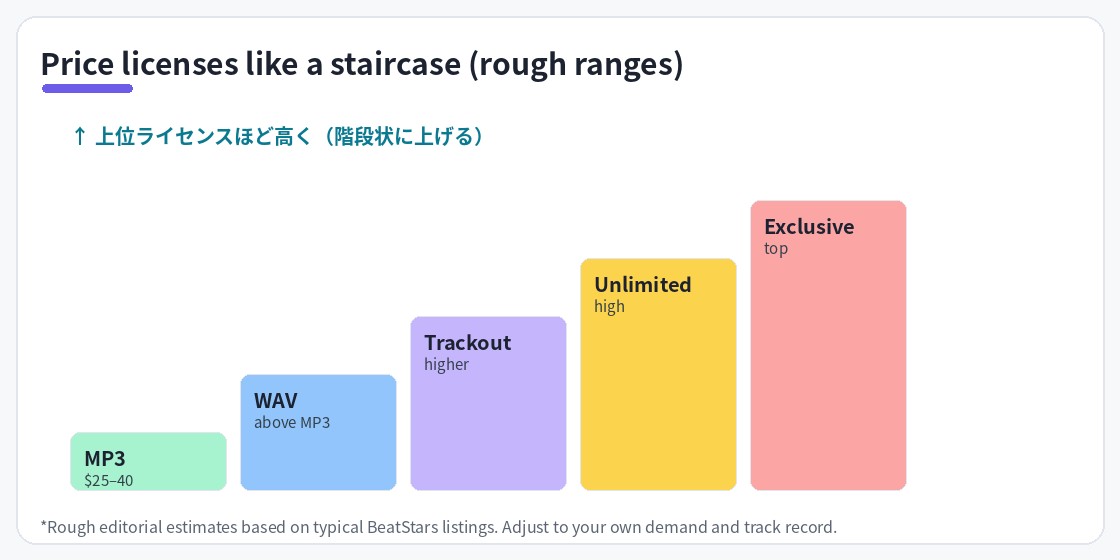
The price bands commonly seen among producers internationally are roughly as follows (our editorial estimate).
| License | Typical price | Positioning |
|---|---|---|
| MP3 Lease | $25-40 | The cheapest entry point. Mostly demo/social-media use |
| WAV Lease | $40-75 | Standard license for streaming releases |
| Trackout (Stem) Lease | $75-150 | Includes stems. Assumes a full mix |
| Unlimited Lease | $150-300 | Removes usage caps while staying non-exclusive |
| Exclusive | $300+ | Exclusive deal. New sales stop afterward |
*These are only a general sense of international pricing (our editorial estimate). They vary widely with reputation, track record and genre demand, and well-known producers sell far above this range.
If you're unsure about your first prices, the safest move is to stay within this range. A price far below the range (e.g., an MP3 at $5) may look easy to sell at first, but it tends to create a "cheap = low quality?" impression and is hard to bring back up to market level later. Conversely, pricing above the top of the range with no track record often means you don't even make the shortlist for comparison.
3. Thinking about "take-home" given the fees
Alongside pricing, you should understand the fees. As of July 7, 2026, BeatStars' terms are as follows (cross-checked against the official site and Help Center).
- Seller commission: 0% on every plan. 100% of the sale is the seller's share
- On Marketplace purchases, a 12% service fee on the subtotal is added on the buyer's side (excluded for Pro Page and embeddable-player purchases; you can also set the seller to absorb the fee)
- PayPal/Stripe payment processing fees are charged separately
- Seller plans come in three tiers: Starter $19.99/yr, Growth $79.99/yr, Professional $179.88/yr
What this reveals is a very low break-even: on the Starter plan, a single $30 MP3 Lease sale covers the annual fee. Meanwhile, since a buyer via the Marketplace pays the listed price + 12%, looking at prices with "the total the buyer actually pays" in mind makes it easier to judge value. For details on choosing a plan, see the pricing-plans section of our getting-started guide.
4. The relationship between catalog size and price
When people talk about pricing, "how much to charge" gets all the attention, but what really drives actual sales is catalog size (the number of beats you have published). There are three reasons.
1. More chances to show up in search
On both the BeatStars Marketplace and YouTube, exposure is basically "number of published tracks × discoverability per track." 100 tracks simply give you 10 times more entry points to be found than 10 tracks.
2. It builds trust as a shop
A shop with a single track and a shop with dozens create very different psychological hurdles to buying, even at the same price. The selection itself becomes proof that you're "a producer who is consistently active."
3. It sparks "browsing → bundling up"
A buyer who likes one track will listen to other beats in the same shop. The deeper your catalog, the higher the chance of multiple sales from a single visitor.
The conclusion is simple: early on, rather than fiddling with prices, it's more rational to fix a safe price within the range and spend your time growing your catalog. As a guide, aim for around 30 tracks first; a serious price review can wait until you've accumulated some catalog and sales data. You can cut the time spent on titles and tagging with Beat Lab: Type Beat Title & Tag Generator.
5. When to raise prices: three signs
So when should you review your prices? We recommend using the following three signs as a guide.
Sign 1: You start selling consistently every month
If you're selling steadily at the same price, that's a sign demand exceeds your price. Since license prices can be edited any time from Contracts in BeatStars Studio, it's safest to raise by one step (e.g., MP3 Lease from $29.99 to $34.99) and watch how sales change.
Sign 2: Offers and inquiries increase
BeatStars has a mechanism where buyers can submit price negotiations (offers), and sellers can set a minimum offer price. Frequent offers near your list price, or more inquiries for Exclusives — these are signals that your current list price may be low relative to demand.
Sign 3: Your credentials grow
A moment when the accomplishments you can list on your profile grow — high-view Type Beat videos, placements with artists, rising social followers — is a good time to raise prices. Price is payment not only for "beat quality" but also for "who you're buying from."
Note that even if you raise prices, already-completed contracts keep their original terms, so you don't need to worry about affecting past buyers. Conversely, if you want to run something on the discount side, keep the list price intact and use the coupon-code feature for a limited-time discount to preserve the credibility of your list price.
6. Pricing mistakes to avoid
- Joining the race to the bottom: the $1-10 band always has a flood of competitors. Buyers who chose you only for cheapness rarely become repeat customers, and you won't recoup your effort
- Breaking the ladder: having MP3 and WAV at nearly the same price, or Unlimited priced above Exclusive, confuses buyers. Higher tiers should cost more — that's the rule
- Changing prices frequently: a shop whose prices move within short spans invites lowballing. Review on a cadence where data accumulates (every few months)
- Contradicting your Free Download: using free downloads for lead generation is a classic strategy, but check that the distribution terms are consistent with your paid license content (here's how to set up Free Download)
Frequently asked questions
Q. What price should I set for my first beats?
A. A safe starting point is to base your prices on BeatStars' default pricing and stay within the roughly $25-40 MP3 Lease range commonly seen internationally (our editorial estimate). Extreme underpricing makes it hard to raise prices later, so keep within the typical range and adjust once you have a track record.
Q. If I raise prices, does it affect people who already bought?
A. Purchase agreements that have already been completed remain valid under the license terms and price at the time of the transaction. A price change applies only to new purchases from that point on, so existing buyers are never charged more. You can edit license (contract) prices at any time from Contracts in BeatStars Studio.
Q. Is it OK to run sales or discount coupons?
A. BeatStars has a coupon-code feature you can use for limited-time discount campaigns. However, if you are always discounting, the credibility of your list price drops, so it's common to use coupons for defined periods such as Black Friday.
Q. How much is deducted from my sales in fees?
A. BeatStars' seller commission is 0% on every plan, so 100% of the sale is the seller's share. However, on Marketplace purchases a 12% service fee on the subtotal is added on the buyer's side (excluded for Pro Page and embeddable-player purchases), and PayPal/Stripe payment processing fees and the annual subscription are charged separately (as of July 7, 2026).
This page contains affiliate advertising (PR). As an Amazon Associate, Beat Lab earns from qualifying purchases.
Summary
BeatStars pricing, boiled down, comes to these four lines:
- What you price is the entire license ladder. Keep it consistent from MP3 to Exclusive
- When unsure, place it within the international range (e.g., MP3 Lease $25-40)
- Early on, catalog size beats price. Fix a safe in-range price and stack up tracks
- Raise prices in small steps once the signs appear: "selling consistently," "more offers," "more credentials"
To learn about sales channels beyond BeatStars and how their fees differ, see Airbit, Traktrain & selling beats direct.