Melodyne 5 Review: Melodyne vs Auto-Tune & Which Edition to Buy (2026)
When engineers say "just Melodyne it," they mean the tool that has become the generic verb for pitch editing. Celemony's Melodyne displays a recorded vocal as notes on a grid and lets you redraw pitch and timing one note at a time, almost like editing MIDI — an approach so influential it earned Celemony a technical Grammy. The current version is Melodyne 5.
Yet the two questions people actually search for are "how is it different from Auto-Tune?" and "which of the four editions do I need?" In this review, the Beat Lab editorial team verified Celemony's official site and web shop plus Plugin Boutique listings as of July 21, 2026, and breaks down Auto-Tune vs Melodyne (real-time effect vs note-based editing) and how to choose between Essential, Assistant, Editor and Studio. For the Auto-Tune side of the story — including the hard-tune sound — see our Auto-Tune Pro 11 review; for aligning stacked harmonies, see the VocAlign Pro review.
▶ Melodyne 5: What’s new? (official Celemony channel)
What Is Melodyne 5? Editing, Not "Correcting"
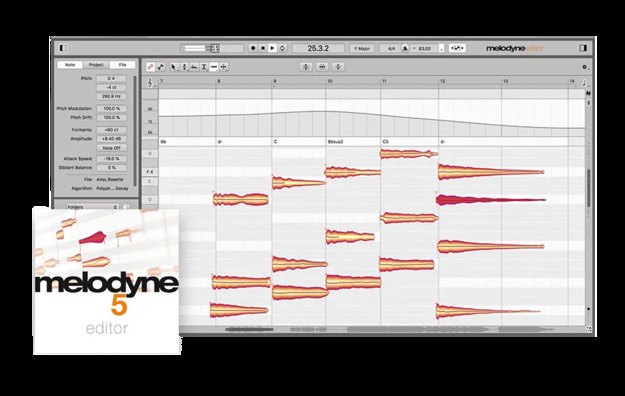
Melodyne detects the individual notes inside an audio file and understands each one in its musical context. That gives you note-level access not just to pitch, but to position, length, volume, vibrato, formants and sibilants — virtually every element of a vocal performance.
It runs standalone or as a plugin (VST3, AU, AAX), and in supported DAWs, ARA (Audio Random Access) integration means clips open directly in Melodyne with no audio transfer step. The key mindset: you don't leave Melodyne "inserted and always on" like an effect — you open recorded material in the editor, fix it, and commit the result. That is exactly where it parts ways with Auto-Tune.
Comparison Table: Auto-Tune vs Melodyne by Use Case
It's not about which one is "better" — it's about what you want to do. Here is how the two tools compare, side by side.
| Aspect | Auto-Tune (Pro 11) | Melodyne 5 |
|---|---|---|
| Core concept | Real-time correction effect — insert it, sing, it tunes as you go | Note-based editing after recording — redraw each note by hand |
| Hard-tune / T-Pain effect | ◎ Retune Speed 0 + Classic Mode is the classic recipe | △ Possible, but not what it's built for |
| Transparent, natural correction | ○ Achievable with careful settings | ◎ Fix only the off notes, surgically |
| Timing / rhythm fixes | × Out of scope | ◎ Edit note position and length directly |
| Vibrato, formants, sibilants | ○ Partial parameter control | ◎ Per-note editing (Assistant and up) |
| Chords & samples (polyphonic) | × | ◎ DNA reaches single notes inside chords (Editor and up) |
| Live / streaming | ◎ Real-time is its home turf | × Offline editing by design |
| Entry price | $459 perpetual / $24.99 per month subscription | From $99 perpetual (Essential) |
| Best for | Rap and melodic vocals that use tuning as a sound | Songwriters, producers and mixers who fix pitch and timing cleanly |
Table by the Beat Lab editorial team, based on official information as of July 21, 2026. If you share or quote it, please link back to this page.
In real sessions this isn't either/or: the pro standard is "Auto-Tune for the effect, Melodyne for the repairs." Buy Melodyne to get the T-Pain sound and you'll take the long way round; buy only Auto-Tune for natural corrections and you'll fight it on every detail. Decide which job you're hiring the tool for first.
Melodyne 5 Highlights for Beatmakers
1. Note-level pitch and timing editing
Drag a note to fix its pitch; grab its edge to fix its length. That's most of the workflow — and because you only touch the notes that need it, you avoid the stair-stepped artifacts of always-on tuning. Pitch center, pitch drift within a note and vibrato depth are all separately adjustable.
2. Melodic algorithm with sibilant handling
Melodyne 5 detects sibilants ("s" and "t" sounds) separately from the pitched part of each note, so consonants stay natural even after heavy pitch moves. A Fade tool and a Leveling macro bring volume editing down to the note level too.
3. Chord Track and chord recognition
Every edition includes the Chord Track, and Melodyne can detect chords from audio for you — the foundation for conforming vocals and samples to your song's harmony. Need to check a reference track's key first? Try our free BPM & Key Finder.
4. "Percussive Pitched" — yes, it tunes 808s
The sleeper feature for beatmakers: Melodyne 5 added an algorithm built for material that is percussive in character but still has a recognizable pitch — like tabla, berimbau, or an 808 kick. When a sampled 808 doesn't sit in your key, you can tune it note by note. For the bigger low-end picture, see our 808 & bass mixing guide.
5. DNA: edit single notes inside chords (Editor and up)
Melodyne's signature technology, DNA (Direct Note Access), reaches individual notes inside polyphonic material — piano, guitar, chord loops — so you can retune one note of a chord or "recompose" a library sample to match your progression. For sample-based producers this is the killer feature, but note that DNA requires Editor or above.
Editions and Pricing (verified July 21, 2026)
| Edition | Price (official web shop) | What it adds (each includes everything below it) |
|---|---|---|
| Melodyne 5 essential | $99 | Basic pitch and timing editing (Main Tool + macros). All algorithms except DNA; Chord Track included |
| Melodyne 5 assistant | $249 (MSRP $299) | Full toolset: vibrato, pitch drift, formants, sibilants, note volume/fades, inspectors, Audio-to-MIDI |
| Melodyne 5 editor | $399 (MSRP $499) | + DNA (single notes inside chords), chord editing, extended tempo and scale functions |
| Melodyne 5 studio | $699 (MSRP $849) | + Multitrack view, multitrack note editing and macros, quantize to a reference track, Sound Editor |
Prices verified by the editorial team on Celemony's official web shop (US, USD) on July 21, 2026; Plugin Boutique showed matching pricing (e.g. Editor at $399). Prices vary with sales and currency. All editions run standalone or as VST3/AU/AAX plugins with ARA support, and projects are compatible across editions.
The detail that changes the buying math: upgrading to a bigger edition officially costs only the difference between the two editions' list prices. Start with Essential, move up to Editor when you need DNA, and you won't have paid meaningfully more than buying Editor on day one. Few plugins let you "start small and grow" this safely.
Who Essential Is Enough For — and Who Needs Editor
- Essential ($99) is enough if you just want to fix off-pitch notes and loose timing in your own vocals or raps. Start here.
- Assistant ($249) is for anyone finishing other people's vocals. Vibrato depth, formants and sibilant levels are the practical difference between "fixed" and "polished."
- Editor ($399) is for producers who edit piano or guitar recordings and chord-based samples. DNA lets you move single notes inside chords and conform loops to your progression — this is where Melodyne becomes unique for sample-based beatmaking.
- Studio ($699) is for engineers and producers editing across many tracks — background vocal stacks, choirs. If harmony alignment is your daily grind, also consider how it pairs with VocAlign Pro, which specializes in timing alignment.
Downsides to Know
- No always-on, real-time use: Melodyne is an editor. If you want live correction or hard-tune as a permanent vocal color, that's Auto-Tune territory.
- Essential is the entry point, not the whole product: vibrato/formant/sibilant tools start at Assistant, DNA at Editor. Don't judge "Melodyne" by Essential alone — the difference-only upgrade path exists for a reason.
- Editing takes time: reviewing notes one by one is inherently slower than an insert effect. For bulk-aligning harmony stacks on a deadline, pair it with an automatic alignment tool.
- ARA depends on your DAW: with ARA hosts the workflow is seamless; without ARA you'll use the transfer (record-into-plugin) workflow. Check your DAW's ARA support before buying.
And if you don't have a vocal to fix yet, an AI vocal tool like ACE Studio can generate demo vocals first — Melodyne is for polishing what's already recorded. After the mix, run your bounce through our free Dynamics & LUFS checker.
FAQ
Q1. Should I buy Auto-Tune or Melodyne?
A. Depends on the job. Hard-tune, always-on tuning and live use: Auto-Tune (real-time effect). Natural pitch and timing repair after recording: Melodyne (note-based editor). Many pros run both — Auto-Tune as the sound, Melodyne for the fixes. See the comparison table above.
Q2. Is Melodyne Essential enough?
A. For fixing pitch and timing on your own vocals, yes ($99). You'll want Assistant for vibrato/formant/sibilant control, and Editor for polyphonic material and samples (DNA). Upgrades cost only the difference in list price, so starting small is safe.
Q3. Can I try it for free?
A. Yes — Celemony offers a 30-day trial with no limitations. It starts as Studio, and you can switch editions from the Help menu to compare before buying.
Q4. How is the Melodyne bundled with some DAWs different?
A. Some DAWs include an Essential-level edition (check your DAW's bundle). Essential covers basic editing only; the full toolset starts at Assistant and DNA at Editor. You can upgrade from a bundled version for the price difference.
Verdict
Melodyne 5 became the byword for pitch editing by treating vocals as notes to edit, not a signal to process. The buying logic is simple: Auto-Tune for the effect, Melodyne for the repairs; Essential ($99) for your own vocals, Assistant for client vocals, Editor for chords and samples — and since upgrades cost only the difference, starting small carries no penalty. Grab the 30-day trial, flip between editions, and find the line your own productions actually need.