[Coupon Code Inside] ACE STUDIO 2.0 Review: Real AI Horns & Strings from MIDI Alone
One sax line and the whole track changes color. If you make Lo-Fi or Jazzy Hip Hop, you know the feeling — it is usually what sends people looking for a horn library after hearing Nujabes or Uyama Hiroto.
Then you buy one, and the actual work is waiting: drawing CC and pitch bend. Most of these libraries assume half an hour per phrase, and somewhere in there you lose track of what you were trying to write. If that is where you have stalled before, this review is for you.
ACE STUDIO 2.0 is a production environment where AI turns your MIDI into an actual horn or string performance. You get a phrase you can drop into the track on the first playback — without drawing a single CC or pitch bend.
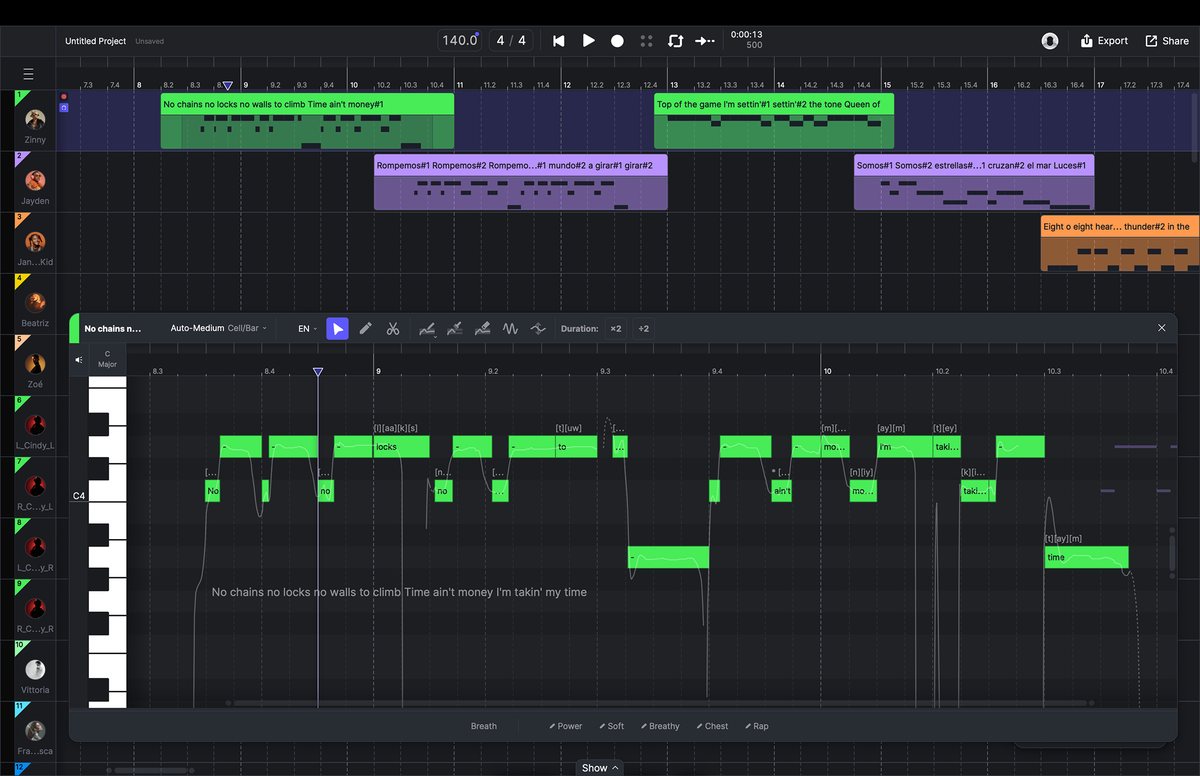
Plain MIDI turns into a performance
ACE STUDIO 2.0, released in December 2025, drops that assumption entirely. What used to read as "the AI vocal app" became an all-in-one AI music studio with AI Instruments for horns and strings. This review looks at 2.0 from the perspective of a beatmaker who has struggled programming horns. Features and pricing were verified on acestudio.ai and the official documentation on September 30, 2026.
Listen to the official demos first
Hearing it beats reading about it. These cover strings, sax and trumpet.
▲ ACE Studio official channel
▲ ACE Studio official channel
What the demos can and can't tell you
| Judge this from the video | Only hands-on will tell you |
|---|---|
| Raw tone, sustain on long notes, thickness of the string section | How it sits in your own key and tempo |
| How phrases connect and where breaths land | How easy it is to fix a take you don't like |
| Which genres it suits | How much DAW round-tripping actually goes away (connection speed matters) |
The rest of this article focuses on that second column.
What AI Instruments covers
As of October 15, 2026, the official lineup is horns including sax and trumpet, plus a string section with violin, viola, cello and bass. The strings ship as "AI String Sections," recorded with the Budapest Art Orchestra, and a unison/ensemble mode lets you stack several instruments on one track. The plan table lists "40+" instruments, and the lineup may grow.
You can load an instrument three ways: from the toolbar library, by double-clicking an empty track on the Canvas, or by clicking the instrument image on the track panel. Drag and drop works throughout. The current lineup is on the official AI Instruments page.
The AI picks articulations from context (Smart)
AI Instruments default to Smart, which analyzes the melody and chooses the articulation that suits each moment. That's why you can place notes without knowing the terminology and still get a performance.
Manual control is there when you want it: select notes in the piano roll and pick from the "Articulation" menu in the toolbar. You don't need to do this everywhere — treating the hook is enough in practice.
Stuck for a phrase? Build a Neo-Soul progression with our chord progression generator and write the MIDI along its chord tones. For matching tempo and key when you work from samples, use BPM & key detection.
Vibrato is painted, not drawn
Expression Controls handle nuance. There are two — Vibrato and Split-tones (multiple simultaneous pitches for a rough, edgy texture) — and you drag across a lane below the piano roll to activate them over that span. Right-drag erases.
This is less precise than dialing in curves on a traditional library. In exchange, "vibrato only on the back half of this long note" takes a couple of seconds. If drawing CC has been burning your sessions, that trade lands well.
ACE Bridge 2 removes the round trip
The dullest part of any AI tool is bouncing audio and importing it back. ACE Bridge 2 (VST3 / AU / AAX) drops onto a MIDI track in your DAW, connects to ACE Studio, and makes that round trip largely unnecessary.
It switches modes on its own. Play a part that has MIDI in your DAW and Bridge goes into Record, sending that MIDI to ACE Studio. Play a part where the linked ACE Studio track has clips and it flips to Playback, streaming the rendered audio back. No buttons to manage. You can also see ACE Studio's clips and playhead without leaving the DAW.
For tempo and meter, use the bundled ACE Bridge ARA plugin. Setup is slightly odd — you attach the ARA plugin to a dummy audio clip — but it gives you two-way transport sync as well. DAWs without ARA fall back to a "send tempo whenever playback starts" mode.
Build drums, bass and chords in your DAW, generate only the horns in ACE Studio, and let them flow straight into the mix. That's the workflow Bridge makes realistic.
Where the time actually goes
What ACE STUDIO 2.0 cuts is the time spent drawing expression. Writing the notes and coming up with the phrase take just as long as before.
Traditional libraries like The Trumpet 3 and the SWAM series are built on the idea that you perform the realism yourself. They cost time but let you chase every detail to your own taste, and if that process is the fun part for you, they are the better buy.
If instead you want realistic horns but would rather spend the hours on the song as a whole, ACE STUDIO 2.0 fits. It isn't about which is better — it's about where you want your time to go.
Other features that help beatmakers
Stem Splitter / Vocal to MIDI
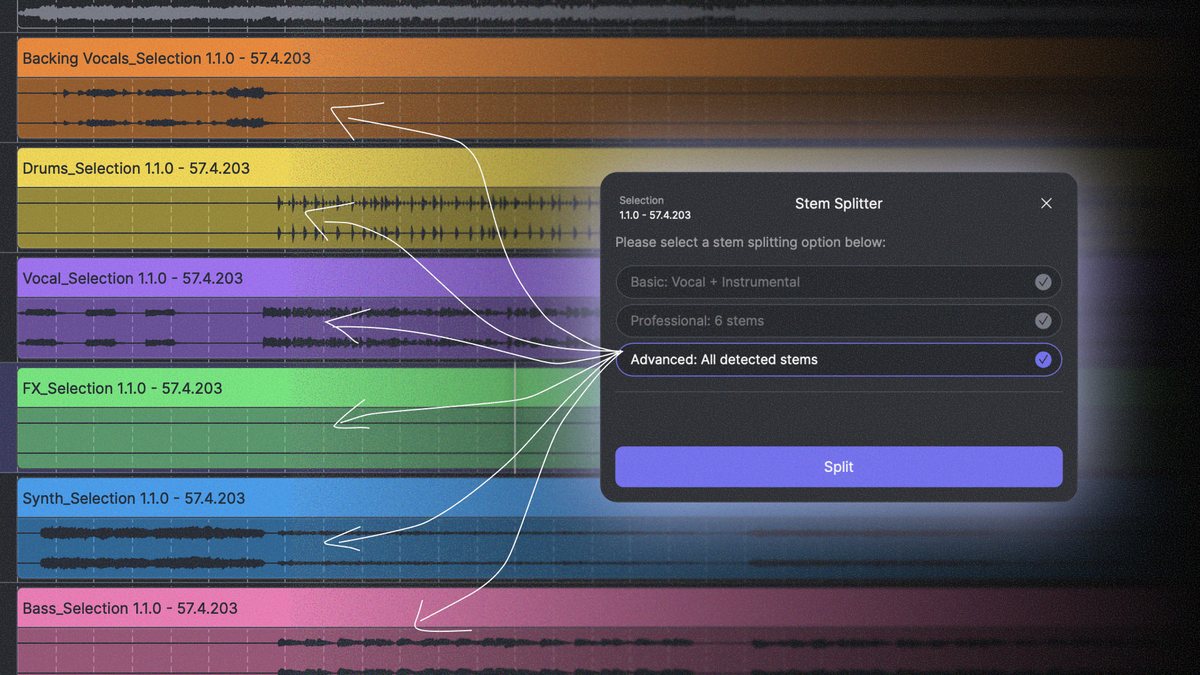
A built-in Stem Splitter separates a track into vocals, drums, bass and more, at three levels of detail — the Advanced setting breaks out drums, bass, synth, FX and backing vocals separately. Standalone stem services keep multiplying, but having it inside the production app quietly helps when you're building sample material or transcribing. Vocal to MIDI turns a sung line into MIDI with lyrics, which is handy for getting a hummed melody down.
AI vocals & choir
The original headline feature is still there. Royalty-free voices cover scratch vocals, backing parts and full leads in English or Japanese, so "this was going to be an instrumental, but let's add a little choir" stays inside one app. Details in the ACE Studio review (basics).
Pricing (as of October 15, 2026, officially checked)
| Plan | List price (annual, per month) | What you get |
|---|---|---|
| Artist | $20.73/mo | 160+ AI voices / 40+ AI Instruments, unlimited vocal & instrument generation, 1 voice clone slot, AI credits for Generative Kits etc., 2,500/mo |
| Artist Pro | $27.5/mo | Everything in Artist plus more clone slots (5 vocal synth, 10 voice changer) and AI credits for Generative Kits etc., 5,000/mo |
At the time of checking there was a 20% off campaign putting Artist at $16.58/mo and Artist Pro at $22/mo (no end date listed officially; sale display varies). The notable part is Rent-to-Own: keep the subscription for two years and it converts to a perpetual license at no extra cost. That suits anyone who dislikes the feeling of renting forever. A one-time purchase option exists, and there is an official path to start free.
*Pricing reflects September 30, 2026. Check the official site for current pricing.
What it can't do, and what to watch for
Listing only the good parts helps nobody, so here is what stood out on the other side.
| Caveat | Detail |
|---|---|
| Not a replacement for a real player | The breath and interpretation a human brings on the day is a different thing. Some phrases still sound better after you edit them by hand |
| No fine vibrato shaping | Expression Controls work by painting an active region; the official documentation describes no numeric control over depth or speed |
| Pro Tools ARA sync doesn't work | The bundled Pro Tools ARA plugin is a developer demo and the docs state plainly that it is currently non-functional. Pro Tools users should note this |
| Logic on Apple Silicon needs Rosetta | For ARA tempo sync, the official steps require launching Logic in Rosetta mode |
| An internet connection is assumed | Core AI rendering runs in the cloud, and the official guidance is to stay connected |
| Cancelling early forfeits Rent-to-Own | Cancel before two years and the perpetual license never lands. Voice clone slots also lock on cancellation (unlocking if you resume) |
| ACE Bridge 1 is discontinued | Unsupported since ACE Studio 1.9.7 — you need to move to Bridge 2 |
Who it's for
- You want realistic horns and strings in Lo-Fi or Jazzy Hip Hop
- You'd rather not draw CC and want to finish songs faster
- You want AI vocals, choir and stem separation in one application
If you'd rather master expression itself with a breath controller or MPE, or you need ARA sync in Pro Tools, a traditional physical-modelling library is the better fit right now.
FAQ
Q1. What instruments do ACE STUDIO 2.0's AI Instruments cover?
A. Horns including sax and trumpet, plus a string section (AI String Sections) with violin, viola and cello. The official plan table lists 40+ instruments as of October 15, 2026.
Q2. Are articulations like legato and pizzicato chosen automatically?
A. In the default Smart mode, yes — the AI picks based on musical context. To set them yourself, select notes in the piano roll and use the 'Articulation' menu. Available articulations differ by instrument.
Q3. Can I fine-tune vibrato depth and speed?
A. Expression Controls work by painting the region where the effect is active. The official documentation describes no numeric depth or speed control, so the approach differs from libraries you shape with CC curves.
Q4. Will it work with my DAW?
A. ACE Bridge 2 supports VST3 / AU / AAX, with official setup steps for Cubase, Logic and Studio One. However, the Pro Tools ARA plugin is a technical preview and the docs state it is currently non-functional. Using Logic on Apple Silicon, ARA sync requires launching in Rosetta mode.
Q5. How much is it? Is there a one-time buy?
A. Annual billing works out to $20.73/mo for Artist and $27.5/mo for Artist Pro ($16.58 / $22 with the 20% off shown on September 30, 2026; no end date listed). Rent-to-Own converts to a perpetual license after two years, and both a one-time purchase and a free starting path exist.
Q6. Can the generated audio be used commercially?
A. Preset AI voices and AI Instruments are royalty-free and usable in monetized projects per the official site. Cloned voices require separate rights and permission for the source recordings.
Summary
ACE STUDIO 2.0 isn't just a realistic horn library. It's a production environment bundling horns, strings, vocals, stem separation and DAW integration into one app, standing on a different axis from the "craft the performance yourself" tradition.
What it offers is realism and speed at the same time. If programming horns has been eating your sessions, start free and hear how it sits in your own key and tempo. One phrase is usually enough to know whether it is for you. For the basics, see the ACE Studio review (basics); for writing the parts, our chord progression generator.