[Coupon Code Inside] ACE Studio: AI Vocals & AI Brass for Producers — Features, Pros & Cons
Tired of arranging a guide vocalist for every demo, or fighting with brass that always sounds "programmed"? ACE Studio is an AI music tool built to solve exactly that. This article walks through what ACE Studio is and its features, pros, and cons — from a producer/beatmaker's perspective.
What is ACE Studio?
ACE Studio is an AI music tool that generates realistic vocals and brass instruments. Just input a melody and lyrics to produce pro-quality vocals, and program trumpet or sax parts that include lifelike breath and articulation.
It also supports Audio-to-Audio — import a hum or an existing audio clip and convert it into an instrument performance. Because the processing runs in the cloud by default, you can get started even without a high-spec PC (and there's an optional local "Turbo Mode" that renders on a supported GPU if you want more speed). From vocals (guide to final), demo production and toplines to adding brass parts, it's useful across every stage of beat production.
Words don't do it justice. First, listen to this demo video.
Can't see the video? ▶ Watch on YouTube
Played back, neither the vocals nor the brass sound especially "programmed." Ordinary MIDI notes take on the texture of a performance with breath in it — that is what ACE Studio does. Below are the specific pros and cons from a beatmaker's point of view.
Pros — why producers should consider it
Here is where it actually changes how you work.
① Program vocals yourself (guide or final)
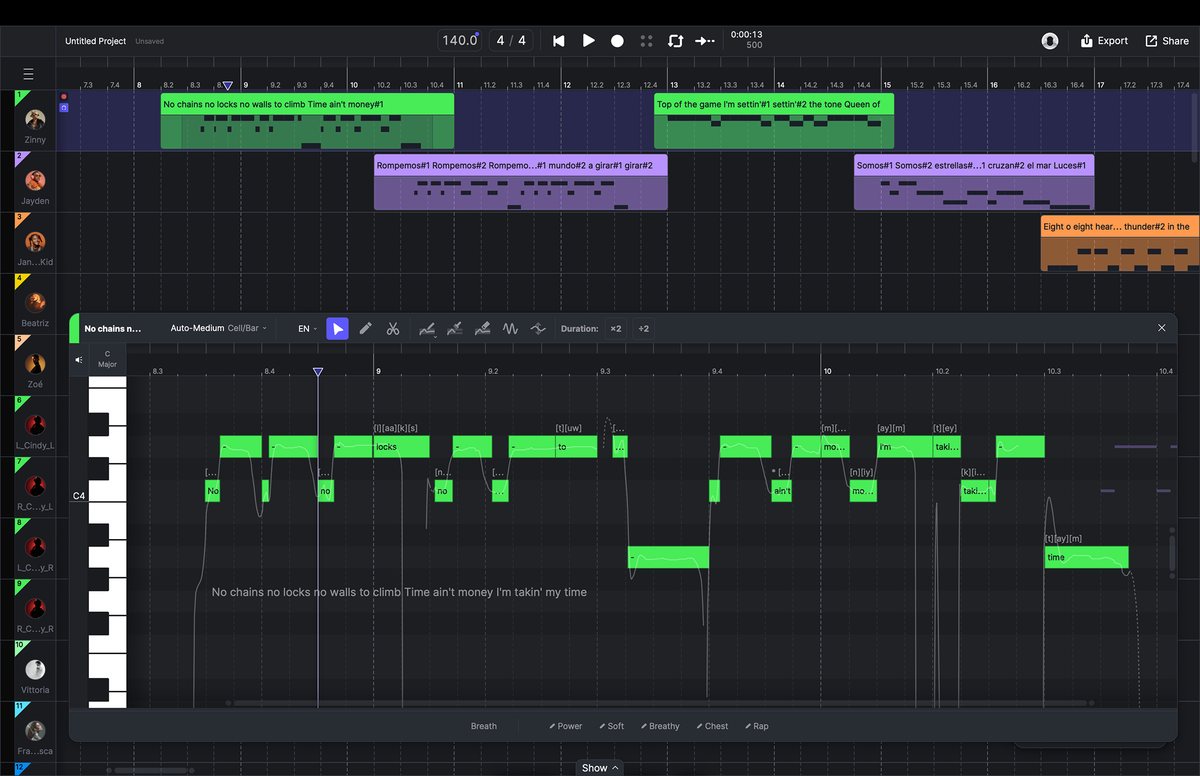
Just input a melody and lyrics and within minutes you get realistic vocals. Great as a guide vocal, and clean enough to use in the final track. No more booking a singer, juggling schedules and paying fees for every comp or demo. You cut the outsourcing cost and days entirely, and you can complete the vocal part yourself.
Here's what those AI vocals sound like dropped into a real production.
Can't see the video? ▶ Watch on YouTube
② Escape cheap programmed brass — breath-level realism
For beatmakers and arrangers, killing the "programmed" feel of trumpet or sax has always been tough. Even expensive sample libraries eat hours of articulation tweaking (re-tonguing, bends, and so on).
ACE Studio has the AI simulate a brass player's breath and the instrument's character, so thick, lifelike brass that sits well in pop, funk and Lo-Fi hip hop is ready in an instant.
Hard to believe it's AI? Listen to the tonguing and breath in this one.
Can't see the video? ▶ Watch on YouTube
③ Turn a hum or audio clip into an instrument instantly
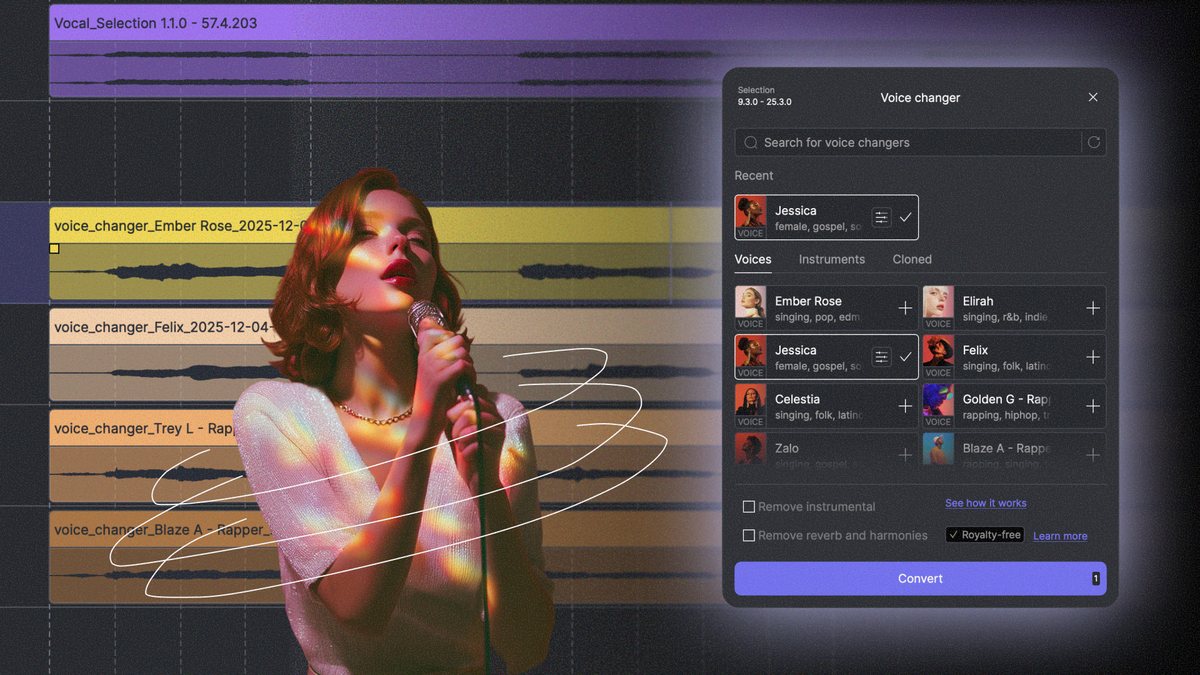
Even brass phrases that are hard to play on a keyboard can be sung as a hum into your mic and imported — the AI converts it into a polished trumpet or sax performance (Audio-to-Audio). Dropping the melody in your head straight into the track, with zero wasted time, is a serious weapon for beatmakers.
④ Get started without worrying about PC specs
Normally, vocals and brass this realistic need tens of GB of heavy libraries and a high-spec PC (lots of RAM). But ACE Studio processes in the cloud by default, so even a several-generations-old laptop can export high-quality audio without the fans screaming. If you want more speed, you can switch to the local "Turbo Mode" and render on a supported GPU.
Cons — things to know before you sign up
It's an excellent tool, but there are a few things worth knowing first.
It generally needs an internet connection
ACE Studio runs its high-precision AI processing in the cloud by default. So in places with no internet — on the go, or in a basement studio — cloud generation and export won't work. There is a local "Turbo Mode" for supported GPUs, but you'll still typically need to be online for account sign-in and other features.
A small "loading wait" on playback/edits
When you change a note or lyric, there's a few-second wait while the AI recalculates and returns the audio. If you're used to traditional samplers that respond instantly on your machine, it may feel a touch slow at first.
Subscriptions have running costs
If you pick a monthly plan, you pay even in months you don't use it. If you'd rather "buy it once and use it without worrying about ongoing fees," consider the lifetime license (Artist / Artist Pro) — see the comparison below.
ACE Studio pricing plans
The main plans at a glance (prices verified on the official site September 30, 2026, in USD — check the official site for the latest).
| Artist | Artist Pro | |
|---|---|---|
| Price | $16.58 / mo | $22 / mo |
| AI voices | 160+ | 160+ |
| Custom model slots | 1 | 5 |
| Voice changer slots | 1 | 10 |
| Vocal generation | Unlimited | Unlimited |
Note: $16.58/$22 are monthly-equivalent prices when billed annually (20% off); monthly billing costs a bit more. As of October 15, 2026 the official pricing page shows a "HOLIDAY DISCOUNT 20% OFF" banner; list prices are Artist $20.73 and Artist Pro $27.5, with no end date stated.
Also as of October 15, 2026, new subscriptions come with a welcome bonus of 30 days of AutoTune 2026 free, per the official pricing page.
※ There is no free trial; instead ACE Studio offers a 100% money-back guarantee — email support ([email protected]) within 7 days of payment for a full refund (as of October 15, 2026; check the official site for the latest pricing and promotions).
※ Besides the monthly plans, there are lifetime licenses (Artist 2.0 / Artist Pro 2.0). You can buy outright or via Rent-to-Own (monthly payments that automatically convert into a permanent license). Lifetime buyers also get two years of AI Credits (Artist: 2,500/mo, Artist Pro: 5,000/mo) and all future v2 updates. If running costs bother you or you plan to use it long-term, the lifetime option is a good choice.
Conclusion: try it with a money-back guarantee
That's a look at what ACE Studio is, plus its pros, cons and pricing. To recap, ACE Studio is a great fit if you:
- Want to program vocals yourself, from guide to final (and cut singer-booking cost and time)
- Want to escape cheap programmed brass and get lifelike playing with ease
- Are a beatmaker who wants to turn a hum into a pro-level track in an instant
- Want high-quality vocals and instruments without worrying about PC specs
Not sure it'll work in your setup? ACE Studio is backed by a 100% money-back guarantee — email support within 7 days of payment and you get a full refund. Bring this "next-gen quality" into your workflow with that safety net — once you feel the speed and realism, it's hard to go back.
Getting started is easy — 3 steps
- Go to the official ACE Studio site from the link below
- Create a free account and download the app
- Log in and start using realistic AI vocals and brass right away
Frequently Asked Questions
Can ACE Studio make realistic AI brass (trumpet / sax)?
Yes. ACE Studio's AI Instruments include brass such as trumpet and saxophone. Just load the MIDI you programmed in your DAW, and the AI adds natural, breath-like phrasing and articulation — so you get lifelike parts without hand-drawing CC data. They work across a wide range of styles, from pop and funk to Lo-Fi hip hop.
Besides vocals and brass, what can the AI Instruments make?
Beyond trumpet and sax, the AI Instruments include strings such as violin, viola and cello. For a hands-on look, see our ACE Studio 2.0 review.
Is ACE Studio free? What are the plans?
The plans are monthly/annual subscriptions (Artist / Artist Pro) and a one-time Lifetime license. Rent-to-Own is also supported, where your subscription payments go toward owning the license permanently. There is no free trial at the moment, but a 100% money-back guarantee is offered — email support ([email protected]) within 7 days of payment for a full refund. Check the official site for the latest pricing and promotions.
Does ACE Studio need an internet connection?
By default it runs AI rendering in the cloud, so you generally need to be online to generate and export. On a PC with a supported GPU you can also use local "Turbo Mode", but sign-in and some features still require internet.
Can ACE Studio run on a low-spec PC?
Because AI rendering runs in the cloud by default, you can use it without a powerful GPU. That said, editing and playback responsiveness depends on your PC, so a very old machine may feel less smooth. With a supported GPU, Turbo Mode enables faster local rendering.