Wavesfactory Trackspacer Review: How It Works, Price, and Sidechain Compression vs Dynamic EQ (2026)

Image: Wavesfactory
The beat sounds good. The vocal sounds good. Put them together and the lyrics get hard to follow.
Turn the beat down and it loses its weight. Cut the mids with EQ and the beat goes hollow. Either way you give something up.
Wavesfactory Trackspacer offers a third route. While the vocal is playing, it automatically lowers only the part of the beat's spectrum that overlaps the vocal.
Short answer: it is very nearly a one-knob plugin for clearing space under the lead, without drawing a single EQ curve.
This review covers how Trackspacer works, its controls, the price, how it differs from sidechain compression and dynamic EQ, and three ways to use it on beats, based on Wavesfactory's site and the Plugin Boutique product page (checked November 19, 2026).
- How it works: it analyses the sidechain in 32 bands and applies the inverse EQ curve
- How it differs: from plain sidechain compression and from dynamic EQ
- Where to use it: vocals over a two-track beat, kick against 808, clearing reverb
- Price: $59 list at Plugin Boutique, €59 at Wavesfactory (the maker's store is priced in euros). A demo is available
What is Trackspacer and what does it do?
Trackspacer is a mixing plugin from Wavesfactory, which describes it as a "spectral sidechain EQ".
- The job: analyse the frequencies of the lead track (the sidechain input) and carve the same frequencies out of the track it is inserted on, in real time
- Under the hood: according to Wavesfactory, "an internal 32 band EQ that reacts to the incoming sidechain signal" and applies "a reversed EQ curve"
- The workflow: in the maker's words, "Insert it on a track, set the sidechain signal and turn up the amount knob"
The key point is that you do not choose which frequencies to cut. A lower voice carves lower in the spectrum, a higher voice carves higher, moment by moment.
For the background on why overlapping sounds hide each other, start with how to fix frequency masking.
How is Trackspacer different from sidechain compression and dynamic EQ?
Trackspacer is not the only way to "duck when the other part plays". The methods differ in what gets lowered, and how you tell it.
Compared with plain sidechain compression
A sidechain compressor reacts to the level of the trigger and turns the whole track down. It is the classic bass-pumps-with-the-kick effect, covered in how to set up sidechain.
Key a whole beat from a vocal that way, though, and the kick and hi-hats sink along with everything else. The beat tends to pull back every time a line is delivered.
Trackspacer reacts to the shape of the spectrum rather than the overall level. Wavesfactory calls it "similar to a multiband sidechain compressor but much more powerful, transparent and precise".
Compared with dynamic EQ
A dynamic EQ with an external sidechain can lower a chosen band only while the vocal plays. Conceptually, that is the closest alternative.
The difference is effort. With dynamic EQ you set frequency, width, and threshold for each band yourself, and a melody that moves around may need several bands.
Trackspacer tracks the trigger with 32 bands automatically. The trade-off is that you cannot fine-tune individual bands. If you want that level of control, a dynamic EQ such as FabFilter Pro-Q 4 is the better fit.
| Sidechain compressor | Dynamic EQ (external sidechain) | Trackspacer | |
|---|---|---|---|
| Reacts to | Level of the trigger | Level of the trigger, in the band you chose | Spectral shape of the trigger (32 bands) |
| What gets lowered | The whole track | The bands you select | The frequencies that overlap the trigger |
| Setup effort | Low | High (per band) | Low (mostly the Amount knob) |
| Fine control | Limited | Excellent | Limited to range, attack, and release |
| Best for | Kick and bass pumping | Surgical work on a known band | Quickly clearing space for the lead |
What controls does Trackspacer have?
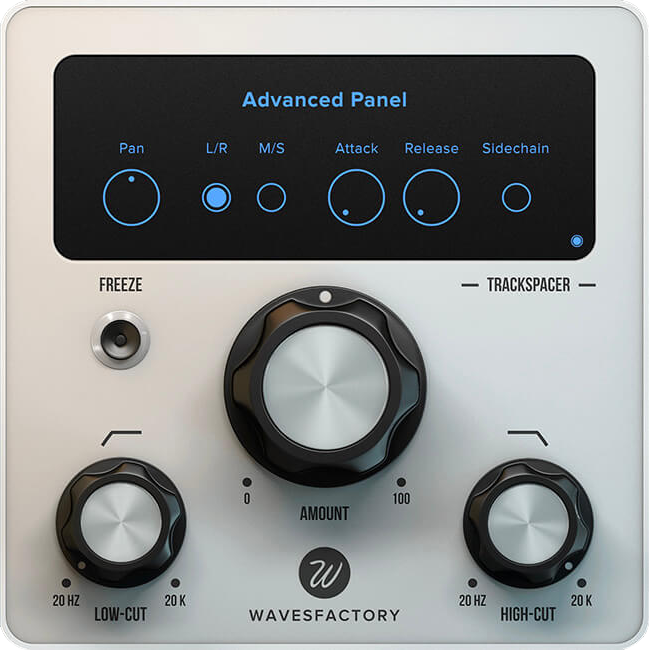
These are the controls described on Wavesfactory's site and the product page.
| Control | What it does | Why it matters |
|---|---|---|
| Amount (central knob) | Sets how much reduction is applied | One control gets you a result, so there is less to second-guess |
| Low-cut / high-cut filters | Limit the area of the spectrum that is processed; nothing happens outside it | You can open up the mids and leave the low end alone |
| Pan and M/S | In stereo mode, left to right; in Mid/Side mode, mid to sides | Clear the centre while keeping the width |
| Attack / Release | Reaction and recovery times in milliseconds | Choose between a smooth dip and a tight, punchy one |
| Sidechain listen | Lets you hear the incoming sidechain | Set the filter range by ear |
| Frequency display | Shows the sidechain spectrum and the resulting reduction curve | You can see where, and how much, is being cut |
The current version is 2.5.10 (from the official changelog, checked November 19, 2026). Formats are VST, VST3, AU, and AAX, 64-bit only.
You need a DAW with sidechain functionality; it is listed in the system requirements. Sidechain routing differs from DAW to DAW, so look up the steps for yours first.
How can you use Trackspacer on beats? Three ideas
These are approaches that follow from the documented features. Settings depend on the song, so read them as starting points rather than recipes.
1. Vocal over a two-track beat: open up only the mids
Leased beats and type beats often arrive as a single stereo file. You cannot reach the drums and the melody separately, so any EQ cut hits everything.
- Insert Trackspacer on the beat
- Send the vocal to its sidechain input
- Use the low-cut and high-cut filters to restrict processing to the core of the voice
- Raise Amount gradually
With the range restricted, the kick and 808 lows and the hi-hat highs are left alone. The beat keeps its weight and the lyrics get their own space.
Wavesfactory's site quotes Greg Wells (credited there with Adele and Katy Perry): "The tiniest amount of this gives the lead vocal a mix clarity like nothing else." Start small.
For the full process of putting a vocal on a stereo beat, see how to make a 2-track mix for rappers.
2. Kick against 808: give up the lows only for the kick's hit
When kick and 808 share the same low frequencies, both lose definition.
- Insert Trackspacer on the 808 and send the kick to the sidechain
- Use the high-cut filter so only the low end is processed
- Set Attack and Release so the 808 yields for the kick's transient and comes straight back
Unlike a sidechain compressor, which drops the whole signal, this leaves the 808's upper harmonics in place. The 808 steps aside for a moment instead of disappearing.
How to mix 808s and bass covers the rest of the low-end workflow.
3. Reverb and melodic layers: clear the centre with M/S
Vocal reverb and delay can cloud the vocal they are supposed to flatter.
- Insert Trackspacer on the reverb return and key it from the dry vocal
- The tail dips while a line is sung and blooms in the gaps
For pads and sampled melodies, M/S mode is the tool. Apply the effect to the Mid only and the centre opens up for the vocal while the sides stay wide.
How much does Trackspacer cost? (as of November 19, 2026)
| Details | |
|---|---|
| List price (Plugin Boutique) | $59 |
| List price (Wavesfactory) | €59 (the maker's store is priced in euros) |
| License | Perpetual. Authorised with a serial number; no iLok |
| Installations | All of your personal computers, as long as you are the only user (official FAQ) |
| Demo | Available. Volume dip or watermark every minute; parameters and presets are not saved |
| Formats | VST, VST3, AU, AAX (64-bit) |
| System requirements | macOS 10.9 or higher (Intel and Apple Silicon); Windows 7, 8, or 10. A DAW with sidechain functionality |
| Refunds | Wavesfactory does not offer refunds on direct purchases and recommends trying the demo first |
Checked November 19, 2026 on Wavesfactory's product page and support FAQ and on the Plugin Boutique product page. The demo limitations are Wavesfactory's general statement for its plugins. System requirements are quoted as published; Windows 11 is not listed, so test the demo on your system before buying.
At $59, Trackspacer sits at the affordable end of mixing plugins. Wavesfactory products do go on sale from time to time, so if you are not in a hurry, check the deals page first.
Trackspacer vs the alternatives: which one for which job?
Several plugins deal with parts getting in each other's way. They are good at different things.
| Product | What it does | Reach for it when |
|---|---|---|
| Wavesfactory Trackspacer | Follows the trigger's spectrum and automatically lowers the overlapping frequencies | You want to clear space for a lead (vocal, kick) quickly |
| FabFilter Pro-Q 4 | EQ, dynamic EQ, and spectral processing in one plugin; dynamic bands accept an external trigger | You want to decide the band and the amount yourself |
| oeksound soothe (soothe3) | Finds and suppresses harsh resonances in the track itself; also has an external sidechain input | The problem is in the sound itself: harshness, fizz |
| Cableguys Kickstart 2 | Fast volume ducking shaped by a curve, following the kick | You want kick-and-bass pumping in seconds |
| Cableguys ShaperBox | A multi-effect that moves volume, filter, and more with drawn curves; supports external sidechain input | You want ducking plus groove shaping |
Descriptions are based on each maker's information as checked for the linked reviews. See those articles for prices and where to buy.
In one line each:
- You want rhythmic pumping → Kickstart 2 or ShaperBox (they move volume)
- You want to fix harshness in a sound → soothe (it treats the track itself)
- You want to specify the band yourself → Pro-Q 4 (dynamic EQ)
- You want two sounds to stop overlapping, fast → Trackspacer
Because the roles differ, these are complements more than competitors. The second half of how to fix frequency masking also compares the AI-assisted balancing tools.
Who should buy Trackspacer, and who can wait?
- You put vocals on two-track beats: you can open up the vocal range without access to the stems
- Kick and 808 separation eats your time on every beat: restrict it to the lows and let the 808 yield only on the kick
- Setting up multiple EQ bands feels like a chore: where to cut is decided for you
- Your mixing time is limited: Wavesfactory itself lists "mix faster" as the benefit
- You have not tried complementary EQ yet: do one mix by hand with your DAW's stock EQ first. The steps are in how to fix frequency masking
- Sidechain routing is still new to you: Trackspacer depends on it. Start with how to set up sidechain
- You want to fine-tune band by band: a dynamic EQ fits better
- You want to try the idea for free first: a free dynamic EQ such as TDR Nova gets you part of the way. More staples are in the free plugins roundup
Trackspacer FAQ
Q1. How much does Trackspacer cost?
The list price is $59 at Plugin Boutique and €59 on Wavesfactory's own site, which is priced in euros (checked November 19, 2026). It is a perpetual license authorised with a serial number. Sale prices come and go, so check the store page for the current figure.
Q2. How is it different from normal sidechain compression?
A sidechain compressor reacts to the trigger's level and turns the whole track down. According to Wavesfactory, Trackspacer analyses the sidechain in 32 bands and applies the reversed EQ curve, so only the frequencies that overlap the trigger are lowered and the rest of the track stays in place.
Q3. Do I need Trackspacer if I already have a dynamic EQ?
A dynamic EQ with an external sidechain can get close, but you set the frequency, width, and threshold of each band yourself. Trackspacer decides where to cut automatically, which suits people who want a fast result. If you want band-by-band control, the dynamic EQ is the better tool.
Q4. Is there a free demo?
Yes. It can be downloaded from the product page on Wavesfactory's site. According to the official FAQ, demos have a volume dip or watermark every minute, and parameters and presets are not saved.
Q5. Does it need iLok, and how many computers can I use?
No iLok is needed; you authorise it with the serial number you receive at purchase. The official FAQ says you may install it on all your personal computers as long as you are the only user.
Q6. Does it work in any DAW?
It comes in VST, VST3, AU, and AAX formats (64-bit). The system requirements call for a DAW with sidechain functionality. Routing differs between DAWs, so it is worth confirming the steps in your own setup with the demo before buying.
Summary: duck only what overlaps, with one knob
- Trackspacer analyses the sidechain in 32 bands and lowers only the overlapping frequencies
- Sidechain compression lowers everything; dynamic EQ is precise but manual; Trackspacer covers the ground between them automatically
- Amount does most of the work, with low-cut/high-cut filters, M/S, and Attack/Release for refinement
- Typical uses: vocal over a two-track beat, kick against 808, clearing reverb
- List price is $59 at Plugin Boutique and €59 from the maker. Demo available, no iLok
If you have been stuck choosing between turning the beat down and losing the vocal, this is a third option worth trying.
Load the demo, put a vocal over one of your beats, and raise Amount just a little.