FabFilter Pro-Q 4: What Is It and What Can It Do? (Free Trial Available)
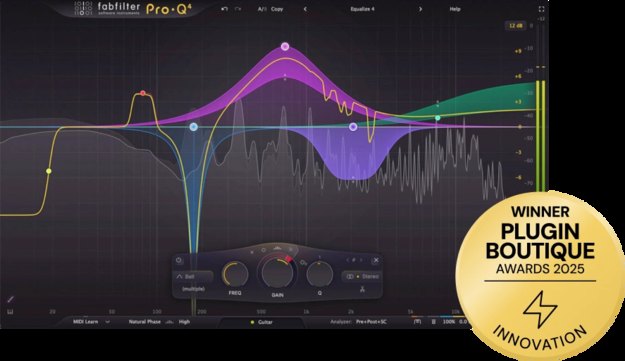
FabFilter's Pro-Q series is an EQ plug-in used by many producers and beat makers. The latest version, Pro-Q 4, was released in December 2024, and its biggest change is merging EQ, dynamic EQ and spectral processing into a single plug-in.
At the same time, free options like ZL Equalizer 2 and your DAW's stock EQ already handle basic cutting and boosting. So is it really worth paying around $199 to move up from a free EQ or from Pro-Q 3? In this article, the Beat Lab editorial team breaks down the new features, current pricing (verified on September 24, 2026 via FabFilter's official announcements and Plugin Boutique) and who should — or shouldn't — upgrade.
What Is FabFilter Pro-Q 4? The Latest Version of a Popular EQ Series
Pro-Q 4 is an EQ plug-in by Dutch developer FabFilter, released on December 12, 2024. The original Pro-Q dates back to 2009, and Plugin Boutique's product page describes the series as the "trusted workhorse EQ plug-in for many engineers and producers worldwide." User ratings back that up: 4.8 from over 2,500 reviews on Plugin Boutique (checked September 24, 2026).
The core spec sheet covers virtually everything an EQ can do: up to 24 bands, a huge range of filter types, 6–96dB/octave slopes for every filter (plus brickwall slopes for the high/low cut), dynamic EQ on any band, per-band mid/side processing, three processing modes including linear phase, and surround support up to Dolby Atmos 9.1.6 (per FabFilter's official press release).
New Features: What Changed from Pro-Q 3
1. Spectral Dynamics — Target Only the Frequencies That Misbehave
This is the headline feature. Conventional dynamic EQ moves the whole band once the threshold is crossed. Spectral Dynamics instead applies compression or expansion only to the frequencies within the band that exceed the threshold, leaving everything else untouched. FabFilter's press release notes that this kind of processing "has always required a dedicated plug-in," but Pro-Q 4 integrates it as just another per-band option. For beat makers, that means harsh hi-hats, piercing snares and ringing 808 resonances can be tamed surgically inside your main EQ.
2. Instance List — Control Every EQ in Your Session from One Window
The Instance List shows every Pro-Q 4 instance in your project in a single overview, with fully editable curves. In a busy mix — kick EQ, bass EQ, sample EQ, vocal EQ — you burn serious time just opening and closing plug-in windows. Being able to carve complementary EQ moves across tracks in one view is a genuine workflow upgrade, especially when you're fighting frequency masking between kick and bass.
3. EQ Sketch — Draw Your Curve with the Mouse
Drag across the display and Pro-Q 4 builds a matching set of filters automatically, with slopes defined by how steeply you draw. It's ideal for roughing out a "cut the lows, lift 2kHz a little" starting point in seconds, then refining with the regular controls.
4. Character Modes — Not Just Transparent Anymore
The new Character modes bring FabFilter's circuit-modelled saturation into Pro-Q: Clean (the classic transparent sound), Subtle (gentle transformer-style saturation) and Warm (more obvious tube-style saturation). Handy for adding weight and glue to sample-based boom bap beats without reaching for another plug-in.
5. Other Additions and Improvements
- Copy and paste EQ curves between plug-in instances
- Fractional filter slopes — e.g. a 3dB/oct low cut is now possible
- All Pass filter type for phase adjustments
- Redesigned preset browser with tags, favorites and search
- Improved dynamic EQ with attack/release controls and sidechain filtering
You can see the new features in action in FabFilter's official walkthrough video.
▶ Watch on YouTube (official FabFilter channel)
Price & System Requirements (as of September 24, 2026)
| Item | Details |
|---|---|
| Regular price | $199 on the official FabFilter shop (checked September 24, 2026) |
| Launch price (official) | USD 179 / EUR 169 / GBP 144 per FabFilter's December 2024 press release |
| Upgrades | Owners of Pro-Q 1–3 get a discounted upgrade via their FabFilter account; Plugin Boutique also sells a dedicated upgrade license |
| Free trial | Free 30-day evaluation period (stated in the official press release) |
| OS | Windows / macOS (Intel & Apple Silicon) |
| Formats | VST / VST 3 / Audio Units / AAX / AudioSuite / CLAP |
Verified by the editorial team on September 24, 2026 against FabFilter's official shop and press release and the Plugin Boutique product page. Prices may vary with sales and currency.
Who Should Buy It — and Who Can Stick with Their Current EQ
Worth it for you if…
- You use dynamic EQ and masking fixes daily — if taming kick/808 clashes and harsh hi-hats is part of your routine, the faster workflow and clearer display save real time
- You mix sessions with lots of tracks — the Instance List and curve copy/paste dramatically cut down EQ window-hopping
- Harshness and resonances are your enemy — Spectral Dynamics replaces what used to require a separate specialist plug-in
- You want one EQ you'll use for a decade — Pro-Q has been the standard since 2009, so tutorials and presets are everywhere
Your current EQ is enough if…
- You only do basic cuts and boosts — your DAW's stock EQ plus the free ZL Equalizer 2 (dynamic EQ and sidechain support, the free EQ used in our mix template) will carry you a long way. Build your foundation with our free plugin roundup first
- You're happy with Pro-Q 3 — the main additions in Pro-Q 4 are Spectral Dynamics, the Instance List, EQ Sketch and Character modes. If harshness, resonances and jumping between EQ windows aren't slowing you down, there's no rush. If you do upgrade, choose the discounted upgrade license rather than a new one
- You're still unsure when to EQ at all — a better tool won't fix an unclear process. Start with our boom bap mix template guide to get the order of operations right
Once your beat is EQ'd and bounced, check loudness before uploading or selling: see our LUFS loudness guide and the free dynamics checker tool. For low-end balance specifically, the 808 and bass mixing guide pairs well with this article.
FAQ
Q1. Can I try Pro-Q 4 for free?
A. Yes. FabFilter offers a free 30-day evaluation period for all of its plug-ins, including Pro-Q 4, as stated in the official press release. Since this is a one-time purchase, mixing one full beat with the trial before deciding is the smart move.
Q2. Is Pro-Q 4 worth upgrading from Pro-Q 3?
A. The main additions are Spectral Dynamics, the Instance List, EQ Sketch and the analog-style Character modes. The more you rely on dynamic EQ and the more tracks you mix, the bigger the payoff. Existing FabFilter customers can log into their official account for a discounted upgrade price, and Plugin Boutique also sells a dedicated upgrade license.
Q3. What is the difference between dynamic EQ and Spectral Dynamics?
A. With dynamic EQ, the whole band moves once the signal crosses the threshold. According to FabFilter, Spectral Dynamics applies compression or expansion only to the frequencies within the band that exceed the threshold, leaving everything else untouched. That makes it ideal for harshness and resonances where only part of the spectrum misbehaves.
Q4. Which systems and plug-in formats does Pro-Q 4 support?
A. According to the official press release, Pro-Q 4 runs on Windows and macOS (Intel and Apple Silicon) in VST, VST 3, Audio Units, AAX, AudioSuite and CLAP formats, so it works in all major DAWs such as Ableton Live, FL Studio, Logic Pro and Pro Tools.
Verdict
Pro-Q 4 takes a popular EQ beyond dynamic EQ into spectral processing, and pulls your whole session's EQ into one window with the Instance List. Free EQs still cover the basics — but if fighting harshness, resonances and masking is part of your daily workflow, the upgrade earns its price. Grab the 30-day trial, drop it on your next beat, and hear the difference for yourself.