Cableguys ShaperBox Review|Sidechain & Groove in One
The kick and bass clump together and the low end just won't cut through. Pads and loops sound flat, and the beat never gets that swaying groove. These two stumbling blocks at the "one step short" stage of beatmaking both fall into a domain you can solve by "moving sound along the time axis." Cableguys' ShaperBox is a go-to multi-effect that handles exactly that in a single plugin.
In this article, the Beat Lab editorial team checked information on the Cableguys official site (cableguys.com) and Plugin Boutique as of July 8, 2026, and organizes what's inside the current ShaperBox 3 — with a focus on the sidechain (ducking) and rhythmic processing used in beatmaking — right down to pricing, system requirements, and whether a free demo exists.
▶ Official demo video (Cableguys)
What Is ShaperBox|A Multi-FX That "Draws Waveforms to Move Sound"
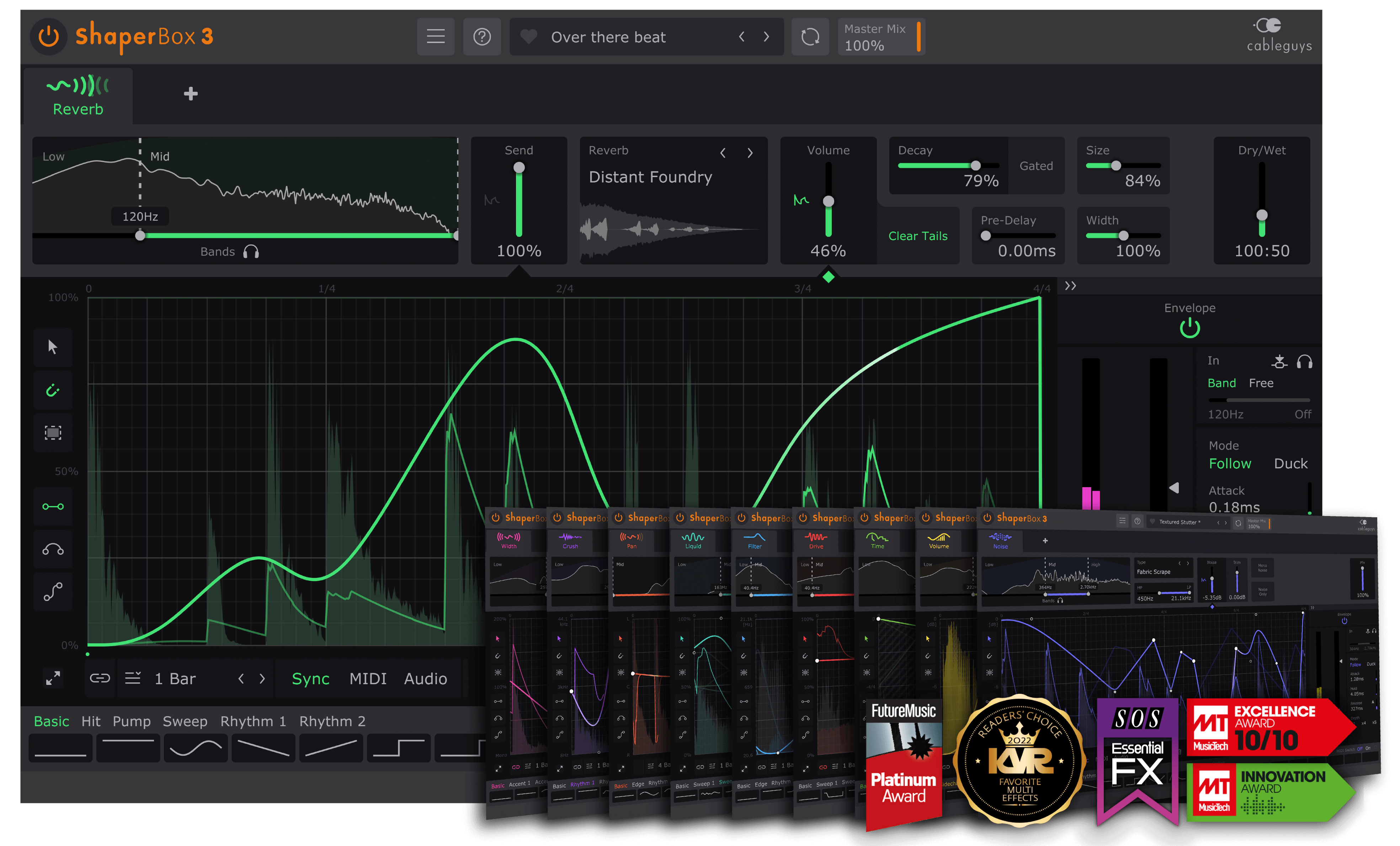
ShaperBox is a multi-effect that lets you modulate several effects — volume, filter, pan, and more — along the time axis by drawing an LFO waveform with the mouse or reacting to it with an envelope follower. The basic concept is "the sound sways exactly along the curve you draw, synced to beats and bars," and Cableguys describes it as something that gives your beat rhythmic movement with "drawable LFO waveforms" and "responsive envelope followers."
The current ShaperBox 3 is a package that combines 11 Shapers (effects) into one plugin. Per Cableguys' official listing as of July 8, 2026, the included Shapers are as follows.
- VolumeShaper: draw and move volume. The lead role for sidechain / ducking
- TimeShaper: time processing such as stutter, reverse, and time-warp
- FilterShaper: open and close an analog-style filter in time with the rhythm
- PanShaper / WidthShaper: processing of placement and spread (stereo width, mid-side)
- DriveShaper / CrushShaper: low-bit processing in the distortion / bit-crush family
- NoiseShaper / LiquidShaper: dynamic noise layers, flanger-like swaying
- ReverbShaper (added in 3.4): reverb that chops or swells in sync with the rhythm
- PitchShaper (added in 3.6, NEW): a drawable pitch shifter. Four algorithms: Complex / Vocals / Drums / Vintage
These can be chained in series within a single ShaperBox instance. For example, a chain like "duck the bass with VolumeShaper → clean up only the low end with FilterShaper → add texture with DriveShaper" can be completed entirely inside one plugin — that's a strength.
Furthermore, in ShaperBox 3 you can split every Shaper into 3-band multiband and assign an individual LFO and envelope follower to each band, according to Cableguys. Band-by-band shaping such as "duck only the lows, stutter the mids, reverse the highs" is possible.
The Lead Role in Beatmaking: Sidechain (Ducking)
The biggest reason beatmakers adopt ShaperBox is this drawn sidechain. Unlike sidechain via a DAW's stock compressor, you can draw the way it ducks (the ducking curve) directly as a waveform, so you can control the exact depth and recovery down to the millisecond.
Building "Kick Priority" with VolumeShaper
The most classic use is inserting VolumeShaper on the bass, pad, or top elements and drawing a curve that dips the volume the moment the kick hits. It works not only for four-on-the-floor house / EDM but also for trap and drill, addressing the "the low end gets muddy where the 808 and kick overlap" problem. Just pulling the 808 back for an instant in time with the kick makes it easy to feel the low end's clarity improve at once. To be safe, it's worth checking how loudness changes before and after this move with our site's Dynamics Check (free).
When the Kick Isn't Four-on-the-Floor: Audio Triggering
For beats where the kick isn't evenly spaced, such as hip-hop / trap, simple LFO sync won't line up. ShaperBox provides External Sidechain Input and Audio Triggering, and according to Cableguys, "even when the kick isn't four-on-the-floor, you can duck in time with the kick's rhythm." On top of that, VolumeShaper's "Show External Sidechain" feature overlays the kick's waveform on top of the bass, letting you draw a ducking curve that follows the kick's contour.
Audio Triggering isn't just for ducking. Cableguys also cites uses like "apply a bit-crush pattern to a synth every time the snare hits" — using the onset of any track as a trigger to fire a different effect. For crafting the texture of 808s and drums, it's effective to design alongside 808 Mixing Basics and Drum Layering.
Uses for Adding Groove and Rhythmic Processing
Creating Movement with Filter / Volume
Drawing a beat-synced filter opening and closing with FilterShaper on a flat pad or loop creates a forward-moving groove on its own. Draw a 1/16 gate pattern with VolumeShaper for a trance-gate-like rhythmic chop, and layer TimeShaper to add the expression of stutters and rolls. Because the waveform syncs to beats and bars at the sample level, it stays in place even when you change tempo — a practically welcome point.
As a Special-Effect Tool for Fills and Transitions
Official tutorials frequently showcase uses as special-effect tools for transitions such as reverses, risers, and glitches using TimeShaper and PitchShaper. Being able to build fills every 8 bars, or a riser just before the drop, inside the plugin without rendering audio directly translates to production speed. When you want to match the key and BPM of a reference track, also make use of the BPM & Key Detection Tool (free).
Pricing & Editions (as of July 8, 2026)
ShaperBox is known as a product with frequent discounts. The following is organized on a regular-price basis. Discount rates and timing vary, so we won't state anything definitively — please check the latest price at the linked destination.
| Product | Regular price | Contents |
|---|---|---|
| ShaperBox 3 Bundle | €99 / $99 | Includes all 11 Shapers. Cableguys states it's far cheaper than the individual total (equivalent to €379) |
| Each Shaper individually (e.g., VolumeShaper 7) | Around $29 | You can adopt just one. Runs standalone or combined within ShaperBox |
| Free demo (Free Trial) | Free | Fully featured trial version. Available from the official site |
| Upgrade | Discounted price | Owners of older versions or some Shapers can upgrade for the difference (applied automatically on login) |
*Verified by the editorial team on July 8, 2026 on the Cableguys official site (euro pricing) and Plugin Boutique (USD pricing). The official site lists the ShaperBox 3 Bundle at €99 (marked "73% off" from the €379 individual total). Prices vary with sales and exchange rates.
Cableguys posts this "€99 / $99" as a de facto standard price it has held steady for a long time, while Plugin Boutique and others have previously recorded even lower prices (around $89). If you're not in a hurry, aiming for a sale period is perfectly reasonable. We recommend confirming the feel with the free demo first before deciding.
Pros & Cons
- Pros: you can draw the ducking curve directly as a waveform for volume control exactly as intended / Audio Triggering follows kicks that aren't four-on-the-floor / every Shaper supports 3 bands for band-by-band shaping / 11 effects complete in one plugin keep the chain light / you can verify in advance with a fully featured free demo
- Cons: for simple "kick-linked ducking" alone, there are cases where a free tool like Cableguys PanCake, or an inexpensive dedicated sidechain plugin (e.g. Kickstart 2), is enough / being multifunctional, it takes some learning to master at first / an internet connection is needed to download noise and reverb material / at regular price it can feel expensive if you assume a sale
Who It Suits and Who It Doesn't
Who it suits: beatmakers who struggle every time with organizing the low end (kick × 808 / bass), want to add groove to pads and loops, or want to build fills and risers quickly — those who want to consolidate this kind of "moving sound along the time axis" processing into one place. It's especially powerful for those who want to nail sidechain with waveforms rather than by feel.
Who it doesn't: if your goal is just "simple pumping in time with the kick," a cheaper or free dedicated tool can sometimes be enough. Also, beginners who want to first build a foundation with their DAW's stock effects can confirm the need with the free demo before committing — no rush. If you want to build a production setup at zero cost first, see the Zero-Cost Beatmaking Setup Guide for reference.
System Requirements (as of July 8, 2026, officially verified)
- Windows: Windows 7 / 8 / 10 / 11 (64-bit), host DAW supporting VST 2 / VST 3 / AAX
- Mac: macOS (OS X 10.15 or later), Intel or Apple Silicon, host DAW supporting VST 2 / VST 3 / AU / AAX
- Supports major DAWs including Ableton Live / Logic Pro / Pro Tools / Cubase / Bitwig Studio / FL Studio / REAPER / Studio One
- An internet connection is required to download noise material and reverb files
Frequently Asked Questions
Q1. Can you do sidechain (ducking) with ShaperBox?
A. Yes. Drawing a volume curve in VolumeShaper to duck the bass or pad on the kick's timing is the classic drawn sidechain. Even when the kick isn't four-on-the-floor, Cableguys states you can duck in time with the kick's rhythm using External Sidechain Input and Audio Triggering (as of July 8, 2026).
Q2. Which Shapers are included in ShaperBox 3?
A. Per the official listing as of July 8, 2026, there are 11: Pitch, Reverb, Time, Drive, Noise, Liquid, Filter, Crush, Volume, Pan and Width. PitchShaper is a relatively new effect added in 3.6, and ReverbShaper in 3.4.
Q3. Is there a free version or trial?
A. There's no permanent free version, but you can try a fully featured Free Trial from the official site. Each Shaper is also sold on its own — for example VolumeShaper 7 is around $29 at regular price (as of July 8, 2026), so you can start with just one.
Q4. Should you wait for a sale?
A. Since Cableguys products are discounted frequently, if you're not in a hurry, waiting is a solid option. Discount rates and timing vary, so check the latest price on the official site or Plugin Boutique.
Summary
ShaperBox is a multi-effect that takes on all your "moving sound along the time axis" processing at once. In the context of beatmaking, its two headline acts are the drawn sidechain you can nail with waveforms and the groove-building via beat-synced filter / volume. With 11 Shapers, 3-band processing, and Audio Triggering all in place, it handles everything from organizing the low end to special-effect transitions in one plugin. Since it's a frequently discounted product, first confirm the feel with the free demo, and once you're convinced of the need, adopt it at sale timing — this is the sensible order the editorial team suggests.