FabFilter Pro-L 2 Review: Algorithms, LUFS Metering & Price (2026)
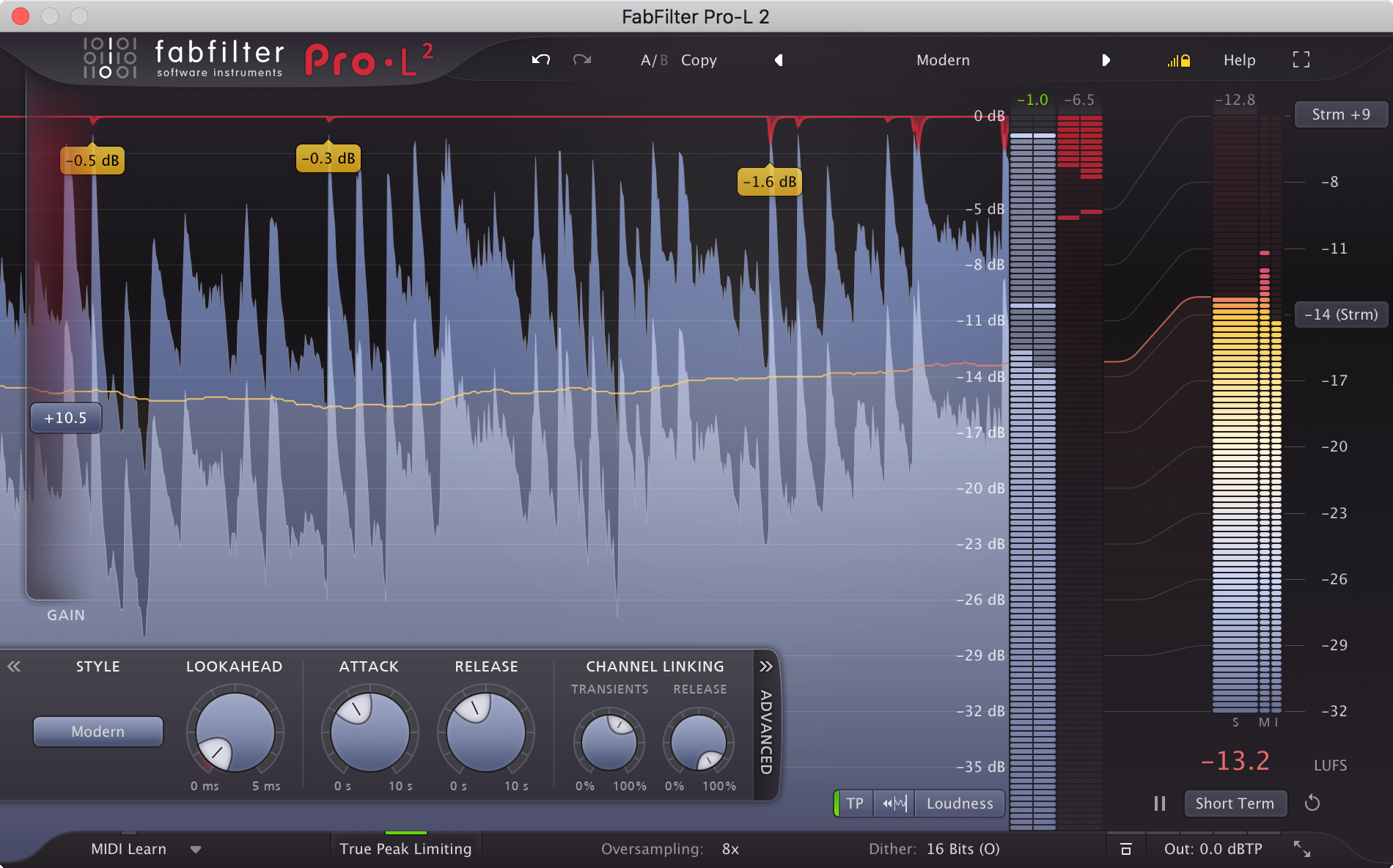
Image: FabFilter
You bounce a beat, upload it to BeatStars or YouTube, and play it back to back with someone else's. Yours is quieter.
Push the master fader and the meter goes red and it distorts. Lean on the stock limiter and the kick sinks into a flat wall of sound.
"Louder, but not broken" is exactly what a limiter is for, and the one most people point to is FabFilter Pro-L 2.
Pro-L 2 is a true peak limiter with eight algorithms and built-in LUFS metering. List price is $199, and there is a 30-day trial.
This review covers what a limiter actually does to a beat's loudness, how the eight algorithms differ, how to read the loudness meter, the price, and how it compares with Ozone and Waves L4 — based on FabFilter's own documentation (checked November 19, 2026).
▲ Introduction to FabFilter Pro-L 2 Limiter (FabFilter's official channel)

What is FabFilter Pro-L 2?
Pro-L 2 is a limiter plugin from the Dutch company FabFilter. It goes last on the master, raises the level, and keeps the peaks under the ceiling.
- Eight limiting algorithms: from transparent to ones that add punch or deliberate squash
- True peak limiting: catches the peaks hiding between samples
- Built-in loudness metering: LUFS and true peak, right in the limiter window
FabFilter calls a true peak limiter "an essential tool for every mastering or mixing engineer" and describes Pro-L 2 as "loud and transparent at the same time".
The reviews FabFilter quotes on its page are strong too: both Computer Music and MusicTech (August 2018) gave it 10 out of 10.
What does a limiter do to a beat's loudness?
Digital audio has a ceiling — 0 dBFS — above which nothing can be recorded.
A beat's waveform is mostly spikes: the kick and snare shoot up for an instant, while everything else sits much lower. Turn the whole thing up and those spikes hit the ceiling first and distort.
A limiter turns down only the peaks that are about to cross the ceiling, and only for an instant. With the peaks lower, the whole beat can come up, so its perceived loudness rises.
Push too far, though, and the kick loses its attack and the beat goes flat. How far you can go depends on how well the limiter handles those peaks, and that is where limiters differ.
What is a true peak, and why does it matter?
The other trap is the true peak, also called an inter-sample peak.
FabFilter's help page explains it this way: digital processing, especially ultra-fast limiting or clipping, can produce an analog signal after D/A conversion that is higher than the individual sample values. The same thing happens during MP3 conversion.
In practice, your DAW meter can show nothing over 0 dB while the beat still distorts on a phone or a streaming service. You do not want a buyer to hear that.
According to FabFilter, True Peak Limiting in Pro-L 2 works in two stages.
- It detects true peaks already in the input and reduces them
- It smoothly attenuates any overshoot created by the limiting itself
FabFilter also recommends preventing overshoot in the first place: "In most cases, choosing 4x oversampling in combination with a minimum lookahead time of 0.1 ms, keeps inter-sample peaks within a range of 0.1 dB." Pro-L 2 offers up to 32x oversampling.
How do the eight Pro-L 2 algorithms differ, and which suit beats?
The Style menu has eight algorithms. Four carry over from the original Pro-L and four were added in Pro-L 2.
| Algorithm | FabFilter's description (summarized) | Suggested material |
|---|---|---|
| Modern | The Pro-L 2 default. All-purpose and transparent, even at very high loudness | General use |
| Transparent | Avoids pumping and coloring; stays true to the original | Most material, especially rock and pop |
| Punchy | Gets punchy and adds a bit of pumping when pushed | Single tracks like vocals or bass; beat-oriented music |
| Dynamic | Enhances transients before limiting to keep punch and clarity | Rock and more |
| Allround | A balance between loudness and transparency | Almost any material |
| Aggressive | A near-clipping style of limiting | EDM, trance, rock, metal, pop |
| Bus | Not meant to be transparent: glue, pump, or squash | Drum buses and individual tracks |
| Safe | Designed to avoid distortion entirely | Acoustic and classical music, individual instruments |
Summarized from the FabFilter help page "Advanced settings" (checked November 19, 2026).
Going by those descriptions, a beatmaker's shortlist is three.
- Modern: the default, and the place to start
- Punchy: the one FabFilter says "can give a nice edge to beat-oriented music"
- Aggressive: when you want a clipper-like character
Bus is meant for a drum bus rather than the master. Getting a master limiter and a drum-bus tool from one plugin is the clearest payoff of having this many algorithms.
FabFilter is explicit that "one is not better than the other" and that they all go loud. The fastest way to choose is to switch between them on the same beat during the trial.
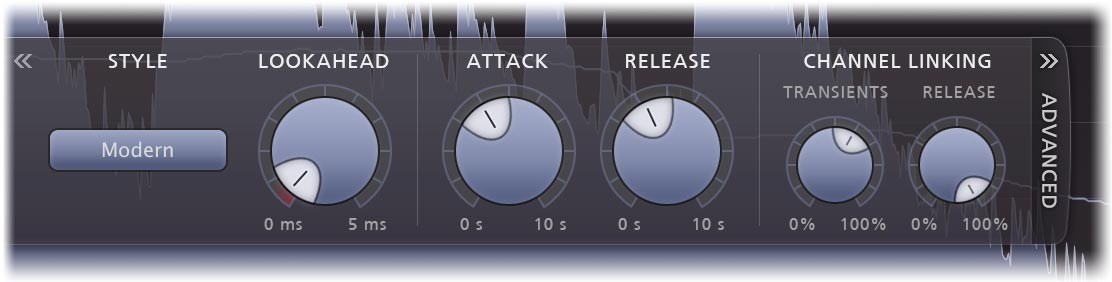
If you like to fine-tune, Lookahead, Attack, and Release are all adjustable. The help page notes that a shorter lookahead preserves transients and sounds louder but risks distortion, while a longer one is safer and less loud.
That said, FabFilter itself writes that choosing the right preset works very well most of the time. You do not have to open this panel on day one.
What does the loudness meter show, and what LUFS should you aim for?
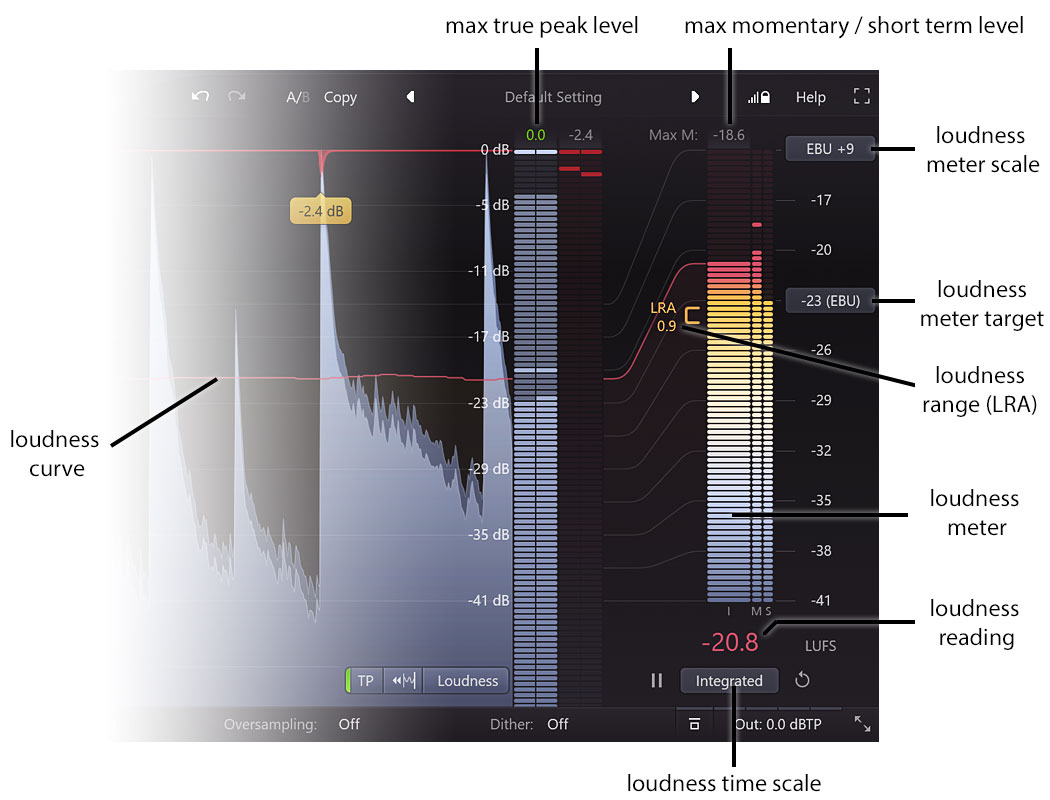
How loud is loud enough? LUFS answers that with a number. It measures loudness closer to how ears perceive it, and Pro-L 2 supports the EBU R128, ITU-R BS.1770-4, and ATSC A/85 standards.
The meter's target menu comes with these presets.
| Target | FabFilter's note |
|---|---|
| -9 LUFS | Commonly used for audio CDs |
| -14 LUFS | Roughly the target used by streaming services like Spotify or YouTube |
| -23 LUFS | EBU R128 (broadcast) |
| -24 LUFS | ATSC A/85 and TR-B32 (broadcast) |
| Custom | Enter any value |
From the FabFilter help page "Loudness metering" (checked November 19, 2026).
You can switch the main reading between three time scales.
- Momentary: the loudness right now
- Short Term: a slower reading of the recent passage
- Integrated: the whole song. This is the one you compare with the target
The practical win is that the numbers sit in the same window as the limiter. No more raising the gain, opening a separate meter, checking, and going back.
Targets differ between selling beats and releasing to streaming. We break them down by use in the best LUFS for selling beats.
How would a beatmaker use Pro-L 2 before export?
The setup FabFilter's help recommends for streaming is short.
- Set the loudness target to -14 LUFS
- Turn on True Peak Limiting and True Peak Metering
- Set Output Level to -1 dBTP
- Move the Gain until the Integrated reading roughly matches the target
Here is how that maps to real beatmaking situations.
Before uploading to a beat store
Preview MP3s change your peaks during conversion. Controlling true peaks beforehand makes post-conversion distortion less likely.
When louder seems to sound "different"
Louder almost always sounds better at first. Pro-L 2 has Unity Gain, which lets you hear the limiting at the original level, and Audition Limiting, which plays only the difference between input and output.
Both let you hear what is being taken away without the volume fooling you — which is how you stop yourself before you over-limit.
When the drum bus needs glue
The Bus style is made for drum buses and individual tracks, as a second instance alongside the one on the master. FabFilter lists low CPU usage among the plugin's features.
When you deliver stems
Pro-L 2 supports external side chain triggering, which FabFilter describes as being for stem mastering.

One caveat: the help page says true peak limiting adds about 5 ms of latency. Treat Pro-L 2 as a finishing tool for after the mix, and bypass it if the delay bothers you while programming parts.
For what to do before the limiter, see our practical guide to mastering EQ.
How much does FabFilter Pro-L 2 cost? (checked November 19, 2026)
| Item | Details |
|---|---|
| List price (single) | $199 (same at the FabFilter shop and Plugin Boutique) |
| Bundles that include Pro-L 2 | Mastering $519 (Pro-L 2, Pro-Q 4, Pro-C 3, Pro-MB) / Pro $769 / FX $949 / Total $1,069 |
| Free trial | 30 days, fully functional, no account needed |
| License | Perpetual. No iLok. Up to three computers for one user |
| Education discount | 50% off (apply on FabFilter's site; proof of enrollment or employment required) |
| Operating systems | Windows 11, 10, 8, 7, or Vista; macOS 10.13 or higher (Apple Silicon or Intel) |
| Formats | VST, VST3, Audio Units, CLAP, AAX Native, AudioSuite |
| iPad version | Yes (sold separately on the App Store; desktop licenses do not carry over) |
Regular prices from the FabFilter shop (USD view) and the Plugin Boutique product page; features, requirements, and license terms from FabFilter's website. All checked November 19, 2026.
Worth remembering: the Essentials and Mixing bundles do not include Pro-L 2. If the limiter is what you are after, buy it alone or go for the Mastering bundle.
If you expect to buy the Pro-Q 4 EQ ($199) and the Pro-C 3 compressor ($199) eventually, the three singles come to $597, and the four-plugin Mastering bundle ($519) is cheaper. We walk through the order in which FabFilter plugin to buy first.
If you already own the original Pro-L or any other FabFilter plugin, log in to your FabFilter account first — it shows your personal upgrade prices.
To see whether a sale is on, check our deals page.
Pro-L 2 vs Ozone, Waves L4, and free limiters: which one?
There are a lot of limiters. Sorting them by what you actually want makes the choice easier.
| Product | List price | What it is | Best for |
|---|---|---|---|
| FabFilter Pro-L 2 | $199 | A dedicated limiter: eight algorithms plus LUFS and true peak metering | Dialing in final loudness by ear and by the numbers |
| iZotope Ozone 12 | Standard $219 (Elements $55) | A mastering suite. AI proposes a starting point; Standard lets you adjust the EQ, Maximizer, and other modules | Doing EQ through limiting in one place, or starting from an AI suggestion |
| Waves L4 Ultramaximizer | $99 | A dedicated limiter built for loudness | Adding a dedicated limiter on a smaller budget |
| IK Multimedia T-RackS 6 | Free Intro to $99.99 (19 modules) | A modular mastering suite | Starting at $0 and expanding as needed |
| Free limiters (LoudMax and others) or your DAW's own | $0 | Basic loudness | Anyone who still needs to finish songs first |
List prices in USD: Pro-L 2 checked November 19, 2026; Ozone 12 and Waves L4 on November 18; T-RackS 6 on July 8, on each maker's site or Plugin Boutique. See the linked reviews for details.
The dividing line is whether you want one limiter you can go deep with, or one product for the whole finishing stage.
- You have an EQ and compressor and only loudness is unsolved: Pro-L 2
- You have no finishing tools yet and want suggestions to start from: Ozone 12
- You want to learn the process without spending: our free mastering walkthrough
Who needs Pro-L 2, and who can stay with a stock limiter?
- You sell or release beats and do not want to lose on loudness: eight algorithms give you a choice of how the beat gets louder
- You worry about distortion after export: it has true peak limiting and up to 32x oversampling
- You measure LUFS in a separate meter today: here it is in the same window
- Your stock limiter squashes as soon as you push it: Unity Gain and Audition Limiting let you hear what is being removed as you adjust
- You have only finished a few beats: balance comes before loudness, and a limiter will not fix a mix
- You already own Ozone 12 Standard or higher: its Maximizer covers this job. Wait until you feel a gap
- An engineer mixes and masters for you: files for hand-off are normally exported without a limiter
- Your budget is around $100: start with Waves L4 or a free limiter, then compare against the trial when you outgrow it
FabFilter Pro-L 2 FAQ
Q1. How much is FabFilter Pro-L 2?
The list price is $199, the same at the FabFilter shop and Plugin Boutique (checked November 19, 2026). The Mastering bundle, which adds Pro-Q 4, Pro-C 3, and Pro-MB, has a list price of $519.
Q2. How many limiting algorithms does it have?
Eight. Transparent, Punchy, Dynamic, and Allround carry over from the original Pro-L; Modern, Aggressive, Bus, and Safe were added in Pro-L 2. Modern is the default.
Q3. Which algorithm works best for beats?
Start with the default, Modern. FabFilter's help says Punchy "can give a nice edge to beat-oriented music" and describes Bus as especially nice for drum bus processing. FabFilter also says none is better than another, so compare them on your own beat during the trial.
Q4. Should true peak limiting be on?
For anything you release or sell, on is the safe choice. For streaming, FabFilter's help recommends enabling True Peak Limiting and True Peak Metering and setting Output Level to -1 dBTP. Just remember it adds about 5 ms of latency.
Q5. What LUFS should I aim for?
Pro-L 2's meter has presets for -9 (CD), -14 (roughly the streaming target), -23 (EBU R128), and -24 LUFS (ATSC A/85), plus a custom value. For beat-selling specifics, see our article on the best LUFS for selling beats.
Q6. Can I try it for free?
Yes, with a 30-day trial. FabFilter's FAQ says the trials are fully functional and need no account. Have a nearly finished beat ready so you can compare it with your stock limiter on the same song.
The bottom line: loud without breaking it, managed by the numbers
- FabFilter Pro-L 2 is a true peak limiter with eight algorithms. List price $199
- A limiter holds down only the peaks so the whole beat can come up
- True peak limiting and up to 32x oversampling make post-export distortion less likely
- LUFS metering is built in, with preset targets such as -14 LUFS in the same window
- For beats, look at Modern, Punchy, and Aggressive; for drum buses, Bus
- If you want one product for all of finishing, Ozone 12 fits; if you are just starting, a stock limiter is enough
Two equally good beats do not make the same first impression if one is finished better.
Put the 30-day trial on the master of the beat you are about to release. Your own song will tell you honestly whether there is a difference.