Which FabFilter Plugin to Buy First? Order, Bundles & Prices (2026)
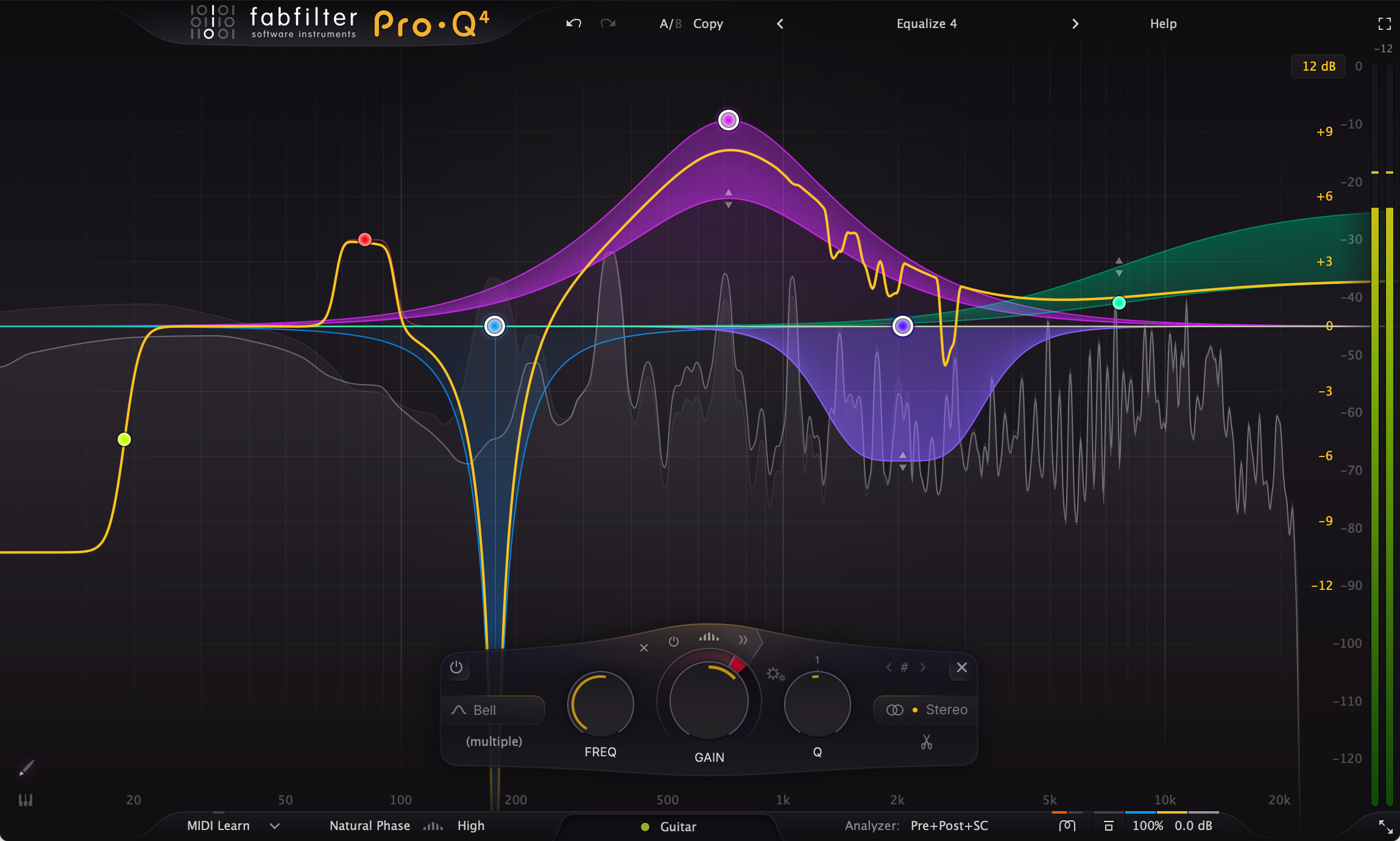
Image: FabFilter
Watch enough mixing tutorials and you start seeing the same company's plugins on the EQ, the compressor, and the limiter.
Dark background, smooth moving curves. So FabFilter is good — got it. Then you open the shop, find 14 plugins, most of them $199 each, and stall on the obvious question: which one first?
Short answer: for a beatmaker, the first FabFilter plugin is the Pro-Q 4 EQ, and the second is the Pro-L 2 limiter.
This guide covers which FabFilter plugin to buy first, the list price of all 14, what is inside each of the seven bundles, how pricing works if you already own something, the education discount, and the 30-day trial — all from FabFilter's own site (checked November 19, 2026).

- Just one plugin: Pro-Q 4 ($199). The EQ goes on every track
- You sell or release beats: Pro-Q 4, then Pro-L 2 ($199). You control loudness and true peaks yourself
- You want character on 808s and drums: Saturn 2 ($149)
- You plan to own the EQ, compressor, and limiter: the Mastering bundle ($519). Four plugins for less than three singles
- Still undecided: every plugin has a 30-day trial, and you do not need an account
What is FabFilter, and what is in the current lineup?
FabFilter makes mixing and mastering effects plus a few synths. The company's site splits the range into three groups.
- Mixing and mastering (the seven Pro plugins): Pro-Q 4, Pro-C 3, Pro-L 2, Pro-R 2, Pro-MB, Pro-DS, Pro-G
- Creative (four): Saturn 2, Timeless 3, Volcano 3, Twin 3
- Basic (three): One, Simplon, Micro
One thing to watch: the current compressor is Pro-C 3. Plenty of older articles and videos still say "Pro-C 2", so check the version number before you buy.
Licenses are perpetual and need no iLok. FabFilter's FAQ says one license can be used on up to three computers, as long as you are the one using them.
▲ Introduction to FabFilter Pro-C 3 (FabFilter's official channel). A quick way to see how the interfaces look and move
Which FabFilter plugin should a beatmaker buy first?
Forget popularity. Ordered by the problems you hit while making beats, the list looks like this.
First: Pro-Q 4 (EQ) — used on every track, every session
The kick fights the 808. The sample sounds boxy. The hi-hats sting. Most everyday beat problems are EQ problems.
FabFilter says it too: an equalizer is probably the tool you use most while mixing and mastering. Spend first on the thing you reach for most.
- Dynamic EQ: turn a band down only when it gets loud
- Spectral dynamics: tame only the frequencies that poke out. New in Pro-Q 4
- Instance List: adjust the Pro-Q 4 on other tracks from one window
The details are in our FabFilter Pro-Q 4 guide. For the thinking behind carving space, see how to fix frequency masking.
Second: Pro-L 2 (limiter) — if your beats leave your computer
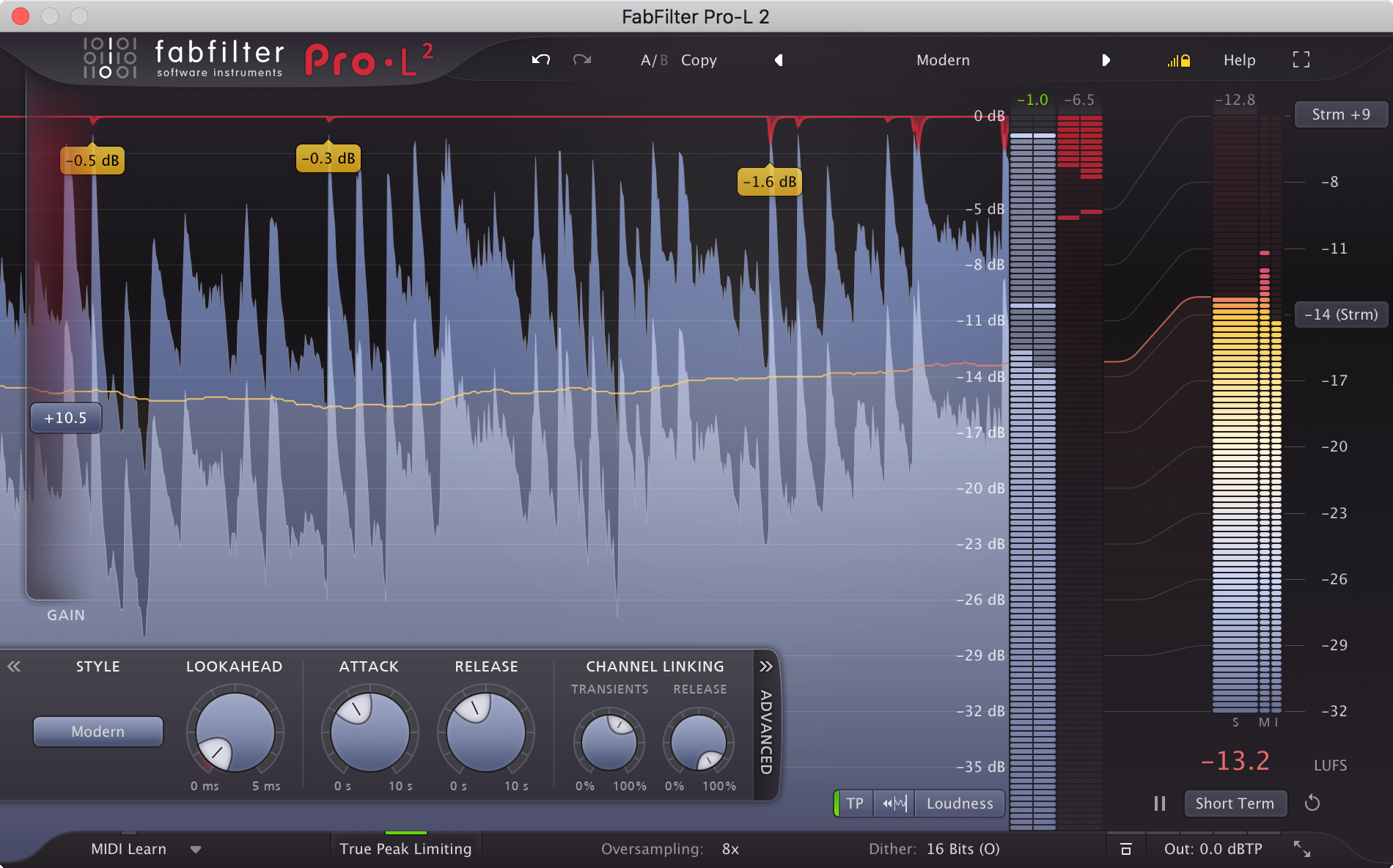
You upload a beat to BeatStars or YouTube and it sounds quieter than the one next to it. You push it and it distorts. That is the limiter's job.
Pro-L 2 combines eight limiting algorithms, true peak limiting, and LUFS loudness metering. Seeing how far you have pushed, in numbers, is the practical difference from a stock limiter.
We go deeper in the FabFilter Pro-L 2 review, and cover targets in the best LUFS for selling beats.
Third: Saturn 2 (saturation) — weight for 808s and drums
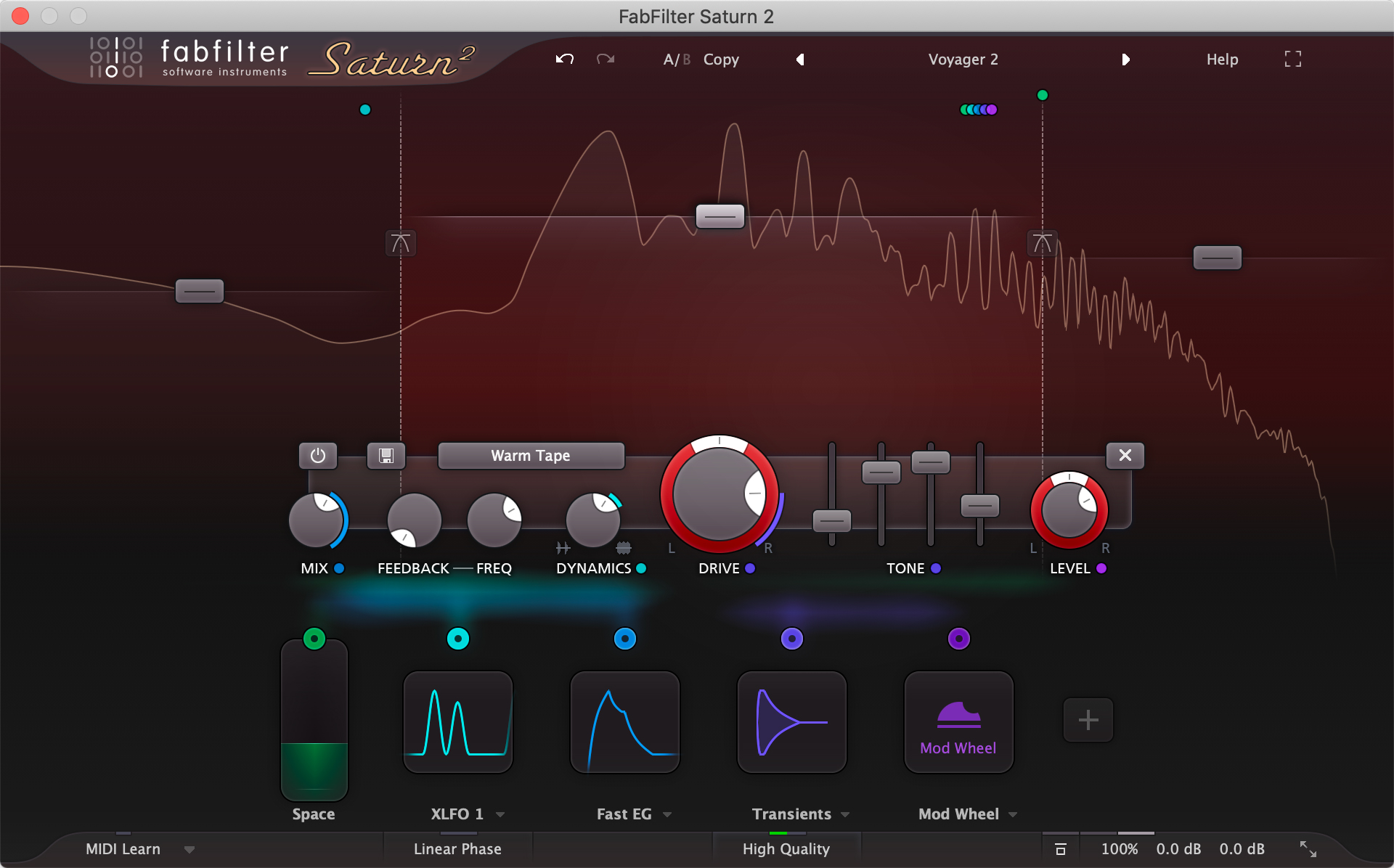
The 808 disappears on small speakers. The drums are too clean. Saturation adds harmonics to fix both.
Saturn 2 offers 28 distortion styles — tube, tape, guitar amps and more — across up to six bands. That lets you leave the sub alone and drive only the mids.
FabFilter's page quotes Grammy-nominated engineer Damien Lewis saying he puts it "on everything from vocals to 808's". Our 808 and bass mixing guide covers the rest of that chain.
At $149 it is also $50 cheaper than the Pro plugins.
Fourth: Pro-C 3 (compressor) — glue and groove

The compressor comes fourth because your DAW's stock compressor already handles the basics. What Pro-C 3 adds is range of character.
- 14 compression styles: six of them new in version 3 (Versatile, Smooth, Vari-Mu, El-Op, Upward, TTM)
- Character modes: analog-style saturation and color
- Host tempo triggering: tempo-synced pumping without needing a kick to trigger it
- Side-chain EQ: up to six bands
FabFilter's line is that you do not get one compressor, you get dozens. For the pumping technique itself, see how to set up sidechain compression.
After that: Pro-R 2, Timeless 3, and the rest
From here, let your genre and your problems decide.
- Pro-R 2 (reverb, $199): described by FabFilter as covering both vintage and natural sound. For depth on melodies and vocals
- Timeless 3 (delay, $149): a tape delay for tails and throws
- Pro-MB (multiband compressor, $199): for finishing work, like controlling only the low end of a two-track
- Pro-DS (de-esser, $199): for sibilance, if you record rappers or singers
- Pro-G (gate/expander, $199): for cleaning up recorded material
- Volcano 3 (filter, $149) and Twin 3 (synth, $149): sound-design tools. Leave them for later if mixing is your goal
How much does each FabFilter plugin cost?
| Plugin | Type | List price | Priority for beatmakers |
|---|---|---|---|
| Pro-Q 4 | EQ | $199 | High: buy first |
| Pro-L 2 | Limiter | $199 | High if you sell or release beats |
| Saturn 2 | Distortion / saturation | $149 | Medium: 808 and drum character |
| Pro-C 3 | Compressor | $199 | Medium: once the stock one feels limiting |
| Pro-R 2 | Reverb | $199 | Medium: space for melodies and vocals |
| Timeless 3 | Delay | $149 | Low: when you need it |
| Pro-MB | Multiband compressor | $199 | Low: when you get serious about mastering |
| Pro-DS | De-esser | $199 | Low: if you record vocals |
| Pro-G | Gate / expander | $199 | Low: if you work with recordings |
| Volcano 3 | Filter | $149 | Low: sound design |
| Twin 3 | Synthesizer | $149 | Low: sound design |
| One / Simplon | Synth / filter (basic) | $55 each | — |
| Micro | Filter (basic) | $35 | — |
List prices from the FabFilter shop (USD view), checked November 19, 2026. Plugin Boutique listed the same regular prices. The priority column is Beat Lab's own ranking.
Add up all 14 and you get $2,134 — the same figure FabFilter shows on the Total bundle page ("14 plug-ins worth $2,134").
If you own an older version, there are upgrade editions. At Plugin Boutique the Pro-Q 4 and Pro-C 3 upgrades were $84 and the Saturn 2 upgrade was $65 (regular prices, checked November 19, 2026).

What is in each FabFilter bundle? Essentials vs Mastering vs Mixing vs Total

The FabFilter shop has seven fixed bundles.
| Bundle | List price | Plugins | Contents | Bought separately |
|---|---|---|---|---|
| Essentials | $419 | 3 | Pro-Q 4, Pro-R 2, Pro-C 3 | $597 |
| Mastering | $519 | 4 | Pro-L 2, Pro-Q 4, Pro-C 3, Pro-MB | $796 |
| Creative | $389 | 4 | Saturn 2, Timeless 3, Volcano 3, Twin 3 | $596 |
| Mixing | $729 | 7 | Pro-Q 4, Pro-R 2, Pro-C 3, Pro-DS, Pro-G, Saturn 2, Timeless 3 | $1,293 |
| Pro | $769 | 7 | The whole Pro range (Pro-Q 4, Pro-C 3, Pro-L 2, Pro-R 2, Pro-MB, Pro-DS, Pro-G) | $1,393 |
| FX | $949 | 10 | The seven Pro plugins plus Saturn 2, Timeless 3, Volcano 3 | $1,840 |
| Total | $1,069 | 14 | Everything | $2,134 |
List prices and contents from the FabFilter shop (USD view), checked November 19, 2026. "Bought separately" is the sum of the single-plugin list prices above. Plugin Boutique sells all seven at the same regular prices.
Three things stand out for beatmakers.
- Essentials ($419) has no limiter: it is Pro-Q 4, Pro-R 2, and Pro-C 3 — a mixing-first set
- Mastering ($519) is EQ, compressor, limiter, and multiband: the closest match if you finish and deliver your own two-tracks. No reverb
- Mixing ($729) does not include Pro-L 2 either: if you want the limiter, it has to be Mastering, Pro, FX, or Total
At what point does a bundle beat buying singles?
At list prices, the math goes like this.
- Pro-Q 4 plus Pro-C 3 is $398. Essentials ($419) adds Pro-R 2 for $21 more
- Pro-Q 4, Pro-L 2, and Pro-C 3 come to $597. Mastering ($519) is $78 cheaper and adds Pro-MB
So if you already know you want two or more Pro plugins, look at the bundles before you buy a single.
If you just want to try Pro-Q 4 and see how it goes, a single is fine. The next section covers what happens when you add more later.
The shop also has a Custom bundle page where you pick the contents yourself. The price depends on what you select, so check it in the shop.
How does bundle pricing work if you already own a FabFilter plugin?
The worry: if you buy Pro-Q 4 now and a bundle later, do you pay for Pro-Q 4 twice?
Here is what FabFilter's site confirms.
- The shop says: "Already own a FabFilter product? Log in to see your upgrade prices." Once you are logged in, prices reflect what is already in your account
- The FAQ refers to "a custom bundle via your account", described alongside regular bundles as carrying generous discounts
- New major versions are sold through a "Personal Upgrade Offer" in your account, and the FAQ says that upgrade discount never expires
The exact amount is only shown to the logged-in owner, so we do not quote a number here.
If you own even one FabFilter plugin, log in to your FabFilter account and look at your own prices before buying anything else.
Three rules worth knowing:
- A bundle covers the versions current when you buy it: later major versions and new plugins are not added automatically (minor updates are free)
- A plugin from a bundle cannot be transferred on its own: the bundle moves as a whole
- Your account is created automatically with your first purchase: there is nothing to sign up for in advance
If you buy from a reseller such as Plugin Boutique, you receive a 12-letter activation code and redeem it on FabFilter's site to get your license. The FAQ notes that legitimate resellers only ever hand out activation codes.
Is there an education discount or a free trial?
Education discount: 50% off
FabFilter offers a 50% educational discount to students and to teachers at music schools. The FAQ lists these requirements.
- Students need proof of enrollment (student ID, enrollment certificate, or digital verification); teachers need proof of employment at an accredited institution
- The proof must be no more than one year old
- The course's tuition fee must be at least €1,000
- You apply through a form on FabFilter's site for an Educational Account
Educational licenses do not expire, keep working after you graduate, and can be used commercially. The one difference is that they are NFR — not for resale or transfer.
The discount is only available direct from FabFilter. If you qualify, check the form before you go to a store: FabFilter FAQ.
Free trial: 30 days, fully functional
Every plugin has a 30-day trial. The FAQ describes the trials as fully functional, with no account needed — you just install from the download page.
The help pages add that if the period runs out before you could evaluate properly, you can email FabFilter and ask for a new one.
The smart way to use it: have a nearly finished beat ready before you install. Thirty days is plenty to compare against your stock EQ or limiter on the same song.
Note that FabFilter's FAQ says it does not offer rent-to-own. If you would rather spread the cost, see our plugin subscriptions and rent-to-own comparison for other routes.
Where should you buy FabFilter plugins?
- Plugin Boutique: singles and bundles were listed at the same regular prices as FabFilter's own shop (checked November 19, 2026). Purchases there often come with a free gift or store credit
- FabFilter's shop: the only place for personal owner pricing, the Custom bundle, and the education discount. FabFilter shop
A simple rule: a store for your first plugin; for the second and beyond, compare against the price in your FabFilter account.
FabFilter says in its FAQ that it never runs extreme discounts like 80% off. Sales do happen, though — the current state of play is on our deals page and in Black Friday plugins worth buying.
The same FAQ warns that licenses sold very cheaply on auction and marketplace sites are usually not legitimate. Stick to FabFilter or an authorized reseller.
Who should buy FabFilter, and who can wait?
- Your stock EQ leaves you guessing where to cut: Pro-Q 4 is built around placing and dragging points on a live spectrum
- You sell or release beats and want to manage loudness by the numbers: Pro-L 2 has loudness metering and true peak limiting built in
- You want one consistent workflow across your tools: the Instance List in Pro-Q 4 also controls Pro-C 3, Pro-DS, and Pro-G
- You prefer to buy once: no subscription and no iLok
- You have only finished a handful of beats: more songs with free plugins and your DAW's own effects will teach you more right now
- You want AI to handle the finishing: if you want suggested settings, a suite like iZotope Ozone 12 fits better
- Your budget is under $100: the Pro plugins are $199 each. Our free mastering walkthrough shows how far $0 goes
- You still need sounds more than effects: start with which Komplete 26 to buy instead
FabFilter buying FAQ
Q1. Which FabFilter plugin should I buy first?
For beatmakers, the Pro-Q 4 EQ (list price $199), because it is the tool you use on every track. If you sell or release beats, add the Pro-L 2 limiter (list price $199) second so you can control loudness and true peaks yourself. Prices checked on the FabFilter shop on November 19, 2026.
Q2. Is Pro-C 2 or Pro-C 3 the current compressor?
Pro-C 3. It adds 14 compression styles (six of them new), character modes, and host tempo triggering. At Plugin Boutique the full version was $199 and the upgrade $84 at regular price (checked November 19, 2026).
Q3. Is a bundle cheaper than buying singles?
Usually, once you want two or more Pro plugins. At list prices, Pro-Q 4 plus Pro-C 3 is $398 while the three-plugin Essentials bundle is $419. Pro-Q 4, Pro-L 2, and Pro-C 3 total $597, while the Mastering bundle with Pro-MB added is $519.
Q4. Do I get a bundle discount if I already own a plugin?
FabFilter's shop says owners can log in to see their upgrade prices. The amount is only shown inside your own account, so log in and check before you buy more.
Q5. Does FabFilter have a student discount?
Yes: 50% for students and for teachers at music schools. You need proof of enrollment or employment no more than a year old, and the course tuition must be at least €1,000. Educational licenses do not expire and can be used commercially, but cannot be resold or transferred.
Q6. Are the trials limited in any way?
FabFilter's FAQ describes them as fully functional 30-day trials that need no account. The help pages say you can email to request a new evaluation period if you did not get a proper chance to test.
The bottom line: Pro-Q 4 first, a bundle if you want three
- FabFilter's current lineup is 14 plugins. The seven Pro plugins are $199 each; the four creative ones are $149 each
- A beatmaker's order: Pro-Q 4, Pro-L 2, Saturn 2, Pro-C 3, Pro-R 2
- The current compressor is Pro-C 3
- There are seven bundles. For EQ, compressor, and limiter, Mastering ($519) costs less than the three singles
- Existing owners should log in to their FabFilter account to see personal prices
- The education discount is 50%; trials run 30 days with nothing held back
Wanting all of them and not knowing where to start is the most expensive place to stand still.
Put the Pro-Q 4 trial on the beat you are working on today. If you cannot imagine removing it in 30 days, you have your answer.