iZotope Ozone 12 Review: Time-Saving Mastering for Beatmakers
You think "I've made a good beat," but the final mastering before you upload to YouTube or SoundCloud (raising loudness and tweaking tone) eats up time and cuts into making your next beat — this comes up a lot in beatmaking. So do worries like "I don't have the expertise to get the loudness and finish of commercial tracks" or "I don't know which bands to cut, and I fall into a rabbit hole of adjustments."
One mastering plugin supported by many creators as an option to solve these efficiently and speed up the workflow is "iZotope Ozone." As of July 2026, the current version is Ozone 12, sold in three editions: Elements, Standard and Advanced.
In this article, the Beat Lab editorial team frames Ozone not as a mere loudness tool but as an "investment to create working time," and objectively lays out the features that are genuinely useful for beatmaking and the caveats worth knowing before you buy. Pairing it with our site's dynamics analysis (loudness / LUFS) for a final loudness check shortens the workflow.
▶ Official demo video (iZotope)
Why iZotope Ozone is so widely used
Ozone has a track record of broad adoption in real music production and finishing — from Grammy-winning engineers to well-known music producers at home and abroad. On the official site, Grammy-winning engineers such as Dave Pensado and Craig Bauer comment on using it.
In professional studios, it's common to see it used alongside high-end analog gear, with "a few Ozone modules used pinpoint for specific jobs." A big reason it's so widely chosen is that it packages pro-level audio processing so that individuals without specialist knowledge can handle it easily.
Efficient "time-saving" lets you focus on making beats
You don't have to spin up compressors, limiters and EQs from scratch and fiddle with parameters all over the place. Run the AI assistant (Master Assistant) and in just tens of seconds it analyzes the track and automatically builds the foundation settings for mastering.
You get a reference for genre-appropriate frequency balance
Ozone 12 adds a new "Custom" flow that lets you pick a direction from many genre profiles (targets), load your own reference track, or specify a LUFS (loudness) target. Because the AI presents the frequency-balance and loudness guideline for the genre you're aiming for — hip-hop, lo-fi and so on — it's easier to escape "adjusting without a clear goal."
Four Ozone features that earn their keep in beatmaking
Here are four concrete features that are genuinely helpful in day-to-day beatmaking.
1. Adjust vocals and drums individually from the 2-mix (Stem EQ)
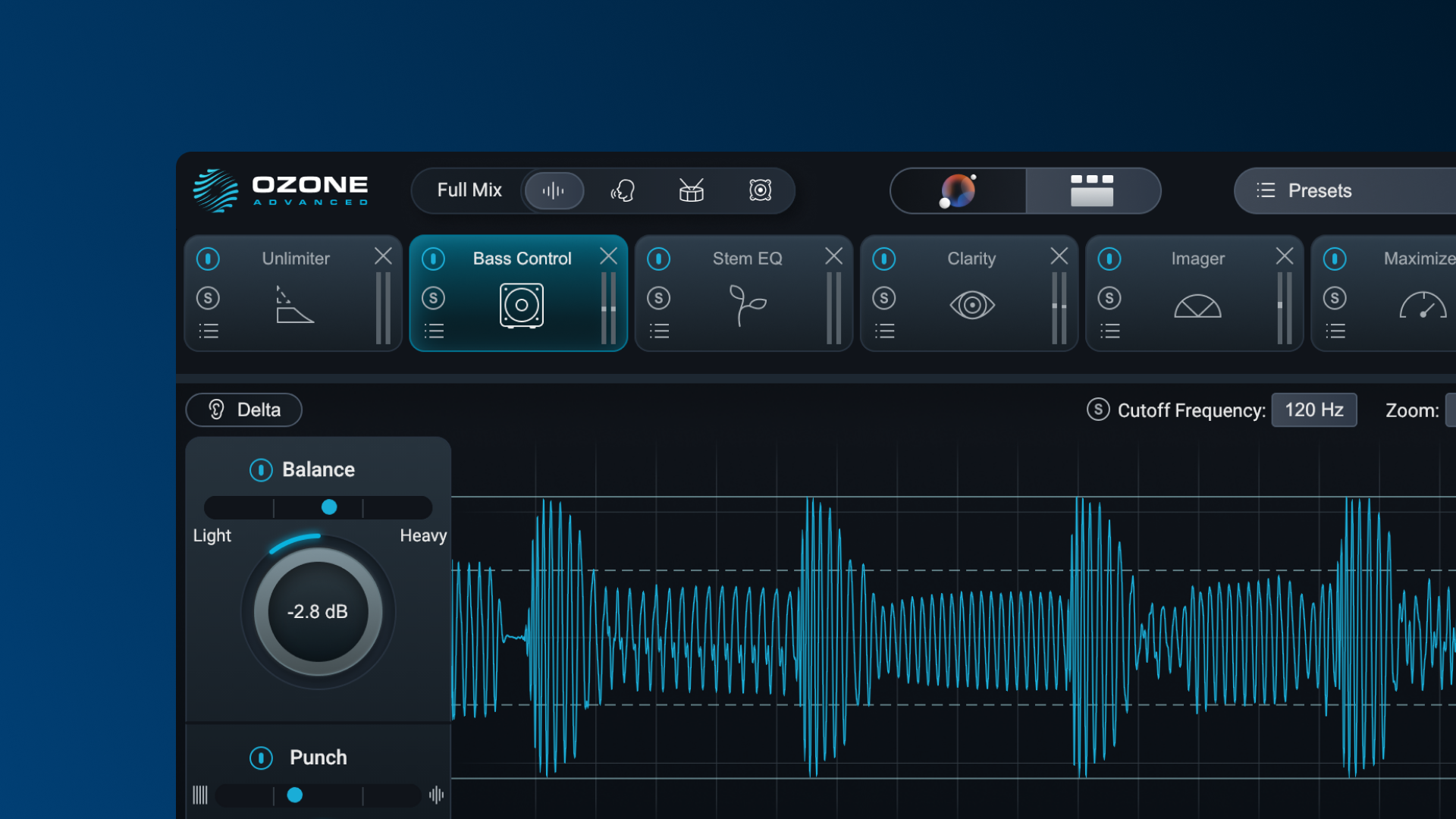
A new feature in Ozone 12 (Advanced only): from a 2-mix (post stereo-export) file, the AI individually recognizes "vocals," "drums," "bass" and "other instruments," and lets you apply separate EQ to each. When you want to "make the drums cut through a bit more" or "give the vocal more presence," you can make quick tweaks in Ozone without going back to the original mix project.
2. Matching that "moves toward or away from" a reference
Load the sonic characteristics of an ideal track or a commercial beat (reference) into the AI, and intuitively adjust how close you get to it. You can make calls like "100% is too much, but around 70% blends well" while watching and listening.
3. Refine later with detailed MS processing and multiband
"Leave the big picture to the AI" for a solid foundation, then adjust in detail by hand afterward (Standard and up). For example, advanced moves like "shaving unwanted width from the low end (side) to tighten it (MS-mode EQ)" or "compressing dynamics on a specific band (multiband compression)" are all at your disposal.
4. A rough "signpost" for mastering
The hardest part of mastering is "losing track of where the goal should be." Because Ozone's AI offers a high-quality starting setting, you can start from that as a baseline. Not having to agonize from zero is a big benefit.
Edition comparison and pricing (as of July 4, 2026)
Ozone 12 comes in three grades. Choose according to your use and budget.
| Elements | Standard | Advanced | |
|---|---|---|---|
| Regular price (USD) | $55 | $219 | $499 |
| Master Assistant (AI) | Yes (Custom flow) | Yes | Yes |
| Manual module adjustment | No (no individual module adjustment) | Yes (14 modules) | Yes (20 modules) |
| Stem EQ / Unlimiter | No | No | Yes (new) |
| Modules as individual plugins | No | No | Yes |
| Best for | Beginners who want to let AI raise loudness | Those who want to refine by ear on the AI base | Those who won't compromise on pro-quality refinement |
*Regular prices as listed on Plugin Boutique (retrieved July 4, 2026). Prices vary during sales (at retrieval, Elements $26 and Advanced $383 sales were confirmed).
Elements (entry)
Centered on AI auto-generation (Master Assistant) and Assistive Vocal Balance. You can't make detailed manual module adjustments. For beginners who "want to keep the budget down" or "just let the AI raise the loudness first."
Standard
You can manually adjust 14 main mastering modules, including EQ (MS-capable), multiband Dynamics, Maximizer and Vintage tools. For detail-minded beatmakers who "want to refine the sound by ear on top of the AI foundation."
Advanced (top tier, recommended)
You get all 20 modules, including "Stem EQ," which adjusts each part from the 2-mix, and "Unlimiter," which restores attack to over-compressed sources. You can also launch each module as an individual plugin in your DAW. For those who "want to streamline the workflow while not compromising on pro-quality refinement."
Caveats to know before buying
To avoid a post-purchase mismatch, here are the caveats and workarounds.
It tends to be heavy on the CPU
Real-time AI analysis and many modules running at once inside it demand a fair amount of PC power.
- Workaround: inserting it directly on the master of a project with many tracks and synths can bog down your PC. It's best to export your beat once to a "2-mix (audio file)," then start a separate project dedicated to mastering and use Ozone there.
The AI's initial suggestion tends to run "loud"
Leaving everything to the AI assistant tends to set a high loudness in line with streaming-platform trends.
- Workaround: in genres where you want to preserve dynamics and air — chill, lo-fi hip-hop and the like — the sound can come across as over-squashed. Treat the AI's suggestion as a starting point, and if it feels over-squashed, pull the limiter (Maximizer) slider back a little. With Ozone 12's Custom flow, you can also specify a lower LUFS target from the start. You can also check the finished loudness with our site's dynamics analysis (loudness / LUFS).
Some note that over-reliance on AI "homogenizes" the sound
Because the same AI algorithm is widely used, some point out that outputting fully auto-generated results can make the sonic tendencies (frequency balance, etc.) resemble those of other creators.
- Workaround: this is exactly where detailed manual adjustment pays off. On top of the AI-built foundation, you can secure originality by dialing in your own low-end approach or adding character with EQ.
Who it's for / who it's not for
- Recommended for: people who feel weak at mastering, who want to speed up beat output, and who want a reference-matched finish quickly.
- Maybe not for: people who already have a finished mastering chain they're happy with, and people without PC headroom (Elements or the 2-mix export workflow is recommended).
If you'd rather try finishing with free plugins only, our recommended free plugins roundup is a useful reference.
How to buy it cheaper (upgrade / crossgrade versions)
Before buying at list price, one thing worth checking is the existence of "upgrade / crossgrade (CG) versions." If you own an eligible product such as an older Ozone or Elements, you can buy a higher edition at a preferential price. Plugin Boutique actually lists preferential versions such as "Ozone 12 Standard Upgrade from Ozone Elements" and "Ozone 12 Advanced Upgrade from any previous version of Ozone Standard." Even an Elements obtained via a past free giveaway or a bundle can sometimes qualify.
When buying, always check the eligibility stated in the product name, such as "Upgrade from ___" or "Crossgrade from ___" (whether the older crossgrade that qualified if you owned any one paid iZotope product still continues for Ozone 12 is, as far as our editorial team confirmed, unverified; we only confirmed the existence of upgrades for owners of older Ozone versions / Elements).
Frequently asked questions
Q1. What is the latest version of Ozone?
As of July 2026, the current version is Ozone 12 (released in 2026). It comes in three editions — Elements, Standard and Advanced — and Advanced includes new features such as Stem EQ and Unlimiter.
Q2. Which of the three editions should I choose?
If you want to keep the budget down and just try AI mastering, go with Elements; if you want to refine by ear on top of the AI foundation, Standard; and if you want every feature such as Stem EQ, Advanced. In Elements you cannot manually adjust individual modules.
Q3. I heard it's heavy on the CPU — is there a workaround?
Inserting it directly on the master of your production project tends to be heavy. Export your beat once to a 2-mix, then use Ozone in a separate project dedicated to mastering for a smoother workflow.
Q4. Is there a way to buy it cheaper?
Upgrade/crossgrade versions for owners of older versions or Elements are sold for less than the list price. Sales can also offer large discounts, so aiming for a sale is a strong option.
Summary: Ozone is an investment that buys beatmakers "time"
iZotope Ozone 12 not only improves sound quality but minimizes time spent agonizing over mastering, creating the "time" to make your next new beat. If you "feel weak at mastering" or "want to streamline the work and speed up beat output," Ozone is a powerful option. The realistic route is to pick an edition to match your setup and budget, and consider buying while checking sales and preferential versions.