AI Writes the MIDI, AI Sings It: Making a Track with ACE Studio × Claude
Making an instrumental is one thing. Putting a vocal on top of it is where the bar suddenly gets higher.
You have to come up with a melody, write lyrics, then record a vocal. Doing all of that yourself is a lot of work.
So this time I paired ACE Studio, an AI vocal production app, with Claude, an AI assistant, and tried to get all the way to a sung vocal over a beat.
Build the beat in ACE Studio, have Claude come up with the melody and lyrics, then use MIDI to make an AI singer perform it. After that, I added a trumpet line as well.
How much of this can actually be automated? Here is the whole run, from generating the track to finishing the vocal.
Before any of that, here is the thing I most want to get across.
What Claude hands back is MIDI, not finished audio. You choose the sound, you fix any note you disagree with, and you can export it as a MIDI file and take it into your usual DAW.
It is less "have the AI make the whole thing" and more "ask it when you get stuck." That is the use case this software fits.
- Making an R&B beat in ACE Studio
- Checking BPM and key, then splitting the parts
- Driving ACE Studio from Claude
- Having Claude write the melody and lyrics
- Adding a trumpet with AI Instruments
- A/B the finished audio
- Play it with your own plugins: ACE Studio as a writing aid
- This is only one way to do it
- Pricing and the discount
- Once the song exists, you can make the video too
1. Making an R&B beat in ACE Studio
First I used ACE Studio's Inspire Me to build the foundation of the track.
This is the prompt I typed in:
A relaxed 88 BPM neo-soul / R&B piece: felt piano chords, a warm bass, drums with a bit of swing, and understated trumpet.
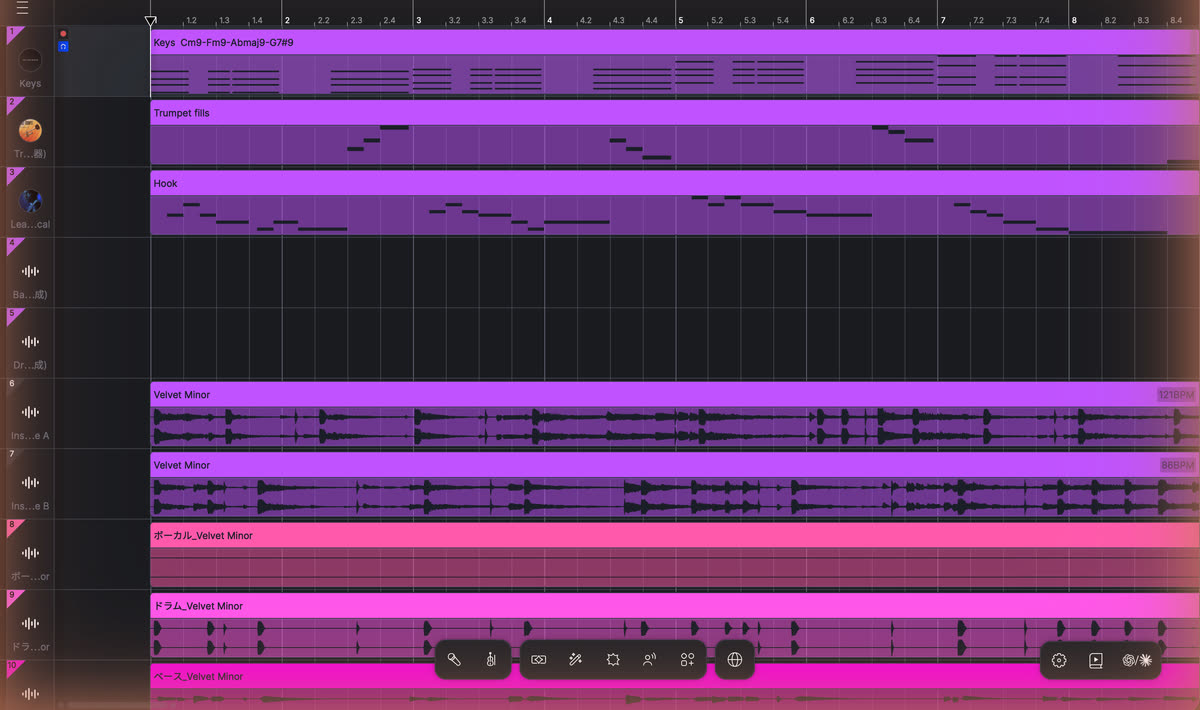
It came back with two full instrumentals, just under three and a half minutes each (3:24 and 3:26 by the file). One of them was titled "Velvet Minor."
Note that the backing track here was generated too, rather than being one of mine. So yes, the "type a prompt, get a song" workflow you might know from Suno is available here as well.
But I do not think that is where ACE Studio's real strength is. As the rest of this article shows, the interesting part is that you can take what comes out, pull it apart, edit it as MIDI and play it back through your own instruments. Section 7 covers that in detail.
Everything from here uses that track.
2. Checking BPM and key, then splitting the parts
You can use a generated track as-is, but it is worth confirming the tempo and key first.
I dropped it into Beat Lab's BPM & Key Detector and got this:
- BPM: 86.2 (98% confidence)
- Key: C Minor (67% confidence)
ACE Studio reported 86.2 as well. I asked for 88 BPM in the prompt, so what actually came back is a touch slower.
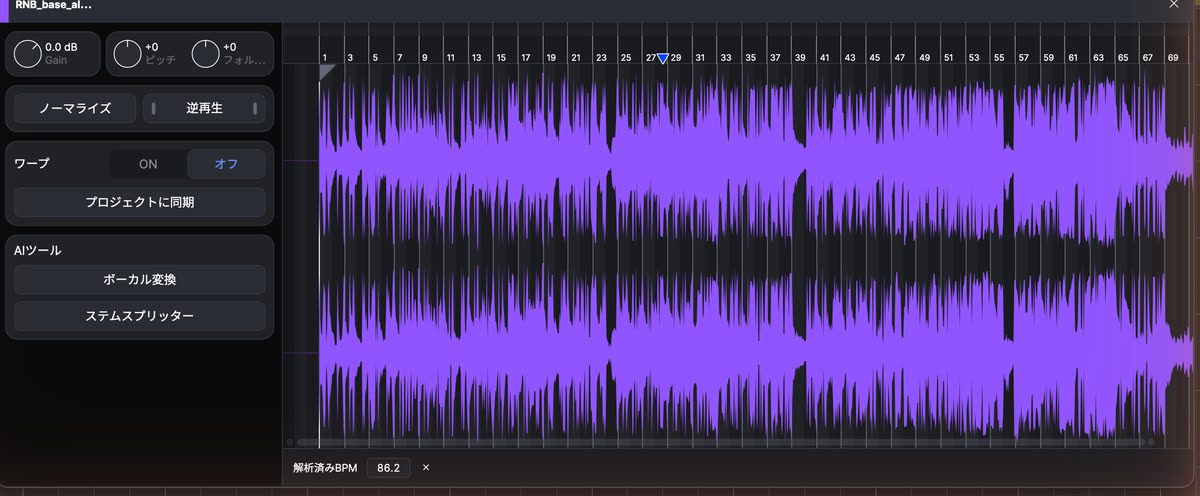
So 86.2 BPM in C Minor is the reference for everything that follows.
Splitting the parts with Stem Splitter
Next up is Stem Splitter.
It takes a finished track and separates it into parts like vocals, drums and bass. It is also handy when you want to pull a single instrument out of a beat you already have.
There are four modes:
- Basic — two stems: vocal and instrumental
- Professional — six stems: vocal, drums, bass, piano, guitar and other
- Advanced — every stem the model detects, separated individually
- Customized — name the sound you want in words, e.g. "just the horns"
I used Professional. Being able to check the drums and bass separately helps later, when you want to adjust the balance.
Basic and Professional do not consume additional AI credits; Advanced and Customized do. What is available to you depends on your plan, so check the official page for current terms.
The split took a few minutes.
3. Driving ACE Studio from Claude
The part I most wanted to try was controlling ACE Studio from Claude.
ACE Studio has a feature called External Agent Access, which lets a supported external AI agent operate the project you are working on.
Normally you would create the MIDI, import it, add tracks and so on yourself. External Agent Access lets you hand some of that over to the AI.
Connecting
You can connect from the agent icon in the lower-right of the ACE Studio window, or from Preferences → General → External Agent Access, where a "Copy command" button next to "MCP Server (stdio)" hands you the connection string.
For Claude I used this command:
Once it is set up, ask Claude about the current project. If it can report the project back to you, the connection is working.
Note that this feature ships as Experimental. Commands and behaviour may change, so check the guidance shown in ACE Studio itself when you set it up.
Also, you cannot connect the browser versions of ChatGPT or Claude directly. Check the requirements on your agent's side — a supported desktop environment, for instance.
4. Having Claude write the melody and lyrics
This is the main event.
Using the 86.2 BPM and C Minor I confirmed earlier, I asked for a short R&B vocal phrase.
Ask for a melody without more context and it will drift off the chords, so I first worked out what the section was playing. It came out as this loop:
Fm9 → Gm11 → Cm9
It keeps the C Minor mood while staying a little unresolved.
I gave Claude the tempo, the key and that progression, and asked for a melody.
For this track I used bars 29–36, picking a stretch where the drums were playing consistently before placing the vocal.
The melody came to 26 notes. Claude wrote English lyrics as well:
Stay a little longer
the night is ours tonight
I can hear you calling
don't turn out the light
The idea being: let's stretch the night out a little longer.
From MIDI to an AI singer
With the melody and lyrics done, I asked Claude to handle the ACE Studio side.
It created a Sing track for the AI vocalist and assigned a singer tagged R&B / Soul / Gospel.
Then it placed the 26 MIDI notes with the lyrics. The pronunciation data is filled in automatically to match.
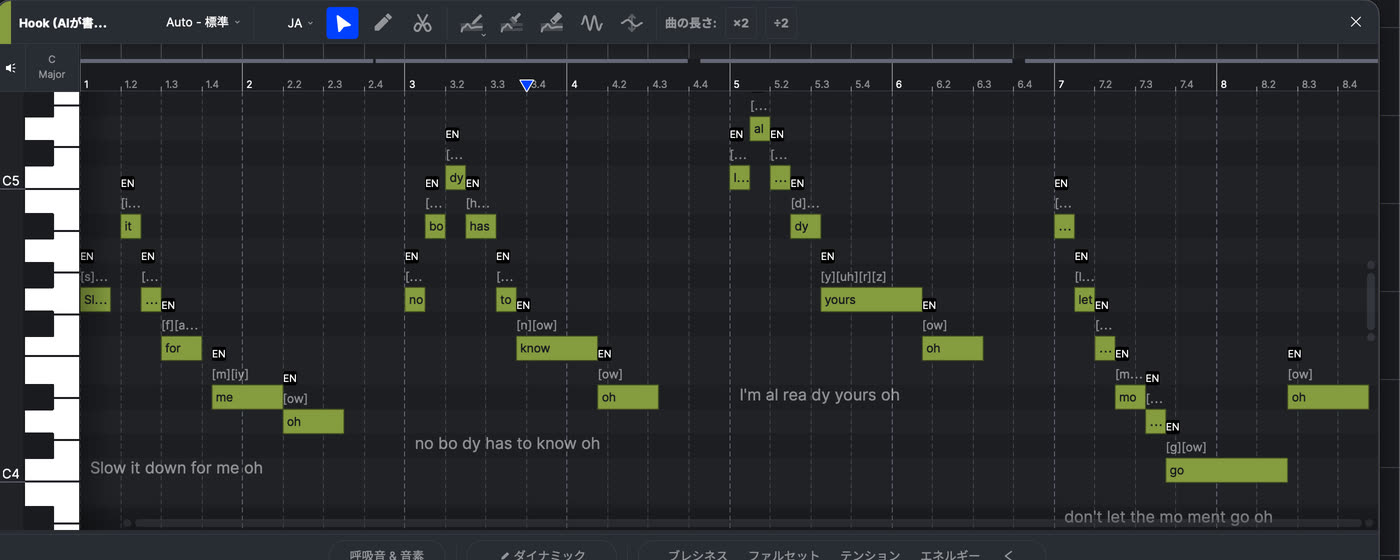
Open the piano roll and you can check note positions and lengths. Anything that bothers you, you can of course adjust yourself.
In this session I never had to enter a melody note by hand.
Even if you cannot sing, you can prepare a melody and lyrics and have an AI singer perform them. For anyone working mostly on instrumentals, that is an interesting way in.
5. Adding a trumpet with AI Instruments
The vocal already made it feel like a song, but I wanted one more thing to listen for, so I added a trumpet line.
ACE Studio's AI Instruments turn MIDI into an AI instrument performance.
I picked trumpet and asked Claude for a short phrase.
Six notes. More than just notes in a row — the result carries dynamics and phrasing too.
AI Instruments covers strings such as violin and cello, plus winds like saxophone and trumpet.
Guitar was not in the official lineup when I checked. If you need guitar, you will be reaching for a different library.
6. A/B the finished audio
Here is the original beat next to the version with Claude's MIDI added.
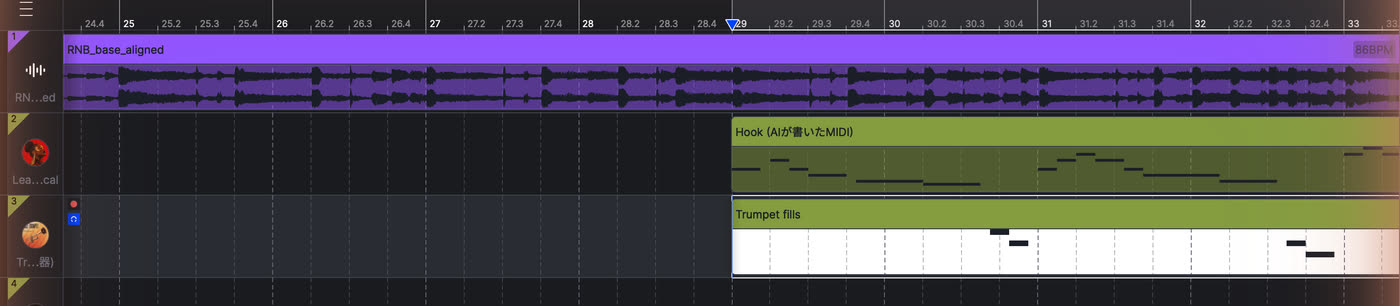
Compared to the instrumental alone, the vocal changes the character of the track considerably. Once a melody is in, it stops being a beat and starts being a song demo.
Rather than trying to build a finished song in one go, adding a short phrase like this seems like a good way to start.
7. Play it with your own plugins: ACE Studio as a writing aid
This is the part I most want to point at.
Beyond AI vocals and AI instruments, ACE Studio hosts VST3 and AU plugins directly.
Which opens up a workflow like this:
- You are stuck on where a section should go, or you want a riff idea
- → Ask Claude for a few MIDI options on the spot
- → Play them back through your own plugin, or through ACE Studio's AI instruments
- → Keep what you like and rewrite it yourself
You are not dropping generated audio into your track. What comes back is MIDI, so you pick the sound, and you can fix any note you disagree with.
If handing a whole song to an AI isn't for you, this distance might suit you better. You are not asking it to write the track — you are asking it for a second opinion when you get stuck.
ACE Studio's AI instruments help here specifically because they come back with performance and phrasing, not just notes. Even at the idea stage, you are judging something that already sounds like playing.
You may stop buying MIDI packs
Writing this up, something occurred to me: working this way, MIDI packs lose a lot of their purpose.
Chord and melody MIDI collections are useful, but:
- finding one that fits your track's key and tempo takes time
- most of them end up "close but not quite," and few are usable as they are
- the popular packs are being used by everyone else too
Those are the usual frustrations.
With this approach you state your track's key and tempo and get something written on the spot, so the searching time goes to zero. Don't like it? Ask for more variations. And nobody else is using the same thing.
Whatever gets written exports as a MIDI file and goes straight into your usual DAW. Nothing forces you to finish inside ACE Studio. Use it for idea generation and do the real work in your DAW, if that suits you better.
I tried it: the export came out as a standard MIDI file (format 1, 480 PPQ) with the 26 vocal notes and the 6 trumpet notes, track names included. The phonemes expanded from the lyrics do not travel in a MIDI file, but for carrying the notes out it does the job.
Your existing plugins load too
On our machine we loaded these three into ACE Studio and confirmed they play from MIDI (they are not used in the finished track above):
- SubLab (Future Audio Workshop) — 808 bass
- MODO BASS 2 (IK Multimedia) — electric bass
- Originals Felt Piano (Spitfire Audio) — felt piano
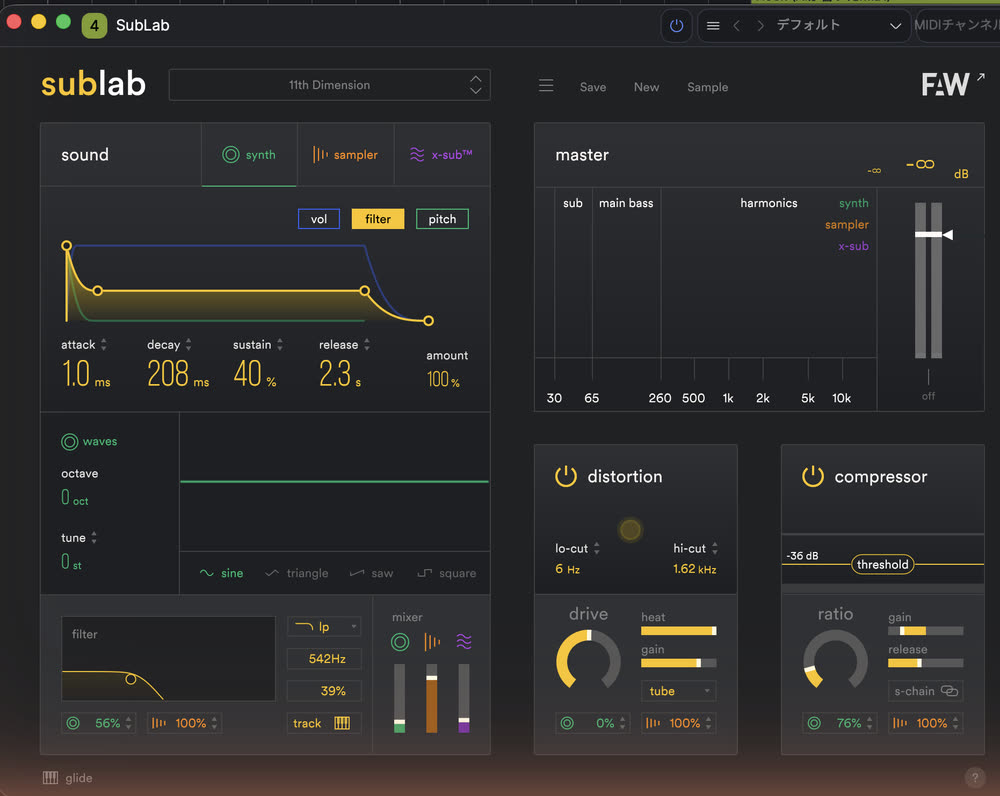
That said, some plugins will not sound from ACE Studio. Drum machines that play back from their own internal sequencer, in particular, may not respond to external MIDI at all.
There is also ACE Bridge 2 for sending MIDI from your DAW to ACE Studio. It comes in VST3 / AU / AAX, so you can insert it in your DAW and drive the AI vocals and AI instruments from there.
If you want to stay centred on the DAW you already use, that is worth a look.
8. This is only one way to do it
This time I worked in one direction: build the beat, then put a vocal on it.
That is just one of many possible orders.
The most realistic version is probably putting a vocal on an instrumental you already have. That removes the beat-generation step entirely; everything after it is the same as above. If you have tracks sitting unfinished, dropping a scratch vocal on one might change how you hear it.
You could start by asking only for MIDI ideas, then build the track yourself from there. Having the skeleton of a melody first makes it surprisingly easy to expand on.
Or take the moment you get stuck halfway through programming something. Ask for a few options for where the section could go next, then rewrite it yourself using whichever one you like.
Handing over an existing phrase to have it ornamented, then borrowing only the nuance, is equally valid.
You do not have to give everything to the AI, and you do not have to do everything yourself.
Which parts you delegate and which you keep is entirely up to you. There is no limit to how you can work.
9. Pricing and the discount
ACE Studio offers plans including Artist and Artist Pro.
These are the annual plans shown as a monthly equivalent on the official Japanese pricing page as of October 15, 2026.
| Plan | Monthly equiv. (regular) | Monthly equiv. (20% off) | What you are actually billed (once a year, at 20% off) |
|---|---|---|---|
| Artist | ¥3,104.16 | ¥2,483.33 | approx. ¥29,800 |
| Artist Pro | ¥4,145.84 | ¥3,316.67 | approx. ¥39,800 |
The main differences are the number of voice-cloning slots and the monthly credit allowance.
| Artist | Artist Pro | |
|---|---|---|
| AI singers / AI instruments | Unlimited (160+ / 40+) | Same |
| Credits | 2,500 / month | 5,000 / month |
| Voice cloning slots (singing) | 1 | 5 |
| Voice cloning slots (voice changer) | 1 | 10 |
| Music video & stem separation | Yes | Yes |
Pricing, promotions and plan contents are subject to change. Check the official page for current rates.
If you sign up through the links in this article, entering the coupon code "BEATLAB" at checkout takes 5% off your first purchase.
There is also a Rent-to-Own option: complete two years of payments and it converts to a perpetual licence. Cancel before the two years are up and it does not convert. A one-time purchase is available as well.
Individual Artist and Artist Pro plans come with a 7-day money-back guarantee. To request a refund, contact [email protected] within 7 days of payment.
Eligible plans and terms may change, so check the official support guidance before you buy.
10. Once the song exists, you can make the video too
Once you have a track with a vocal on it, the next thing you want is usually a video.
ACE Studio covers that as well. It includes an AI music video generator and a Video Composer, available on both the Artist and Artist Pro plans.
You hand it the song, and the AI works out the structure and assembles the visuals.
We cover that feature in its own article, if you want the detail.
Wrapping up: not having the AI make it, but making it with the AI
I paired ACE Studio with Claude and went from generating a beat to adding a vocal and a trumpet line.
Having done it, where this software sits has become a lot clearer to me.
It differs from the "type a prompt, get a finished song" services in what it gives back. They return audio; ACE Studio returns tracks and notes.
- You choose the sound — your own VST3 / AU plugins load right in
- You can fix any note you disagree with
- You can export it as MIDI and take it into your usual DAW
Because of those three things, it never feels like the AI has taken the track away from you.
The most realistic use is probably getting help only where you are stuck. When you cannot think of where the section goes, when you want a riff idea, when you need a scratch vocal. Instead of going shopping for a MIDI pack, you state your track's key and tempo and get something written on the spot.
Of course, what the AI produces will not always be usable as-is. You still listen back and fix the details. But that is not far off what you already do when you take a loop from a sample pack and make it your own.
Being able to make a demo with vocals without a recording setup is reason enough to try it, especially if you usually only make instrumentals.
There is a free tier, so run it once at your own beat's key and tempo and see what you think.