[Promo Code Inside] Everything ACE Studio 2.0 Can Do: AI Vocals, AI Instruments, Voice Cloning and Music Videos
"Wait — that's AI singing?"
Most people have that reaction the first time they hear ACE Studio's AI vocals. What kept me interested, though, wasn't how clean it sounds. It was that you can tell it how to sing.
Softer here. Push on the chorus. Vibrato on that last long note. Take a breath before this line. Those are not vague prompts — they are parameters you draw in.
And ACE Studio 2.0 does not stop at vocals. AI instruments, voice cloning, a voice changer, choir stacking, stem separation and music video generation are all in the same app. This article lays out what it actually does, using official information verified on October 1, 2026 — including the parts worth tempering your expectations about.
- Not "it sings" — "it sings the way you want"
- 160+ AI voices to match the track
- Clone your own voice, or re-skin your take
- AI instruments: performing MIDI, not playing it back
- From finished track to music video
- You don't have to give up your DAW
- The whole feature map
- Pricing and promo code (October 1, 2026)
- Where to temper your expectations
- FAQ
Not "it sings" — "it sings the way you want"
All you need is a melody and lyrics. No singing ability, no vocalist to book, no studio time. Draw the melody as MIDI, assign the words, pick an AI voice, and it sings.
That part is table stakes for AI in 2026. The interesting part comes after.
▲ ACE Studio official channel
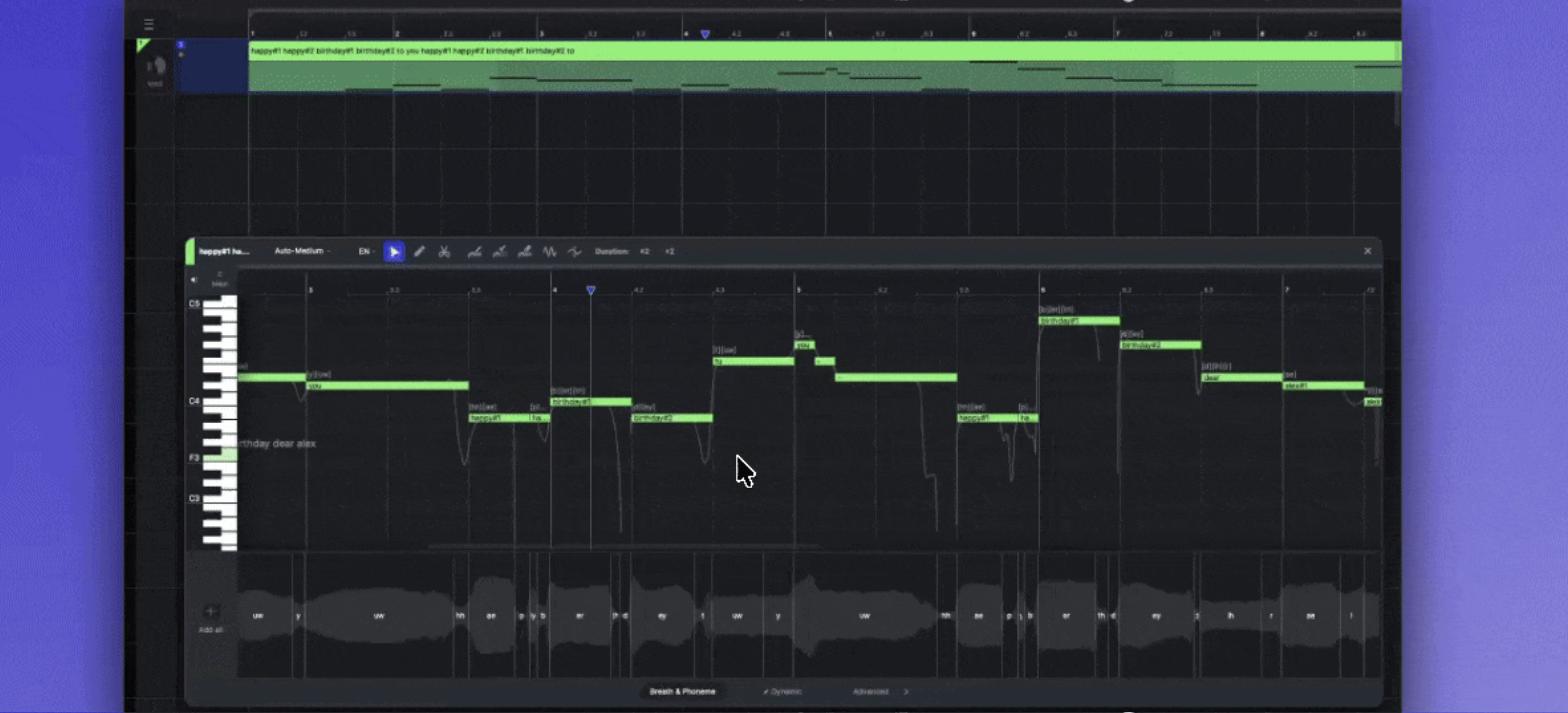
Nobody sings a song the same way twice. A quiet first verse, a pre-chorus that builds, a chorus you lean into, a long note at the end. In ACE Studio those differences are things you draw.
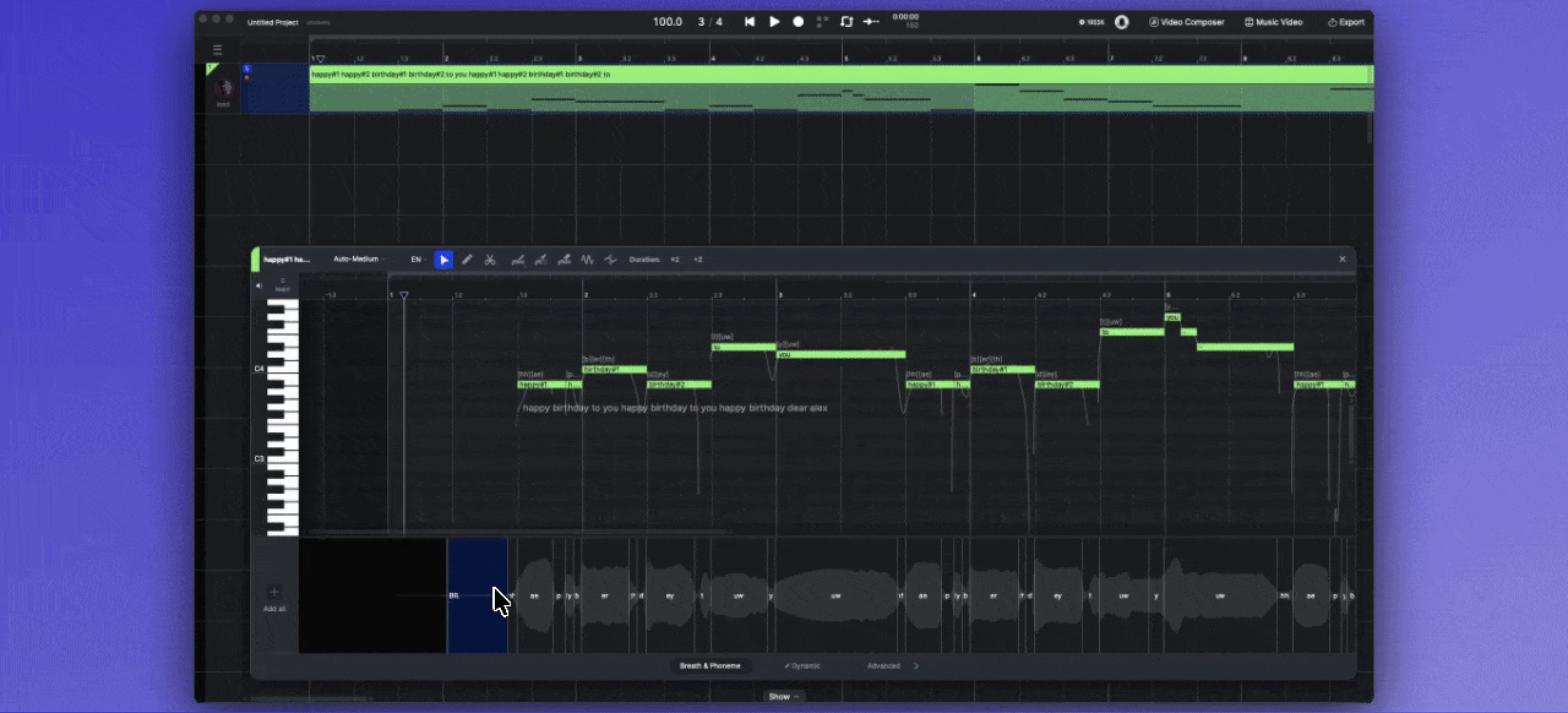
Breaths and phoneme lengths
Put an inhale before a line. Hold a consonant a beat longer. You drag the phoneme boundary and it changes.
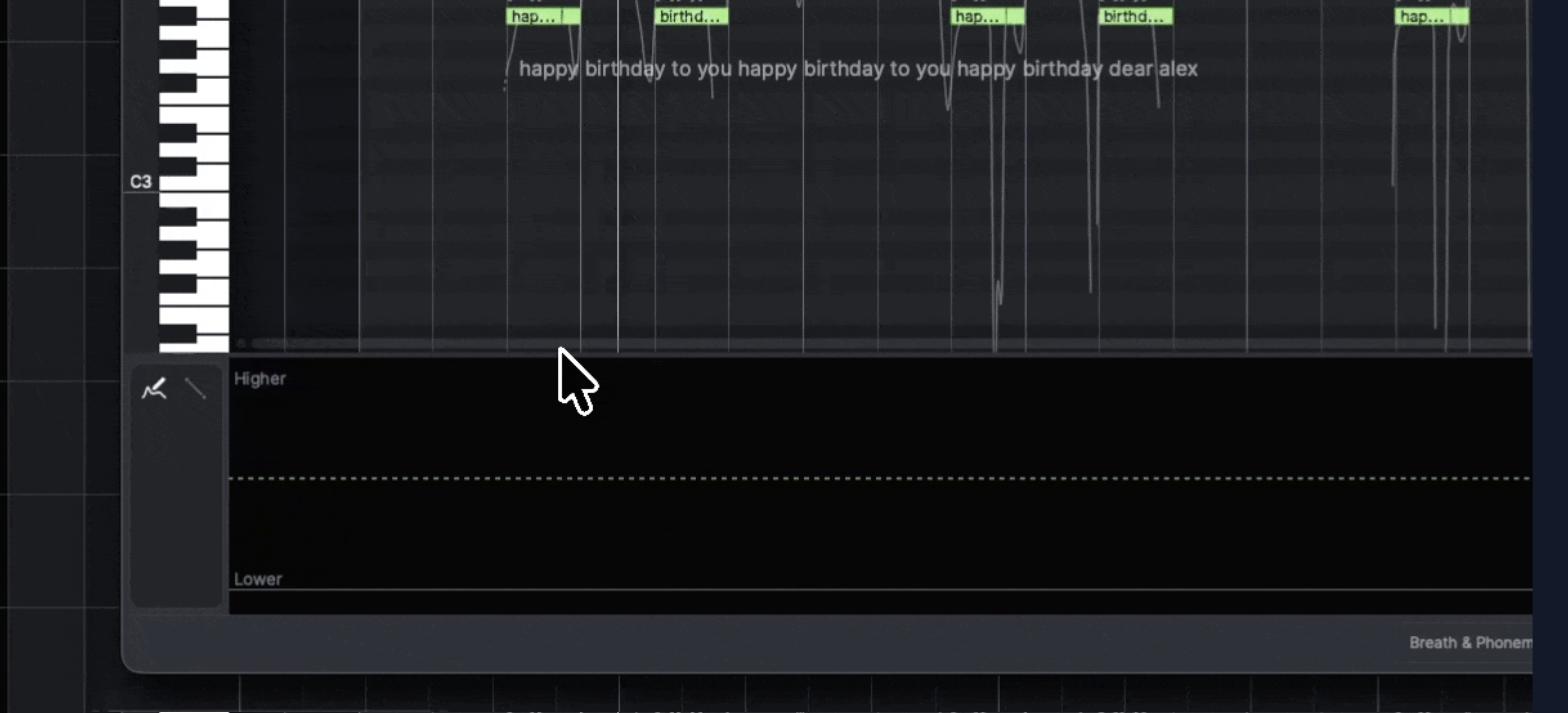
Intensity as a single curve
Overall delivery is one curve called Dynamic. Up for power, down for restraint — lift it through the chorus, drop it in the verse.
And the timbre itself, on four axes
If you want to go further, Advanced exposes Air (breathiness), Falsetto, Tension and Energy as 0–1 curves.
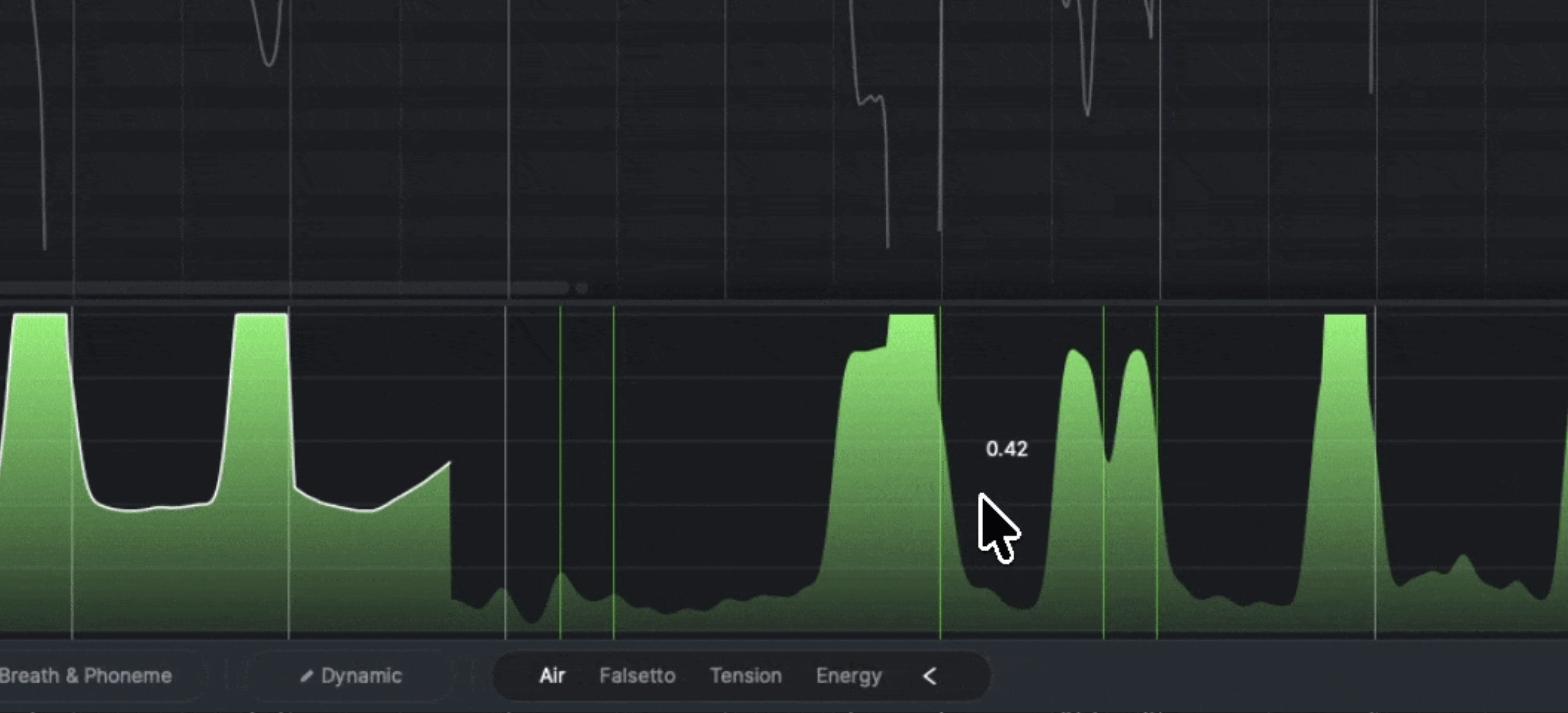
More Air in the verse, Tension up through the pre-chorus, Energy up on the hook, vibrato on the final long note. So it isn't "sing this melody" — it's "sing this song, this way".
160+ AI voices to match the track
As of October 1, 2026 the official plan table lists 160+ royalty-free AI voices — female and male, across pop, R&B, rap and cinematic.
- Instead of "record a vocal, then build the track," you can build the track, then choose the voice
- Swapping voices on the same melody turns casting into something you can actually audition
- If you work alone, that reordering matters more than it sounds
Clone your own voice, or re-skin your take
If you'd rather it were your voice, Voice Cloning builds an AI voice from your own vocal samples.
That unlocks a loop: sing it once → clone your voice → let the AI sing it from MIDI and lyrics. Useful on the days your voice isn't there, when you don't want to punch the same line twenty times, or when you need a wall of harmonies.
Voice Changer goes the other direction: it takes something you actually sang and re-skins it with a different AI voice. Rap the part yourself, keep your timing and phrasing, swap the voice. Less "let the AI sing" and more "dress my performance in another voice."
Stack a choir on your own
You can layer multiple AI voices into backing vocals and choir parts. "The lead is done, now I want harmonies, now I want a choir" is something you can assemble without booking anyone.
AI instruments: performing MIDI, not playing it back
It isn't only vocals. ACE Studio 2.0 includes AI Instruments — 40+ per the official plan table.
The idea mirrors the vocal side. Traditional realistic libraries assume you will nudge velocities, shift timing and switch articulations until it stops sounding programmed. Strings especially: the notes are right and it still sounds typed in.
AI Instruments invert that. Drop MIDI in and a performance comes back — phrasing, dynamics and articulation included — and you fix the parts you don't like. You compose, the AI performs, you make the final call.
▲ AI Instruments demo (ACE Studio official channel)
- Shipping now: string sections (violin, viola, cello), saxophone, trumpet
- The official lineup page also groups woodwind (clarinet) and horn / trombone
- Coming soon: Slap Bass / Dizi / Oboe / Suona
- There is no AI guitar. If realistic programmed guitar is the goal, a dedicated guitar library is still the safer choice
From finished track to music video
Load a track and the agent reads its structure, writes a scene-by-scene script, proposes characters and a look, lays a storyboard on the timeline, and renders the footage. No video editor required.
▲ AI Music Video Generator (ACE Studio official channel)
Beyond full-length videos, it targets vertical clips for TikTok, Reels and Shorts, loops for Spotify Canvas, live backdrops and release teasers.
It runs the other way too: video to music
Video to Music scores a clip you already have; Video to SFX generates sound effects to match it. Video Composer is a separate tool again. If you make YouTube or short-form content, this direction may see more use than the music-video one.
The official site also lists Stem Splitter, Vocal to MIDI, a vocal remover and PDF-to-MusicXML conversion.
You don't have to give up your DAW
With this many features the obvious question is what happens to the DAW you already use. Nothing — this isn't a migration. ACE Bridge 2 (VST3 / AU / AAX) sits on a MIDI track and connects the two.
Hit play in the DAW and MIDI goes to ACE Studio; the generated audio comes back in place. Build drums and bass where you always have, hand the vocals and AI instruments to ACE Studio, mix as usual. It adds a performer to your setup rather than replacing it.
The whole feature map
Laid out side by side, "AI vocal plugin" stops being an accurate description. The official positioning is All-in-One AI Music Studio.
Pricing and promo code (October 1, 2026)
For the amount it covers, the price is grounded. Monthly equivalents when billed yearly:
| Artist | Artist Pro | |
|---|---|---|
| List (per month) | $20.73 | $27.5 |
| With current discount | $16.58 | $22 |
| AI voices | 160+ | 160+ |
| AI instruments | 40+ | 40+ |
| Vocal / instrument generation | Unlimited | Unlimited |
| Voice cloning slots | 1 vocal synth / 1 changer | 5 vocal synth / 10 changer |
| AI credits | 2,500/mo | 5,000/mo |
At the time of checking a "HOLIDAY DISCOUNT" of 20% was applied, with no end date stated. New subscriptions also came with a welcome bonus of 30 days of AutoTune 2026 free. Pricing and promotions move — check the official site for the latest.
Rent-to-Own is also offered: pay the subscription for two years (24 months) and it converts to a perpetual licence at no extra cost. Good if you dislike the idea of renting forever — but cancel before the two years are up and the conversion does not happen. An outright purchase is available too.
Where to temper your expectations
Listing only the good parts helps nobody, so here is what stood out on the other side.
| Caveat | Detail |
|---|---|
| No AI guitar | As of October 1, 2026 the official AI Instruments page lists strings, sax and trumpet. Buying in expecting guitar will disappoint |
| Not a substitute for a live player | The breath of a particular day and a performer's own reading of a line are a different thing. Some phrases still want fixing by hand |
| Pro Tools ARA sync does not work | The bundled Pro Tools ARA plugin is a technical preview and the official docs say it does not currently function |
| Logic on Apple Silicon needs Rosetta | For ARA tempo sync, the official steps require launching Logic in Rosetta mode |
| Internet required | Core features render in the cloud. Not suited to a mostly-offline workflow |
| Generative features burn credits | Vocal and instrument generation are unlimited, but music video, Video Composer, stem separation and Generative Kits draw on the monthly credit pool |
| Cancel early and Rent-to-Own is void | The perpetual licence requires the full two years. Voice cloning slots also lock on cancellation (and unlock if you resume) |
Summary: it adds a performer to your setup
The part that holds up after a while is that the AI generates a performance, not just a sound.
For vocals: MIDI and lyrics in, a vocal with breaths, dynamics and timbre out. For instruments: MIDI in, phrasing and articulation out. On top of that sit cloning your own voice, re-skinning a take, stacking a choir, and generating a video.
Work that once meant finding a vocalist, booking a guitarist, tracking strings, gathering backing singers and hiring a video team is now partly testable at one desk. None of that makes human musicians unnecessary — but working alone covers more ground than it used to.
If "making music with AI" still means "press a button and a song appears" to you, an hour with this will probably change the picture. Start by making the AI properly perform MIDI you wrote yourself.
Frequently asked questions
What can ACE Studio 2.0 actually do?
AI vocals from MIDI and lyrics, hand editing of how they're sung, AI instrument performances, voice cloning, a voice changer, choir stacking, stem separation, vocal-to-MIDI and AI music video generation — in one app. As of October 1, 2026 the official plan table lists 160+ AI voices and 40+ AI instruments.
Is there an AI guitar?
No. As of October 1, 2026 the official AI Instruments page does not list guitar. What ships today centres on string sections, saxophone and trumpet, with Slap Bass, Dizi, Oboe and Suona marked Coming soon. For realistic programmed guitar, a dedicated library is still safer.
How much does it cost, and is there a promo code?
Billed yearly, the monthly equivalent is $20.73 for Artist and $27.5 for Artist Pro. At the time of checking a 20% HOLIDAY DISCOUNT showed $16.58 and $22. Entering BEATLAB at checkout takes a further 5% off your first payment.
Do I have to give up my DAW?
No. ACE Bridge 2 (VST3 / AU / AAX) sits on a MIDI track and sends MIDI out and audio back in place. Keep building drums and bass in your DAW and hand only vocals and AI instruments to ACE Studio. The Pro Tools ARA plugin is a technical preview and the official docs say it does not currently work.