How to Make Vocal Chops: The Complete Guide
That chopped-up vocal hook that sticks in your head across trap, future bass and pop-leaning beats — that's a vocal chop. Put simply, it's a technique where you slice a single vocal into small pieces and reassemble them into a new melody or rhythm. When a lead feels thin, or an intro or drop needs movement, it's one of the first tools you reach for.
The idea itself is simple, but the result changes a lot depending on where you cut, how you add pitch, and what texture you finish with. In this article we'll walk through it in order — from choosing samples to slicing in your DAW, loading into a sampler or synth, matching key, and finishing with effects — so that even a first-timer can build a hook from a single vocal. If you're chopping records or loops rather than voices, our guide to sample chopping is a useful companion.
What are vocal chops? Treating the voice as an "instrument"
Vocal chopping means cutting a vocal, acapella, or a one-word vocal sample into short fragments (chops), then rearranging their order, timing and pitch. Instead of playing the original lyric straight through, you pull out only the character of the vowels and consonants, the "air" of the voice, and play it like a synth lead or pluck — closer to using the voice as an "instrument."
What you do is continuous with sample chopping; the only difference is that the source is a human voice. A voice keeps the texture of words and breath, so the same phrase tends to stick as a hook. That's the strength of vocal chops over slicing drum loops or synths. The workflow breaks down into four steps.
- 1. Slice & rearrange: chop the vocal in your DAW and reorder the pieces
- 2. Load into a sampler / synth: make it playable on a keyboard and add pitch
- 3. Match key / scale: place it on your track's key
- 4. Finish with effects: blend it in with formant, reverb and texture
Choosing samples: royalty-free sources and sample packs
The quality of a chop is mostly decided by the source vocal. First, mind the rights: chopping a hit-song acapella and publishing or selling it leads straight to copyright problems. To stay safe, pull material from one of these three.
- Royalty-free vocal samples: available via subscriptions like Splice or Loopcloud, or one-off sample packs. Always check the license terms before use
- Your own recorded voice: just sing or speak one phrase. Fully original, rights clean. A mic and a DAW are enough
- Material with clear rights: something commissioned from a vocalist, or a buyout acapella
For how licensing works and which services to gather material from, see how to use royalty-free music. For subscription-based sample hunting, our Splice article helps too. When picking samples, choose phrases with clearly sustained vowels and little silence (few breaths or gaps). They're easier to pitch and keep their shape after rearranging.
Step 1: Slice & rearrange in your DAW
The first step is to place the vocal on an audio track and chop it. There are two main ways: manually cutting at consonant and vowel boundaries, and using your DAW's slice feature (Ableton Live's Slice to MIDI, FL Studio's Slicex, etc.) to split automatically by transient. It's fast to rough it in with auto-slicing, then fine-tune only the spots that bother you.
Once chopped, rearrange the fragments into a new phrase. This is the most fun part: break the original word order, repeat the same fragment, push the rhythm off the beat, and it transforms into a completely different hook. Start by building a 1–2 bar loop from four to eight chops.
At this stage the pitch can still be all over the place. In the next step, loading it into a sampler lets you play the same fragment at any pitch on the keyboard.
Step 2: Load into a sampler / synth and play it
Rearranged, the chops are still stuck at "the original vocal's pitch." Load them into a sampler or synth and you can play them at any pitch with a MIDI keyboard, freeing you to write them as a melody. This is the heart of vocal chopping.
Your DAW's stock sampler (start here)
Ableton Live's Sampler/Simpler, FL Studio's DirectWave, Logic's Sampler — every DAW has a way to assign a sample to the keyboard and play it. Start by loading one chop into the stock sampler, playing the keys and writing a melody; it's the quickest route. If you want to start free, the samplers in our 8 free plugins roundup are an option too.
Design it further with Serum 2's Sample / Granular
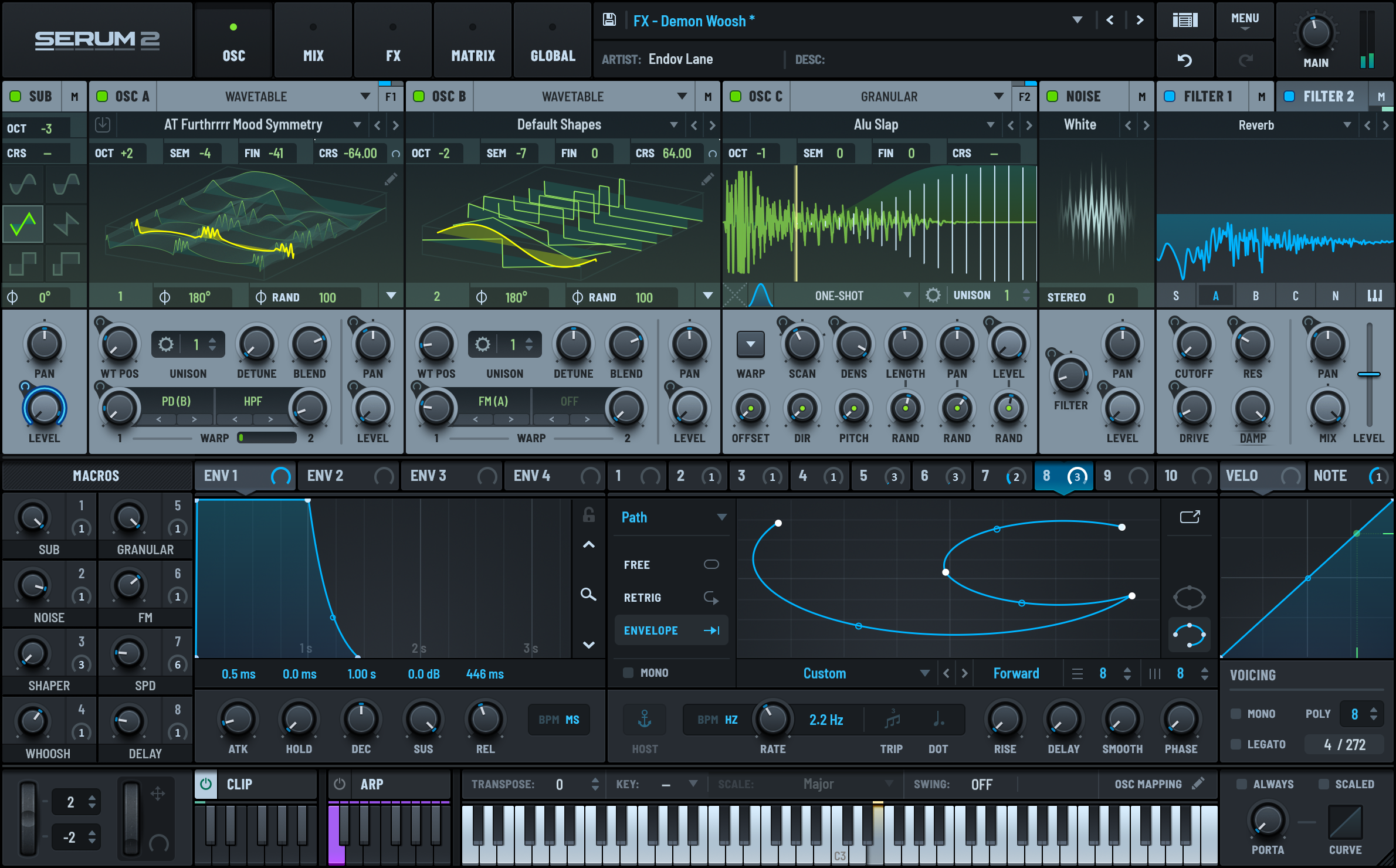
To take it a step further, you can use Serum 2. Serum 2 evolved from a wavetable-only synth and can now load samples and granular as oscillators. Drop a chopped vocal into the Sample OSC and you can run the synth's powerful filters, modulation and effects directly on the voice. Stretch it with granular and you can turn the voice into a lead or pad that barely resembles its source. See our Serum 2 review for the full feature set.
Add texture with Output Portal
"I chopped and arranged the voice, but the texture feels flat" — that's where Output Portal comes in. Portal is a granular effect; insert it after the track and it adds grit, wobble and air to your chops. Its official demos even include a vocal example (Dry / Wet), where a dry voice turns into a three-dimensional texture. Because it keeps the outline of the original while adding only texture, it doesn't become a gimmick and blends into everyday hooks. For how to use it, see our Output Portal review.
*Portal overview video from Output's official channel.

Step 3: Match the key and scale
Once your chops play on the keyboard, place them on your track's key. Miss this and even a great vocal becomes a hook that feels "somehow off." Conversely, get the key right and even a simple arrangement suddenly sounds pro.
The process is simple. First, know the key of your track (or chord progression). If you don't know the key of a reference track or loop, run the file through our BPM/key detection tool (free) and it finds the key and tempo on the spot. With the key known, write the chop melody using only notes in that scale. If your sampler has scale/pitch quantize, turn it on to snap stray notes back into the scale.
If you'd rather start from the chords themselves, check the usable notes with our chord & scale tool so the chop melody doesn't float above the progression. Vocal fragments have complex harmonics, so placing them on chord tones (root, 3rd, 5th) blends especially well.
Step 4: Finish with effects (formant, reverb, VocalSynth)
The last step is texture. A bare, chopped voice tends to stand apart from the surrounding synths and drums. Stack effects here to dissolve it into the track as one element. Four common ones:
- Formant / pitch: when raising pitch, moving the formant along with it or freezing it changes the vocal's character. Push it up for a "chipmunk" tone or down to thicken — both are staples
- Reverb / delay: adds depth and tail. Blend with a short plate, or go dreamy with a long reverb
- Filter / automation: add low-pass or high-pass movement to give chops a "sweep" that makes the hook pop
- Dedicated vocal effects: add body and harmonics with a vocoder or harmonizer
To finish everything with a dedicated tool, a vocal-focused multi-effect like iZotope VocalSynth is handy. It switches between vocoder, harmonizer and texture modules in one place, making it easy to push a chop into a "lead beyond a voice." For details, see our iZotope VocalSynth review. To fix the source pitch itself, our Auto-Tune / pitch correction article helps too.
When it's done, check loudness with our dynamics analysis (free) before exporting to keep the level stable for YouTube and sales. Chops spike in peaks easily, so a quick check here is reassuring.
Frequently asked questions
Q1. Do I need someone who can sing to make vocal chops?
A. No. If you use royalty-free vocal samples or acapella material, you can make chops without singing yourself. Recording and chopping your own voice makes it fully original and keeps the rights clean. A mic and a DAW are enough to start.
Q2. Can I make them with free plugins only?
A. Yes. With your DAW's built-in sampler and time-stretching, the basic slice-and-rearrange chop is fully doable for free. Serum 2 and Portal are for deeper texture and pitch design; get comfortable with the workflow using stock tools first.
Q3. How do I fix chopped vocals that are out of tune?
A. Load the chop into a sampler and play it on the keyboard, and the same vocal sounds on a consistent scale, so pitch lines up. If the source drifts, tidy it slice by slice with pitch correction or a Melodyne-style tool. Check your track's key first with our BPM/key detection tool.
Q4. What's the difference between vocal chopping and sampling?
A. What you do is close: both slice audio and rearrange it. The difference is the source — chopping a record or track is general sample chopping, while chopping a human voice is vocal chopping. A voice keeps words and vowel character, so it tends to stick as a hook.
Summary
Vocal chops come together in four steps: 1. slice & rearrange, 2. load into a sampler/synth, 3. match key, 4. effects. Start with your DAW's stock sampler — chop one vocal and play it on the keyboard — and you can build a hook without buying anything. When you want more, add Serum 2 to design it like a synth, or Output Portal to add texture, and grow your toolkit step by step. First, grab one vocal you have on hand and try chopping and rearranging it.