Type Beat YouTube SEO Guide: Titles, Tags & Thumbnails
Type Beat (a "... Type Beat" = a beat video in the style of a particular artist) is a rare "search-driven" kind of content on YouTube, in that rappers come searching for it. In other words, without relying on going viral or on luck, if you keep uploading in a way that correctly surfaces in search, it leads to plays and sales. That's exactly why understanding YouTube SEO becomes a weapon.
In this article, we explain the title, tags, description, hashtags, thumbnail and upload frequency for Type Beat videos while cross-checking against official YouTube Help (as of July 7, 2026).
1. Start with the mechanics: "search" and "browse" are different
If you look at YouTube Studio analytics, the traffic sources include "YouTube search" and "Browse features." The official Help definitions are as follows.
- YouTube search: plays via keywords viewers searched for. The report even shows the actual search terms used.
- Browse features: plays via what YouTube surfaces as recommendations — the home screen, subscription feed, "Watch later," and so on.
- Suggested videos: plays via the candidates shown alongside other videos or after playback.
And according to YouTube, search ranking is mainly determined by Relevance, Engagement and Quality. For relevance, "how well the title, tags, description and content match the search terms" is used, and for engagement, things like "the video's watch time for that search term" are referenced.
The main battleground for Type Beat is search and suggested videos. Matching search terms like "drake type beat" with your video's metadata, and making beats and videos that don't get abandoned once playback starts, is the foundation of everything.
2. Title syntax: write to the Type Beat "template"
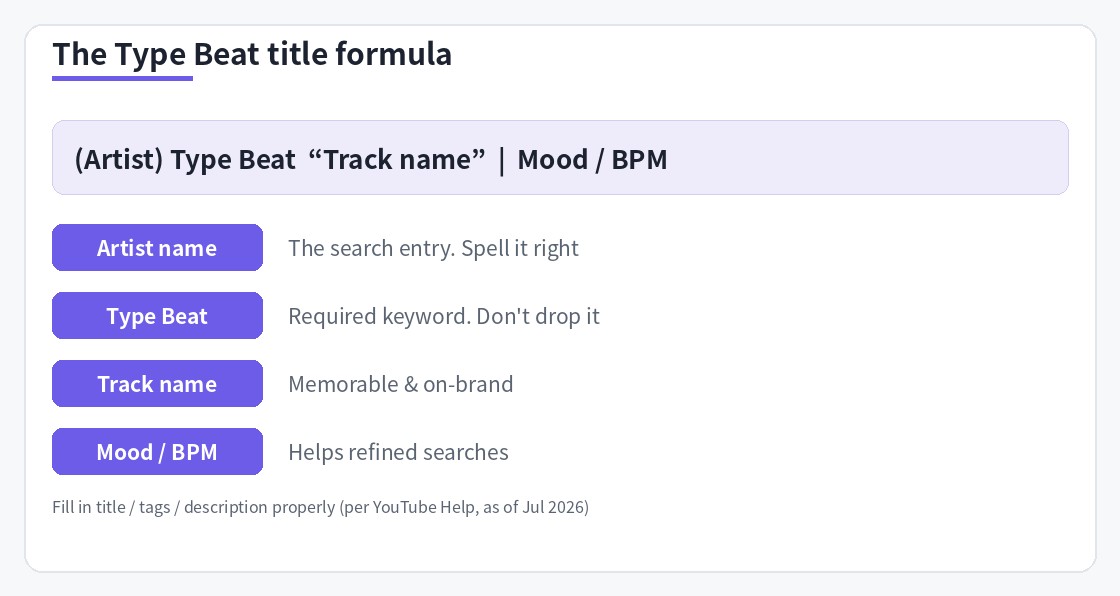
Type Beat titles have a globally shared, standard syntax.
[FREE] {Artist} Type Beat - "{Beat name}" | {Genre/Mood} {Year}
e.g., [FREE] J Cole Type Beat - "Midnight" | Soulful Boom Bap 2026
Here's what each part means.
- [FREE]: the standard marker showing a free preview / free download is available. Aimed at the many users who search with "free." Don't add it if it's paid-only.
- {Artist} Type Beat: the main search keyword. Use only artist names that genuinely match the video's content (a list of unrelated names risks a policy violation as misleading metadata).
- "{Beat name}": for branding and identification. Enclosing it in quotation marks is the convention.
- {Genre/Mood} {Year}: supporting keywords to catch compound searches like "dark trap beat" or "soulful boom bap 2026."
Put search keywords toward the front so the most important words come at the beginning of what viewers read in results. If coming up with an artist × genre × mood combination every time is a hassle, our Beat Lab: Type Beat Title & Tag Generator can generate the title, description and tags together.
3. Getting the description, tags and hashtags right
Description: the first few lines are everything
Official YouTube Help ("Tips for writing video descriptions") recommends writing what the video is about in the first few lines of the description. That's the only part viewers can read without clicking "Show more." For Type Beat, put the following in the first 1–3 lines.
- Purchase link (BeatStars, etc.): the commercial goal of the video. Putting it on the first line is standard.
- Basic beat info: Artist Type Beat / genre / BPM & key (you can check these with our BPM & Key detection tool).
- License and contact: a summary of usage terms plus email, etc.
After that, add related keywords in natural sentences. Official Help also explains using the "Research" tab in YouTube Analytics or the Google Ads Keyword Planner to choose keywords.
Tags: their role is "minimal" — but Type Beat has an exceptional use
It may surprise you, but official YouTube Help states plainly that "tags can be useful if your content commonly has misspellings; otherwise, they play a minimal role in video discovery." If you have time to study dozens of tags, spend it on the title and description.
That said, Type Beat is a genre that deals with frequently misspelled artist names such as XXXTentacion and A$AP Rocky. Putting the correct spelling plus common misspellings in tags is exactly the "misspelling countermeasure" the official guidance mentions, and it's still reasonable.
Hashtags: "up to 3 shown, all void past 60"
The hashtag rules are spelled out in official YouTube Help.
- Of the hashtags you put in the description, up to three judged to have high engagement appear near the title.
- If you add more than 60 hashtags to a single video, all hashtags are ignored.
- Excessive tagging can cause a video to be removed from upload or search.
In practice, narrowing to the three that get shown — like "#typebeat + #{artist}typebeat + #{genre}beat" — is the simple, safe approach.
4. Thumbnail and the video itself: build click-through and retention
The official thumbnail specs
The custom thumbnail specs are given in official YouTube Help as follows (using them requires account verification = phone verification).
- The recommended resolution is 3840×2160px (minimum width 640px), with a 16:9 aspect ratio recommended.
- File formats include JPG / GIF / PNG. The size limit is 50MB when uploading from a computer, 2MB on mobile (for video thumbnails).
Type Beat thumbnails typically use "a visual that evokes the artist + large text (artist or beat name)." However, using the person's photo as-is carries rights risks, so it's safer to use an illustration-style visual or original artwork. So it's readable even on a small screen, keep the text to three words or fewer with high contrast.
"Still image + audio" is enough for the video itself
The mainstream Type Beat video is a simple setup: a single piece of artwork plus the audio. Rather than elaborate editing, good sound and the beat starting right away are what help retention. Without even opening video editing software, our Beat Lab: Video Maker + YouTube Upload tool lets you create a Type Beat video just by uploading an image and audio, and post it straight to YouTube. If you're unsure about loudness and level balance, check it before export with our dynamics analysis tool.
5. Upload frequency and timing: decide with numbers
First, as a premise, YouTube does not officially prescribe "you should upload at this time, at this frequency." On top of that, there are official features and Type Beat characteristics that help you decide.
- Decide the timing with data: in the "Analytics → Audience" tab of YouTube Studio, the "When your viewers are on YouTube" report shows your viewers' active hours over the past 28 days as a heatmap (a feature described in official Help). Type Beat's main viewers are often in North America, so late night to early morning Japan time tends to be the peak. Use scheduled uploads.
- Frequency is "the most you can sustain": Type Beat is asset-type content that gets played via search over a long period. The size of the catalog that increases your search surface matters more than one viral hit. A realistic goal is to build a production flow where you can comfortably keep up 2–3 per week.
- Expand one track across multiple search surfaces: even with the same beat, test titles that change the target artist name and genre words, and dig deeper into the lines that hit.
If you're unsure even about choosing a genre, we recommend starting by finding where your strongest genre overlaps with search demand — see how to make Boom Bap beats as an example.
Frequently asked questions
Q. Are video tags meaningless now?
A. Official YouTube Help states plainly that "tags can be useful if your content commonly has misspellings, but otherwise tags play a minimal role in video discovery." That said, because Type Beat is a genre with frequently misspelled artist names (e.g., XXXTentacion), tags still have some value for covering spelling variations. Prioritize the title and description.
Q. How many hashtags can I add?
A. According to official YouTube Help, of the hashtags you put in the description, up to three judged to have high engagement appear near the title. Also, if you add more than 60 hashtags to a single video, all hashtags are ignored, and excessive tagging can lead to a video being removed. Keeping it to about three is the safe choice.
Q. When and how often should I upload Type Beat videos?
A. YouTube does not officially recommend a specific upload time or frequency. A useful reference is the "When your viewers are on YouTube" report in the Audience tab of YouTube Studio, which shows your viewers' active hours over the past 28 days. Because Type Beat is content whose search-driven plays continue over a long period, building up a catalog to match search demand matters more than the exact moment of upload.
Q. Is it OK to use an artist's name with "... Type Beat"?
A. The "... style beat" expression is established across the whole genre, but the trademark and publicity issues around an artist's name are not zero, so use it with an understanding of the risks. At minimum, avoid stuffing titles or tags with artist names unrelated to the video's content, as that may violate YouTube's policy on misleading metadata.
This page contains affiliate advertising (PR).
Summary
Organized against official information, Type Beat YouTube SEO comes down to these five points.
- The main battleground is search and suggested videos. Ranking is determined by relevance, engagement and quality.
- Use the title template [FREE] {Artist} Type Beat - "{Name}" | {Genre} {Year}, with keywords that match reality toward the front.
- Put the purchase link and basic info in the first few lines of the description. Use tags mainly for misspellings, and narrow hashtags to three.
- Thumbnails: recommended 3840×2160, 16:9 (limit 50MB PC / 2MB mobile), with a word count readable even when small.
- Decide upload timing with the viewers' active-hours report, and build your catalog at the highest frequency you can sustain.
If you automate metadata creation with the Title & Tag Generator and video creation and uploading with the Video Maker + YouTube Upload tool, you can focus on "making beats." For crafting the genre you target, see how to make Boom Bap beats, and to speed up your setup each time, see how to build a mix template.