Softube Tape Review: Warm Analog Tape for Beats
The drums and 808 are hitting. The lead is in place. And yet "the whole thing feels a bit light," "the highs are harsh and tiring," "the tracks float apart with no cohesion" — when a beat built entirely in the box runs into that clean, brittle digital character, one option for smoothing it over is Softube Tape.
It's a tape machine emulation built to add the "analog warmth" and "weight" of running through a real reel-to-reel. As of July 9, 2026, the Beat Lab editorial team reviewed the Plugin Boutique product page and Softube's official description to lay out the three tape machine types, the workflow, CPU load, pricing and system requirements. If you want to streamline your finishing chain, see how to build a mix template as well.
▶ Official demo video (Softube)
What is Softube Tape? A tape emulation that adds cohesion
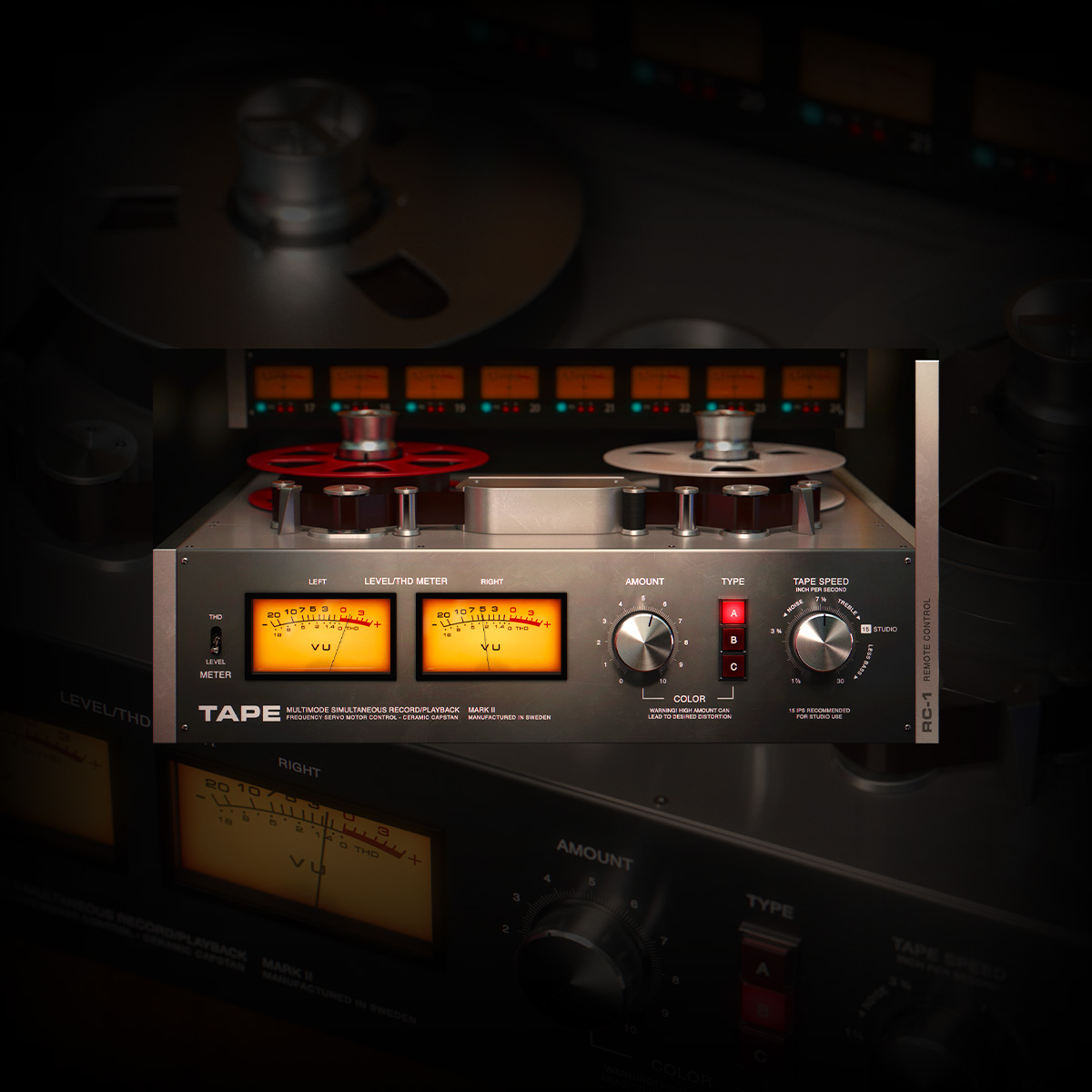
Softube Tape is a tape machine emulator aimed at bringing the "cohesion" and "weight" of analog tape to a mix finished inside the computer. The company explains that "even when used subtly, analog tape has a smoothing effect and adds cohesion and weight to a mix — it takes the recording from a collection of individual tracks into a song where everything is connected and works together."
A defining trait is its simple operation. You pick a tape machine Type (A/B/C) and turn the central Amount knob to taste — in most cases, the company says, that's all it takes to soak your tracks in tape character. Presets are also included, made by engineers such as Joe Chiccarelli and Howard Willing.
The other benefit is being light on CPU. The company notes it's designed not only for a single instance on the master bus but even to be added to every track in your mix, and that it's uniquely light on the processor among Softube plugins. That low load makes it easy to shape texture without breaking your workflow.
Choosing by vibe: the three machine types (A/B/C)
Softube Tape models three tape machines with different personalities. Based on the official description, here are rough guidelines for matching them to genre and desired texture.
- Type A (Swiss high-end machine)
Based on a classic Swiss reel-to-reel known for precision and linearity. A choice for tidying up the whole mix cleanly without changing the original tone much — good for lifting master-wide texture without adding a Lo-Fi flavor. - Type B (transformer-based machine)
Modeled on a transformer-based machine that, per the company, adds "extra weight and cream" to the low end. It pairs well with bottom-focused hip-hop beats like boom bap and trap. - Type C (British vintage machine)
Based on a British tape machine with a distinct vintage vibe. It's easy to get a retro character, so it suits sample-based beats and slightly aged Lo-Fi textures.
Where it fits in mastering: the Ozone → Tape → L4 idea
In the stage where you finalize a beat, Softube Tape makes the most sense placed between the "corrective" tools and the "loudness" stage. One template the editorial team lays out is the order below (this isn't the only correct order every time, just an easy-to-handle flow when you want to tame digital stiffness).
- [1st] iZotope Ozone
First use Ozone (review) to balance the overall tone, cut unwanted low end and EQ out problem areas to build the foundation. - [2nd] Softube Tape
Insert Tape on the tidied-up sound to add the cohesion and warmth of a single tape pass. Cleaning things up first makes it easier to add only the "glue" you want without muddiness or blur. - [3rd] Waves L4
Finally, use L4 (Ultramaximizer) to hold down the peaks and set the final loudness. The rule of thumb is to always place the limiter last in the chain.
Ozone has a loudness-boosting Maximizer too, but in this template that stays off: Ozone handles tone, and L4 handles the final loudness — a role split that's easy to reason about. For a loudness check on the result, use our site's dynamics analysis (loudness / LUFS).
After Ozone alone the sound is "clean, modern and loud," but a hard, programmed edge can remain. Inserting Tape rounds off the overall harshness, so even when L4 pushes the loudness afterward, it's less likely to break up, moving toward a thicker, more forgiving bottom end.
Dialing in with the Remote Control panel
The front Amount knob alone changes the texture plenty, but opening the side Remote Control panel lets you adjust the machine's behavior in more detail. The company says you can control the selected tape machine's speed stability, crosstalk amount and several other features.
- Crosstalk
Adjusts how much the left and right channels bleed into each other — a parameter tied to how the stereo image blends. - Speed Stability
Adjusts the stability of the tape's rotation; moving it lets you shape wow-and-flutter-style pitch wobble. It's a handy starting point when you want a Lo-Fi sway.
The company also explains that the slower the tape speed, the more pronounced the so-called "head bump" that adds low end. When you want to fatten the bottom, this is worth trying. For how the knobs actually behave and how the sound changes, the comparison in the official demo video above is easy to follow.
Price and system requirements (as of July 9, 2026)
| Item | Details |
|---|---|
| Product | Tape (Softube) |
| Regular price | $99 (Plugin Boutique, retrieved July 9, 2026) |
| Formats | 64-bit VST / VST3 / AU / AAX (AAX for Pro Tools 11.0.2 or higher) |
| OS | macOS 11 (Big Sur) / 12 / 13, Windows 10 / 11 (Apple Silicon native) |
| Authorization | Softube account + iLok account required (latest iLok License Manager recommended) |
| Note | In PreSonus Studio One, "Tape Multitrack" for the MixFX slot is available on the same license |
*Price and compatibility are the Plugin Boutique listing and official system requirements at the retrieval date. Check the product page and official site for the latest. Softube can put products on sale depending on the season, but discount rates and timing are not guaranteed.
Pros and cons
- Pros: intuitive texture shaping with just Type/Amount / light on CPU, so it holds up even on every track / three machines let you pick texture by genre / the Remote panel lets you dial in head bump, crosstalk and more / Tape Multitrack included for Studio One users
- Cons: "corrective" work (EQ, compression, all-in-one mastering) is outside its scope, so you'll finish elsewhere / authorization needs a Softube and iLok account / as a single-purpose tool, it won't complete an entire mix on its own
Frequently asked questions
Q1. How much does Softube Tape cost?
A. The regular price on Plugin Boutique is $99 (as shown officially as of July 9, 2026). Softube is known as a maker that can go on sale depending on the season, but since the discount rate and timing can't be stated with certainty, please check the price on the product page before buying.
Q2. Is it heavy on CPU?
A. The company describes Tape as light on CPU, noting that it's designed not only for a single instance on the master bus but also to be inserted on every track.
Q3. How should I choose between Type A, B and C?
A. From the official description: Type A gives a clean, refined cohesion that preserves the original tone; Type B adds low-end weight, pairing well with bottom-focused hip-hop; and Type C has a retro character that suits sample-based and Lo-Fi work.
Q4. Do I need an iLok dongle to buy it?
A. The official system requirements state that a Softube account and an iLok account are required, and the latest iLok License Manager is recommended. Whether a physical iLok USB dongle is required, and the exact authorization details, should be confirmed on the official site before purchase.
Summary
Softube Tape is a tape emulation that adds analog character — cohesion, warmth and weight — to a beat just by running through it, with no complex setup. For beatmakers bothered by in-the-box lightness or digital stiffness, the ease of working with just a Type choice and the Amount knob, plus the low CPU load that lets you insert it everywhere, are practical strengths. On the master, the "correct → Tape for texture → L4 for loudness" split is easy to reason about, so the realistic move is to run it on your own tracks and check how the texture lands. The regular price is $99 (as of July 9, 2026), and since it can go on sale depending on the season, check the current price each time.