sonible smart:comp 3 Review: The AI Compressor Explained, Price & What Changed from smart:comp 2 (2026)
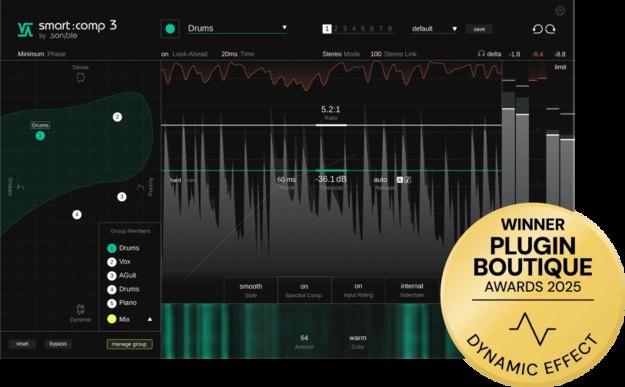
Ask anyone what made them almost quit mixing, and the compressor comes up every time. Threshold, ratio, attack, release — "I can move the numbers, but I can't hear what actually changed" is a frustration shared by beginners and intermediate producers alike. The plugin built to attack that exact problem head-on is the AI compressor smart:comp 3 by Austrian developer sonible, the company behind smart:EQ 4.
A quick note if you got here searching for "smart:comp 2": the current version is smart:comp 3, released in late 2025, and sonible's official smart:comp 2 page now redirects to the smart:comp 3 page (confirmed by our editorial team on July 21, 2026). In this article we break down how smart:comp 3 works, what it costs and what changed from smart:comp 2 — all based on officially confirmed information — and wrap it up in a "lost with compressor settings?" cheat sheet.
What is smart:comp 3? The "spectro-dynamic" AI compressor
smart:comp 3 is the intelligent compressor sonible calls "the spectro-dynamic compressor." The official site describes it as a compressor that combines AI analysis with a semantic approach — controls that follow the way people actually talk about sound. Its core is the Compression Matrix and spectral compression, covered below. Crucially, it also has every standard compressor control, so this is not a dumbed-down "AI-only" tool: it is a full-featured compressor with an AI suggestion layer on top.
Despite being recent, it already sits at 4.8 from 12 ratings on Plugin Boutique (confirmed July 21, 2026). sonible's official site also quotes producer Jonas Wagner saying the days of incorrect compressor settings are over — smart:comp 3 shows you, while you use it, what each parameter means sonically.
How it works: what the AI actually does for you
1. Compression Matrix — a map of the "settings that work"
The headline feature is the Compression Matrix. The AI analyzes the incoming signal and displays the range of musically viable compressor settings for that material as a map. Drag around the map and you glide smoothly between different compression characters. Unlike the older "AI returns one suggested setting" approach, you get to explore the whole picture of how far the material can be pushed. The companion Compression Scope visualizes the viable compression range of the analyzed signal. Because you judge by "which zone am I in" instead of raw numbers, you can catch over-compression even before your ears are fully trained.
2. What spectral compression and spectral ducking actually mean
sonible's signature technology is spectral compression. A conventional compressor squashes the whole signal as one block; the spectral approach distributes high-resolution gain reduction across the frequency spectrum in real time, compressing only the frequencies that need it, only as much as they need. There are no crossovers to set up like a multiband compressor, and the classic failure — "I compressed it and now it sounds dull" — is far less likely. The same idea applied to the sidechain is spectral ducking: only the overlapping frequencies get out of the way, which is exactly what you want for kick-versus-808 situations (see our 808 mixing guide for the bigger picture).
3. Styles — Clean, Smooth, Aggressive, plus Custom
The equivalent of "which classic compressor character" is the Style section. Three calibrated engines — Clean, Smooth and Aggressive — are one click away, and a fully tweakable Custom style opens up attack/release shapes and saturation behavior for deeper shaping. You do not need vintage-hardware knowledge to pick a character by feel — that is the "semantic approach" in practice.
4. Group Mode, zero latency and more
The workflow features are strong too. Group Mode links up to 7 instances so you can batch-edit threshold, ratio, attack, release and mix from a single window. A zero-latency mode (minimum-phase processing) covers recording and live use, while linear-phase mode remains available for mixing and post-production. You also get Input Riding, which stabilizes level variations before compression, and a mid/side mode.
You can see the interface in motion in the official introduction video (sonible's official channel).
▶ Watch on YouTube (official sonible channel)
What changed from smart:comp 2?
smart:comp 2 was an AI compressor of the "learn the track, return one suggested setting" generation. smart:comp 3 pushes the idea further: instead of a single answer, it shows you the whole map of options. The new elements sonible lists officially (confirmed July 21, 2026):
- Compression Matrix / Compression Scope: the AI suggestion evolves from "one answer" into "an explorable map"
- Group Mode: batch control of up to 7 tracks from one window for consistent compression across a session
- Zero-latency mode: minimum-phase processing makes it usable for recording and live work
- Refined Input Riding and updated Style engines: redesigned attack/release behavior and saturation characteristics
Spectral compression and spectral ducking, meanwhile, carry over from smart:comp 2 as the signature technologies. smart:comp 2 is no longer sold as a new license (the official page redirects to smart:comp 3), and an upgrade edition exists for owners. Since upgrade pricing varies, check your sonible account or Plugin Boutique for the current figure.
Price and system requirements (as of July 21, 2026)
| Item | Details |
|---|---|
| Regular price | $129.00 (confirmed on both sonible's official site and Plugin Boutique, July 21, 2026) |
| Upgrade | Upgrade edition available for smart:comp 2 owners (check your sonible account or Plugin Boutique for pricing) |
| Free trial | Fully functional 30-day demo (register on the official site) |
| Education discount | 40% EDU discount for students and lecturers (listed on the official site) |
| Supported OS | Windows 10 (64-bit) or later / macOS 11 or later (native Apple Silicon support) |
| Formats | Mac: VST / VST3 / AU / AAX Windows: VST / VST3 / AAX (44.1-192 kHz) |
| Authorization | Machine-based or iLok |
*Confirmed by our editorial team on the official sonible site and the Plugin Boutique product page on July 21, 2026. Prices may vary with sales and exchange rates.
Why it helps most if you can't yet hear compression
smart:comp 3 is a time-saver for professionals, but our take is that the less you can hear what a compressor is doing, the bigger the payoff. Three reasons:
- You can see over-compression: the classic mistake is cranking gain reduction because you cannot hear the damage. The Compression Matrix and Scope show the zone that is reasonable for the material, so you catch yourself going too far
- It teaches the settings-to-sound relationship: moving around the map while listening is attack/release ear training in itself. Getting an "answer key" to check against is the shared strength of the best AI mixing plugins
- No multiband knowledge required: spectral compression distributes per-band gain reduction automatically, skipping the crossover-setup wall that stops many intermediate mixers
If you are still unsure where a compressor even belongs in your chain, nail down your processing order first with our mix template guide — the right slot for smart:comp 3 becomes obvious.
The "lost with compressor settings?" cheat sheet
Organized by symptom: what to suspect first (the manual playbook), and how smart:comp 3 handles it. The first two columns work even if you stay fully manual.
| Symptom / scene | What to suspect first (manual playbook) | With smart:comp 3 |
|---|---|---|
| 808 / bass level jumps around | Low ratio + longer release to even it out; if the raw level swings are big, fix gain before compressing | Stabilize the input with Input Riding, then find a Smooth-leaning zone in the Matrix |
| Rap vocal buried in the beat | Aim for 3-6 dB of gain reduction, attack slightly slow to keep consonants | Analyze, explore the squash amount in the Matrix, then add spectral ducking on the beat to clear a lane |
| Kick lost its punch | Attack too fast is the usual culprit — slow it down to let the transient through | Style: Clean with a slower attack; use the Scope to back out of the over-compression zone |
| Drum bus needs glue | The classic bus move: around 2:1 ratio, 1-3 dB of gain reduction | Link the tracks with Group Mode and glue the bus gently on Smooth |
| Kick x 808 sidechain | Normal ducking sinks the whole signal and can kill the groove | Spectral ducking dips only the overlapping frequencies — see the 808 mixing guide |
| The 2-mix sounds flat / fatiguing | Suspect over-compression: check GR, blend with the Mix knob for a parallel feel | Keep the master in a shallow zone; after export, verify with our free dynamics checker and the LUFS guide |
| Latency is a problem while recording / live | Disable lookahead / linear-phase processing | Switch to the zero-latency (minimum-phase) mode |
*Feature descriptions are based on sonible's official documentation (confirmed July 21, 2026). If you quote or share this table, please link back to this page.
Pairing with smart:EQ 4: EQ first, then compression
sonible's AI series has a clean division of labor: smart:EQ 4 handles frequency balance (masking, muddiness) and smart:comp 3 handles dynamics (levels jumping, vocals sinking). If you can only buy one, let your dominant problem decide:
- Muddy, masked, can't cut through → start with smart:EQ 4 (our review)
- Levels all over the place, nothing sits → start with smart:comp 3
When using both on a channel, the standard order is smart:EQ 4 to clean up the spectrum, then smart:comp 3 to control the level — this keeps junk frequencies from falsely triggering the compressor. Both tools show you their reasoning, so the learning effects compound. For how they compare to other AI mixing tools, see our AI mixing plugins roundup.
Who should buy it — and who shouldn't yet
Recommended for
- Anyone setting compressors "by vibes" because they can't hear the effect yet: the Matrix turns the invisible into something you can see, so you save time and train your ears at once
- Producers juggling compression across 808s, vocals and buses: Group Mode plus spectral ducking justify the price on their own
- smart:EQ 4 users who want the dynamics side to match: the workflow consistency removes a lot of decision fatigue
Not yet necessary for
- Producers who rarely reach for a compressor at all: build experience with our free plugins roundup first — upgrading later loses you nothing
- Anyone who only wants the final 2-mix automated: if mastering is the goal, read our free AI mastering comparison before deciding
FAQ
Q1. Can I try smart:comp 3 for free?
A. Yes. Registering on the official sonible site gets you a fully functional 30-day demo. We recommend dropping it on your 808, kick and vocal tracks first, to check whether the Compression Matrix's suggestions match what your ears want before buying.
Q2. Can I still buy smart:comp 2?
A. The current version is smart:comp 3. sonible's official smart:comp 2 product page now redirects to the smart:comp 3 page (confirmed July 21, 2026), so new purchases are of smart:comp 3. An upgrade edition is available for smart:comp 2 owners — check your sonible account or Plugin Boutique for the discounted price.
Q3. Should I buy smart:EQ 4 or smart:comp 3 first?
A. Decide by the kind of problem you have. If your main struggle is frequency balance — muddiness and masking — start with smart:EQ 4. If it is dynamics — levels jumping around or vocals getting buried — start with smart:comp 3. When using both on a channel, the standard order is EQ first to clean up the spectrum, then the compressor to control levels.
Q4. What are smart:comp 3's system requirements and formats?
A. According to sonible's official specifications, it supports Windows 10 (64-bit) or later and macOS 11 or later, with native Apple Silicon support. Formats are VST/VST3/AU/AAX on Mac and VST/VST3/AAX on Windows (44.1-192 kHz). Authorization is machine-based or via iLok.
Verdict
smart:comp 3 goes straight at the root cause of "compressor confusion": not being able to connect settings to sound. The Compression Matrix hands you a map; spectral compression lets the AI distribute the per-band work while you focus on the decisions that are actually musical — how much, and with what character. It is the same design philosophy that makes smart:EQ 4 work, applied to dynamics. It will not replace learning manual compression, but trial and error with visible feedback is simply a faster way to improve. Grab the fully functional 30-day demo and hear what it does to the 808 and vocal in your current beat.