iZotope Nectar 4 Review: AI Preps Your Vocal Mix — How It Differs from Auto-Tune (2026)
You cut a verse, tuned it with Auto-Tune — and it still floats on top of the beat instead of sitting in it. Muddy, thin, nothing like a commercial record. The last wall in home-studio vocals isn't pitch correction, it's the mix: EQ, compression, de-essing, reverb and delay in the right order and amounts — the stage that eats the most time when you're learning.
iZotope's Nectar is a plugin suite built specifically for vocal mixing that takes over that entire stage. The AI-powered Vocal Assistant analyzes your voice, preps a full chain, and leaves you free to focus on the final tweaks. In this article, the Beat Lab editorial team checked the official iZotope website and Plugin Boutique as of July 21, 2026, and breaks down the current Nectar 4: what's inside, how its role differs from Auto-Tune and Melodyne, what changes for home-recorded rap vocals, which edition to pick, and when to buy.
▶ Official introduction video (iZotope official channel)
What is iZotope Nectar 4? An AI channel strip for vocals
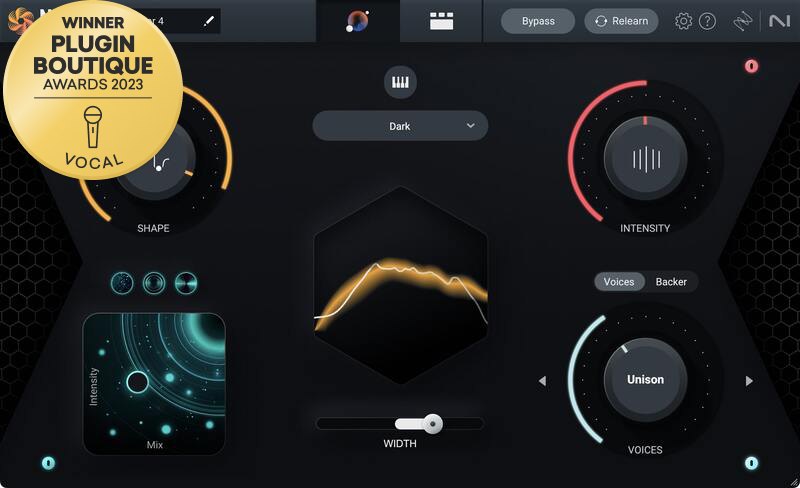
Nectar bundles every module a vocal chain needs — two 24-band EQs with dynamic and pitch-following modes, two compressors, a de-esser, gate, saturation, reverb, delay, Dimension (chorus-type modulation) and pitch correction — into a single plugin. In the current Nectar 4, the AI Vocal Assistant analyzes your vocal and builds a starting chain, which you then steer with broad Intent controls like Shape, Intensity, FX and Width. You can also reference the vocal sound of a commercial track as a target (via Audiolens integration) — as of July 21, 2026, confirmed on the official iZotope site.
Nectar 4 also introduced Voices, which generates instant vocal harmonies, Backer, which layers AI background singers in different voice styles (officially trained on English-language material only), and Auto-Level (ALM), which rides vocal levels automatically. Standard and Advanced additionally bundle Melodyne 5 essential, the classic pitch-and-timing editor. iZotope is now part of the Native Instruments family of brands, and within its lineup Nectar is the vocal specialist alongside Neutron (mixing), Ozone (mastering) and RX (repair).
The Vocal Processing Role Map: Repair, Correction, Mixing and Generation Are Different Jobs
"I already own Auto-Tune — do I need Nectar too?" Split the workflow into stages and the answer is instant. Repair (minus to zero), correction (fixing pitch), mixing (sitting the vocal in the beat) and generation (creating voices) are all separate jobs — and Nectar's job is the third one. Here's the cheat sheet, organized by what you're trying to do.
| What you want to do | Stage | Typical tool | Is it Nectar's job? |
|---|---|---|---|
| Fix noise, clipping, room reverb | Repair (recording care) | iZotope RX | No (use RX etc. before mixing) |
| Real-time pitch correction / hard-tune effect | Correction (incl. the effect) | Auto-Tune | Partly (Pitch module covers basic correction) |
| Edit pitch and timing note by note | Correction (offline editing) | Melodyne | Partly (Melodyne 5 essential bundled with Standard and up) |
| Sit the vocal in the beat with EQ, compression, space | Mixing | Nectar (this review) | Yes — this is its core job |
| Add harmonies and background vocals | Mixing (production flavor) | Nectar Voices / Backer | Yes (Standard and up) |
| Generate or transform a singing voice with AI | Production (creating material) | ACE Studio etc. | No |
| Finish the loudness and tone of the whole track | Mastering | Ozone | No |
*Compiled by the editorial team from official vendor information as of July 21, 2026. For a deeper tool-by-tool comparison, see our Auto-Tune vs Melodyne vs ACE Studio comparison.
In other words, Nectar doesn't compete with Auto-Tune Pro 11 or Melodyne — it's the next stage after them. And if your raw take still has noise or room sound, repair it first with iZotope RX 12 before Nectar touches it. The more you respect the order, the better every tool works.
What Changes for Home-Recorded Rap Vocals: 3 Things We Rate
1 | You graduate from "random preset" much faster
Vocal Assistant builds its starting chain from an analysis of your voice, so the starting point fits better than downloaded presets made for someone else's vocal. Let the AI prep a rough mix, then open only the modules that bother you — that loop cuts per-song mixing time dramatically. It pairs well with a proper mix template workflow.
2 | Anti-"buried vocal" tools are built into the system
The enemy of rap vocals is frequency masking from the beat. Nectar's Follow EQ tracks the pitch of the vocal and treats only the problem frequencies dynamically, and its unmasking features (Standard and up) talk to iZotope plugins on other tracks (Neutron/Relay) so the beat ducks out of the vocal's way — an escape hatch from the "turn it up, too loud, turn it down, now it's buried" loop.
3 | Try harmonies and background vocals without recording them
Voices generates harmonies from presets with zero music-theory knowledge, and can be driven by MIDI for exact notes. Backer layers AI background singers in other voice styles (per iZotope it's trained on English-language material only, so if you rap in another language, audition it during the trial). Sketching a thicker hook with zero re-recording is a serious time-saver — the 10-day free trial covers it.
Editions and Pricing (as of July 21, 2026)
| Nectar 4 Elements | Nectar 4 Standard | Nectar 4 Advanced | |
|---|---|---|---|
| Regular price (USD) | $55 | $199 | $299 |
| Vocal Assistant (AI, custom referencing) | Yes | Yes | Yes |
| Manual editing of EQ, compressor etc. modules | No (AI-driven only) | Yes | Yes |
| Voices (harmonies) / Backer (AI singers) modules | No | Yes | Yes |
| Melodyne 5 essential included | No | Yes | Yes |
| Auto-Level (ALM) | No | No | Yes |
| 13 component plugins / Breath Control | No | No | Yes |
| Best for | Trying the AI prep on a budget | The sweet spot for home-studio vocals | Building custom chains from individual plugins |
*Regular prices shown on the official iZotope store, retrieved July 21, 2026 (USD; Standard also confirmed at $199 on Plugin Boutique). Prices vary with sales and currency. Nectar 4 Advanced is also included in Music Production Suite 9 ($799), and upgrade/crossgrade pricing from older versions and other iZotope products is available.
Which Edition Should You Buy?
Elements ($55) is enough if you…
- Want the vocal mix handled almost entirely by the AI, adjusting only the broad Intent controls
- Want to feel what Nectar does on a budget first, then decide (upgrade paths are available)
Standard ($199) is the sweet spot if you…
- Use the AI prep as a base but want to fine-tune EQ and compression by hand
- Want Voices/Backer for harmonies and background vocals, plus the bundled Melodyne 5 essential
- When in doubt, pick this. Our editorial rule of thumb: finishing one or more vocal tracks a month justifies Standard
Advanced ($299) is for you if you…
- Want Auto-Level (ALM) to ride vocal levels before compression automatically
- Want the modules as 13 individual component plugins for your DAW template, plus Breath Control for breath cleanup
Frequent Sales Mean You Can Pick Your Moment
iZotope is well known as a brand that gets discounted often — in Plugin Boutique promotions, Black Friday and more. The prices above are the regular prices we confirmed on July 21, 2026; discount depth and timing vary, so we won't promise specifics. If you're not in a hurry, targeting Standard during a sale, or starting with Elements and upgrading when a promotion lands, are both realistic plays. We track current promotions on our sale page.
FAQ
Q1. What is the latest version of iZotope Nectar?
A. As of July 21, 2026, the current version is Nectar 4, in three editions: Elements ($55), Standard ($199) and Advanced ($299) (confirmed on the official iZotope store and Plugin Boutique).
Q2. Does Nectar replace Auto-Tune or Melodyne?
A. Different jobs. Auto-Tune covers real-time correction and the hard-tune effect, Melodyne covers note-level editing, and Nectar owns the mixing that comes after. Nectar's pitch module and the bundled Melodyne 5 essential (Standard and up) handle light correction, but for hard-tune as a sound or deep surgical edits, pairing Nectar with a dedicated tool like Auto-Tune Pro 11 is the practical setup.
Q3. Can I try it for free?
A. The official site offers a 10-day free trial (as of July 21, 2026). It's the best way to check how Backer and Voices respond to your voice and language before buying.
Q4. Which DAWs and systems are supported?
A. AU, AAX and VST3 (64-bit only), officially confirmed on macOS Sonoma through Tahoe (Apple silicon supported) and Windows 10/11, with Logic Pro 11, Ableton Live 12, Pro Tools, Cubase 14, Studio One 7, FL Studio and other major hosts. To check the loudness of your finished track, our free dynamics checker is also available.
Verdict
Nectar 4 has the AI prep the hardest last mile of home-studio vocals — sitting the voice in the beat. It's not a replacement for Auto-Tune or Melodyne, but the next stage after them. When in doubt, Standard ($199) — with Voices, Backer and Melodyne 5 essential included — is the pick. iZotope discounts often, so if you can wait, choose your moment, and start with the 10-day trial to hear how it fits your voice.