Akai MPK Mini MK3 Review (2026): Still the Best First MIDI Keyboard?
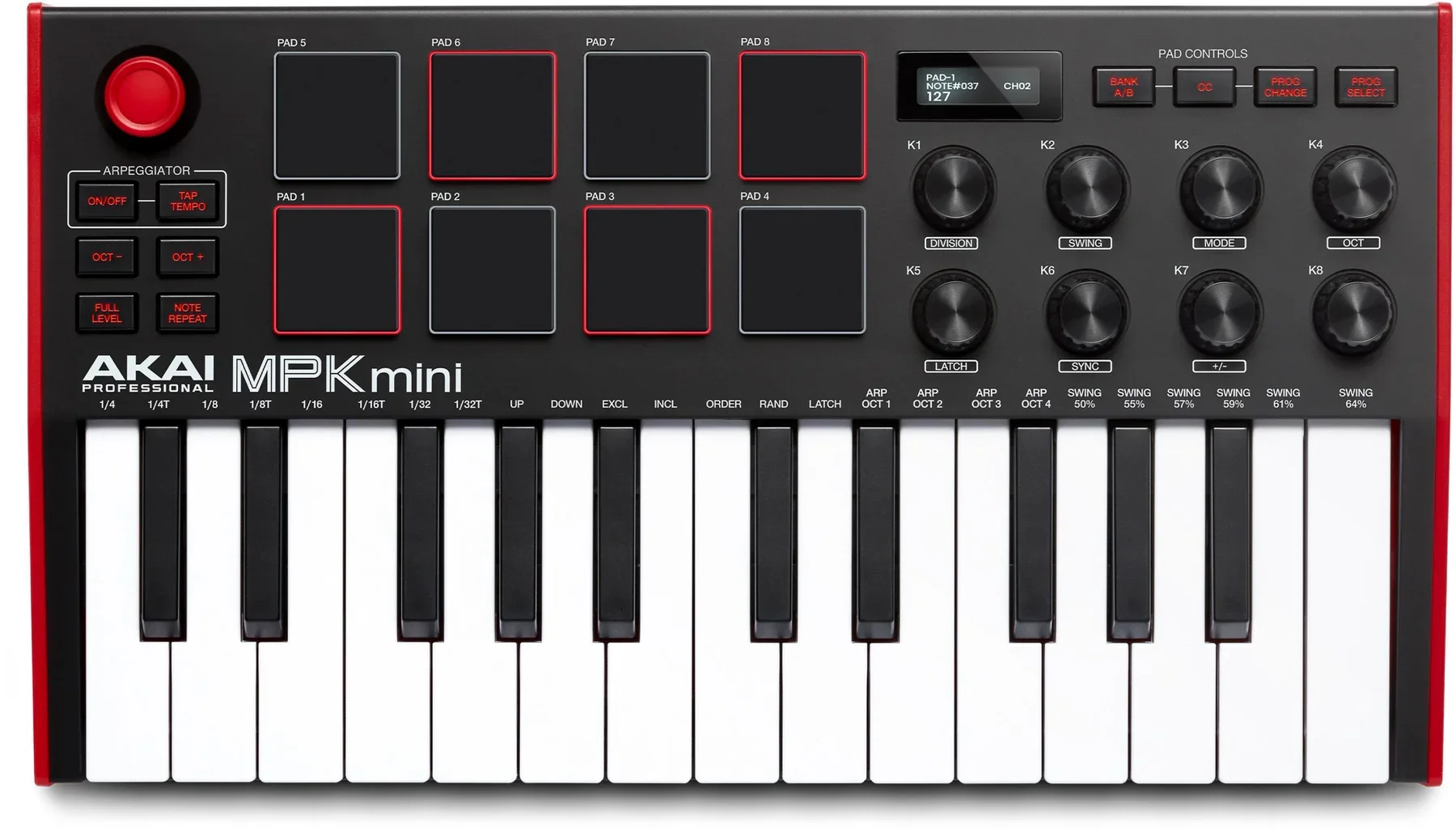
Image: Akai Professional (official product page)
"Every 'best MIDI keyboard for beginners' list ends with the same answer: the MPK Mini. But is it actually the right call?"
Since its launch in August 2020, the Akai Professional MPK Mini MK3 has stayed at the top of the entry-level MIDI controller charts — the keyboard everyone seems to start on. Short version of this review: if you build beats from the drums up and want a full production setup for around $99, the MPK Mini MK3 is still a safe, smart buy in 2026. If playable keys or a deep synth-preset library matter more to you, a full-size board or the Arturia MiniLab 3 may fit better.
Below we look at it strictly from a beatmaker's perspective: the pads and keys in practice, our go-to pad/knob mapping cheat sheet, what the bundled software actually covers, and a head-to-head with the MiniLab 3. For the bigger picture including 49-key boards, see our 49-key MIDI keyboard comparison — this article is the deep dive on the MPK Mini itself.
What the MPK Mini MK3 is: the default first controller
The MPK Mini MK3 packs 25 mini keys, 8 MPC-style pads, and 8 assignable knobs into a USB bus-powered controller roughly the footprint of a laptop (318 × 181 × 44 mm, 750 g). It slips into a backpack without complaint.
"MPC" is Akai's legendary sampler line, at the heart of hip-hop production since 1988. Putting MPC-lineage drum pads on a sub-$100 mini keyboard is the trick that made the MPK Mini series the default first controller for bedroom producers worldwide.
The MK3 generation brought a redesigned Gen-2 dynamic keybed, an OLED display, and endless rotary encoders, so you can see parameter values as you turn the knobs.
Spec sheet at a glance (checked July 2026)
| Keys | 25 velocity-sensitive synth-action mini keys (Gen-2 dynamic keybed) |
|---|---|
| Pads | 8 backlit MPC-style pads (2 banks = 16 assignments), with Note Repeat and Full Level |
| Knobs | 8 assignable endless rotary encoders |
| Other controls | 4-way pitch/mod thumbstick, built-in arpeggiator, OLED display, octave shift |
| Connectivity | USB (bus-powered, class-compliant), sustain pedal input |
| Size / weight | 318 × 181 × 44 mm / 750 g (0.75 kg) |
| Bundled software | MPC Beats (free DAW), 3 AIR instruments (Hybrid 3, Mini Grand, Velvet), sample packs, Melodics lessons |
| Colors | Black, plus RED / WHITE special editions in circulation |
| Street price (reference) | Around $99 (US street) |
Specs per Akai Professional's official site and support pages; US street price per major retailer listings, checked July 20, 2026. Prices fluctuate — always confirm on the store page.
How it performs for beatmaking
🥁 The 8 MPC pads: a real gateway into finger drumming
The pads are the star. They respond to velocity, so kicks and snares take on dynamics from how hard you hit. Eight pads may sound limited, but two banks give you 16 assignments — enough for a core drum kit plus a bank of sample chops.
The killer feature is Note Repeat: hold a pad and it retriggers at your chosen rate (16ths, 32nds and so on), which means trap-style hi-hat rolls and build-ups with one finger. Having this MPC-style workflow on the hardware itself is the clearest advantage over rival mini keyboards in this price class.
🎹 Gen-2 keybed: solid for sketching
The mini keys won't replace a piano, but the Gen-2 keybed tracks velocity smoothly and handles chord stabs and melody sketching well, with octave buttons covering the range. If performance feel is your priority, step up to a full-size 49-key board — our 49-key comparison covers the main candidates.
🎛️ 8 knobs, OLED, arpeggiator: hands-on control that actually helps
All eight encoders are assignable — filter cutoff, send levels, whatever you map. Because they're endless, you avoid the value-jump problem of fixed-position knobs, and the OLED shows the parameter and value as you tweak. The built-in arpeggiator (modes, resolution, swing, latch) turns held chords into instant synth patterns. The pitch/mod thumbstick is a love-it-or-tolerate-it space saver; most producers adjust within a day.
The go-to pad/knob mapping cheat sheet
The first thing every new owner asks: "What should I put on the pads and knobs?" Here is the editorial team's recommended default for beatmaking. Pads follow the GM drum map and knobs use standard MIDI CC numbers, so the layout works out of the box with most DAWs and soft synths. Save it to the hardware with the free MPK Mini Program Editor.
Pad layout (Bank A: core drum kit)
| Pad | Sound | Note (GM) | Why |
|---|---|---|---|
| Pad 1 | Kick | C1 (36) | Left thumb's home position — the foundation |
| Pad 2 | Snare | D1 (38) | Beats 2 and 4, index finger |
| Pad 3 | Closed hi-hat | F#1 (42) | Pair with Note Repeat for rolls |
| Pad 4 | Open hi-hat | A#1 (46) | End-of-bar accents |
| Pad 5 | Clap | D#1 (39) | Layer over the snare for thickness |
| Pad 6 | Percussion (rim etc.) | C#1 (37) | Ghost notes to fill the gaps |
| Pad 7 | 808 / bass | Any (match your instrument) | Roll it with the same thumb as the kick |
| Pad 8 | FX / vocal tag | Any | One-shot risers and tags |
Put your sample chops (slices 1–8) on Bank B. Fixing the roles — Bank A = drums, Bank B = melodic chops — keeps bank switching brainless. New to chopping? See our guide to sample chopping.
Knob layout (standard MIDI CC)
| Knob | Assignment (CC) | Use case |
|---|---|---|
| K1 | Filter cutoff (CC74) | Build-ups and lo-fi muffling — the most-used knob |
| K2 | Resonance (CC71) | Combine with cutoff for acid-style movement |
| K3 | Attack (CC73) | Soften the onset of pad sounds |
| K4 | Release (CC72) | Natural note tails |
| K5 | Reverb send (CC91) | Depth, played in real time |
| K6 | Delay send (CC93) | Throw the end of a phrase |
| K7 | Pan (CC10) | Rough left-right placement of top loops |
| K8 | Volume (CC7) | Quick level balancing per sound |
These eight are the "boring but bulletproof" set that most soft synths respond to by default. Once you settle in, swap K7/K8 for your favorite instrument's macro controls. Feel free to share or cite this table with a link to beats.coastlinkglobal.com/blog-mpkmini-en.
Can you make beats with only the bundled software? (Yes)
The MPK Mini MK3 has no internal sounds — your computer does the sound-making. That's why the software bundle matters, and it's generous (per Akai's official support pages, checked July 2026):
- MPC Beats — Akai's free DAW with the MPC workflow. Up to 8 MIDI + 2 audio tracks per sequence, and it also runs as a plugin inside your main DAW.
- 3 AIR instruments — Hybrid 3 (multi-synth), Mini Grand (acoustic piano), and Velvet (electric pianos): the synth/keys/e-piano trio that covers most melodic duties in a beat.
- Sample packs & Melodics — drum content plus interactive finger-drumming lessons.
In short, the box gets you a DAW, instruments, drum sounds, and practice material with zero additional spend. Want to expand for free? Our roundup of free plugins for beatmaking is the natural next step.
▼ Official support channel walkthrough: setting up the MPK Mini MK3 with MPC Beats
MPK Mini MK3 vs. Arturia MiniLab 3
The rival you'll inevitably compare is Arturia's MiniLab 3. Both are 25-mini-key / 8-pad / 8-knob controllers, but their personalities differ sharply.
| Item | Akai MPK Mini MK3 | Arturia MiniLab 3 |
|---|---|---|
| Character | MPC-flavored, built for drum programming | Built around Arturia's synth-sound ecosystem |
| Pads | 8 MPC-style pads + Note Repeat, optimized for hitting | 8 RGB pads, doubling as DAW control |
| Faders | None (8 knobs) | 8 knobs plus 4 faders |
| Bend/mod | 4-way thumbstick | Two touch strips |
| Software focus | MPC Beats + 3 AIR instruments (beat-production oriented) | Analog Lab Intro (hundreds of synth/keys presets) and more |
| Best for | Producers who start from the drums | Producers who start from sounds and chords |
Specs for both units per the manufacturers' official sites, checked July 2026. The MiniLab 3 typically streets slightly higher.
The decision rule is simple: do you start a track from the drums or from chords? Hip-hop and trap producers who begin with kick-snare patterns will be happier on the MPK Mini; preset explorers who write from harmony first will prefer the MiniLab 3. Curious about Arturia's sound library? See our Analog Lab review.
Honest downsides
- No sound on its own — it's a controller; a computer and software are required. (Want built-in sounds and a speaker? Look at the sibling MPK Mini Play MK3.)
- Mini-key limits — two-handed playing and nuanced piano technique need a bigger board.
- The thumbstick — fine pitch-bend control takes some adjustment if you're used to wheels.
- No faders — for hands-on mixer moves, the MiniLab 3 or a larger controller serves better.
Who should buy it — and who shouldn't
✅ Buy it if you…
- Make hip-hop / trap / lo-fi beats and build tracks from the drums up
- Want a complete production starter kit (DAW + instruments) for around $99
- Have a small desk, or produce on the move with a laptop
- Want the MPC pad + Note Repeat workflow without buying an MPC
❌ Skip it if you…
- Are a trained keys player who values playability first (→ see the 49-key comparison)
- Want faders and a big preset library (→ MiniLab 3)
- Want a standalone, computer-free setup (→ consider an MPC or hardware sampler)
FAQ
Q1. Can I make full beats with just the MPK Mini MK3?
A. The unit itself is a MIDI controller with no built-in sounds, but the bundle includes MPC Beats (a free DAW) plus three AIR virtual instruments (Hybrid 3, Mini Grand, Velvet), sample content, and Melodics lessons — so you can start producing with zero extra spend (checked July 2026).
Q2. Are the mini keys good enough?
A. For sketching chords and melodies, yes. The Gen-2 dynamic keybed responds well to velocity. If playing two-handed parts is central to your workflow, consider a full-size 49-key controller instead.
Q3. MPK Mini MK3 or Arturia MiniLab 3?
A. If you build tracks from the drums up (finger drumming), the MPK Mini's MPC pads and Note Repeat win. If you prefer browsing synth sounds and want faders, the MiniLab 3 with Analog Lab Intro is the better fit. See the comparison table in the article.
Q4. Does it need a power supply or drivers?
A. No. It is USB bus-powered and class-compliant, so basic MIDI input works on Mac and PC without installing drivers — just connect the included USB cable.
Verdict: the default choice earned its spot
Years after launch, the MPK Mini MK3 is still the sensible answer to "what's my first MIDI keyboard?" MPC-lineage pads with Note Repeat, eight genuinely useful encoders, and a bundle that includes your DAW and instruments — around $99 for the whole entrance to beatmaking remains hard to argue with in 2026.
Once your beats are rolling, check their tempo and key with our free browser tool BPM & Key detector, and when you outgrow the mini keys, the 49-key MIDI keyboard comparison is the logical next stop.