49-Key MIDI Keyboards Compared: A-49, KeyLab, Launchkey
49 keys is the size people land on when 25 feels cramped but 61 won't fit on the desk. You can comfortably play chords and melodies, and it still leaves room for everything else. It's far and away the most common choice for a first board.
But two 49-key boards can be completely different instruments. Are you buying for the keybed, for the pads, or for the bundled software? Skip that question and shop on price alone, and you tend to end up thinking "this isn't what I expected."
Here we compare the three current models you can buy new as of July 2026.
- Roland A-49 — a simple staple focused on keybed feel
- Arturia KeyLab Essential 49 mk3 — an all-in-one with a generous software bundle
- Novation Launchkey 49 MK4 — 16 pads, strong for pad performance too
- (Alternative) M-Audio Oxygen 49 MKV — an option for MPC Beats workflows
Specs come from each maker's published information, prices from the lowest listed on kakaku.com (as of July 7, 2026).
How to choose a 49-key MIDI keyboard: four things to look at
1. Keybed quality and feel
The heart of a MIDI keyboard is, above all, its keybed. Even among 49-key boards, the feel ranges from a light synth-style action to a slightly piano-leaning semi-weighted one. The more you want to "play" chords and melodies in, the more you should prioritize keybed quality.
2. Whether it has pads
If you want to finger-drum by tapping pads, pads matter. Conversely, for people who program drums on a dedicated pad controller like Maschine or an MPC, or who draw them in the piano roll, pads on the keyboard aren't essential.
3. Bundled software
Recent MIDI keyboards commonly include licenses for a DAW (such as Ableton Live Lite) and software instruments. If you don't yet own a DAW or instruments, a generous bundle acts as an effective discount.
4. Connectivity and power
All three boards here run on USB bus power and need no external supply. It's worth checking whether there's a MIDI OUT jack for driving external synths, and whether the board connects to mobile devices such as an iPad.
Comparison table (as of July 7, 2026)
| Item | Roland A-49 | Arturia KeyLab Essential 49 mk3 | Novation Launchkey 49 MK4 |
|---|---|---|---|
| Keybed | 49-key synth keybed (velocity). Keybed structure derived from Roland synths | 49 keys, velocity. A "hybrid" feel between synth and piano | 49-key semi-weighted waterfall keybed |
| Pads | None | 8 (RGB, velocity/pressure, 2 banks) | 16 (velocity + poly-aftertouch FSR pads) |
| Knobs/faders | 2 knobs, 2 buttons (assignable), D-BEAM | 9 encoders, 9 faders, 2.5-inch display | 8 endless encoders, 9 faders, OLED display |
| Composition aids | — | Chord mode / scale mode / arpeggiator | 3 chord modes / scale mode / arpeggiator / dedicated Ableton Live step sequencer |
| Key bundled software | Ableton Live Lite license | Analog Lab V (2,000+ sounds), Ableton Live Lite, NI Komplete Select, UVI Model D, 2 months of Loopcloud and more | Ableton Live 12 Lite, 3 Klevgrand plugins, GForce 4-in-1 bundle, Orchestral Tools instrument, Melodics lessons |
| Connectivity | USB (bus power), MIDI OUT, hold/expression pedal jacks | USB-C (bus power), MIDI OUT (5-pin DIN), 1 pedal jack | USB-C (bus power, iPhone/iPad), MIDI OUT |
| Size/weight | 836×182×84mm / 2.5kg | 790×240×70mm / 2.76kg | 730×264×93mm / 4.08kg |
| Street price (lowest, guide) | ~¥18,900 | ~¥24,750 | ~¥35,800 |
*Specs confirmed on each maker's official site (roland.com / arturia.com / novationmusic.com and Novation Japan's official news) on July 7, 2026. Prices are the lowest listed on kakaku.com (same date) and will vary.
Laid out side by side, the strengths divide cleanly.
- Keybed: the A-49 (no pads or faders, but the key action punches above its price)
- Value: the KeyLab Essential (the bundle is worth more than the board)
- Pads: the Launchkey (16 pads with poly aftertouch is rare at this level)
Below, we look at each in more detail.
Roland A-49: a simple board that invests in keybed feel
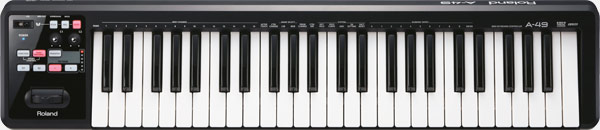
The A-49 is a MIDI keyboard controller carrying a 49-key synth keybed derived from Roland's own synthesizers. Roland describes a keybed structure that reduces twisting and lateral play in the keystroke and lowers key noise, and it does follow keyboard-style playing — fast repeats, glissandos — without complaint. It's been around for years, yet it's still in the current lineup as of July 2026.
The controls are pared right back: a pitch/modulation lever, two assignable buttons, two knobs, and the D-BEAM that shapes the sound as you wave a hand over it. No pads, no faders. It does have two pedal jacks (hold/expression) and a MIDI OUT, so it works as a master keyboard for external instruments. Black and white finishes.
Our take: you give up pads and faders, but in exchange the key action is a step above anything else at this price. If you're someone who thinks "I program drums on Maschine or in the piano roll, so I just want a keyboard that feels good," this is still a genuinely appealing option. If you want one board that does everything, though, it will feel thin — that trade-off is the whole point of the A-49.
Arturia KeyLab Essential 49 mk3: the value king, bundle included
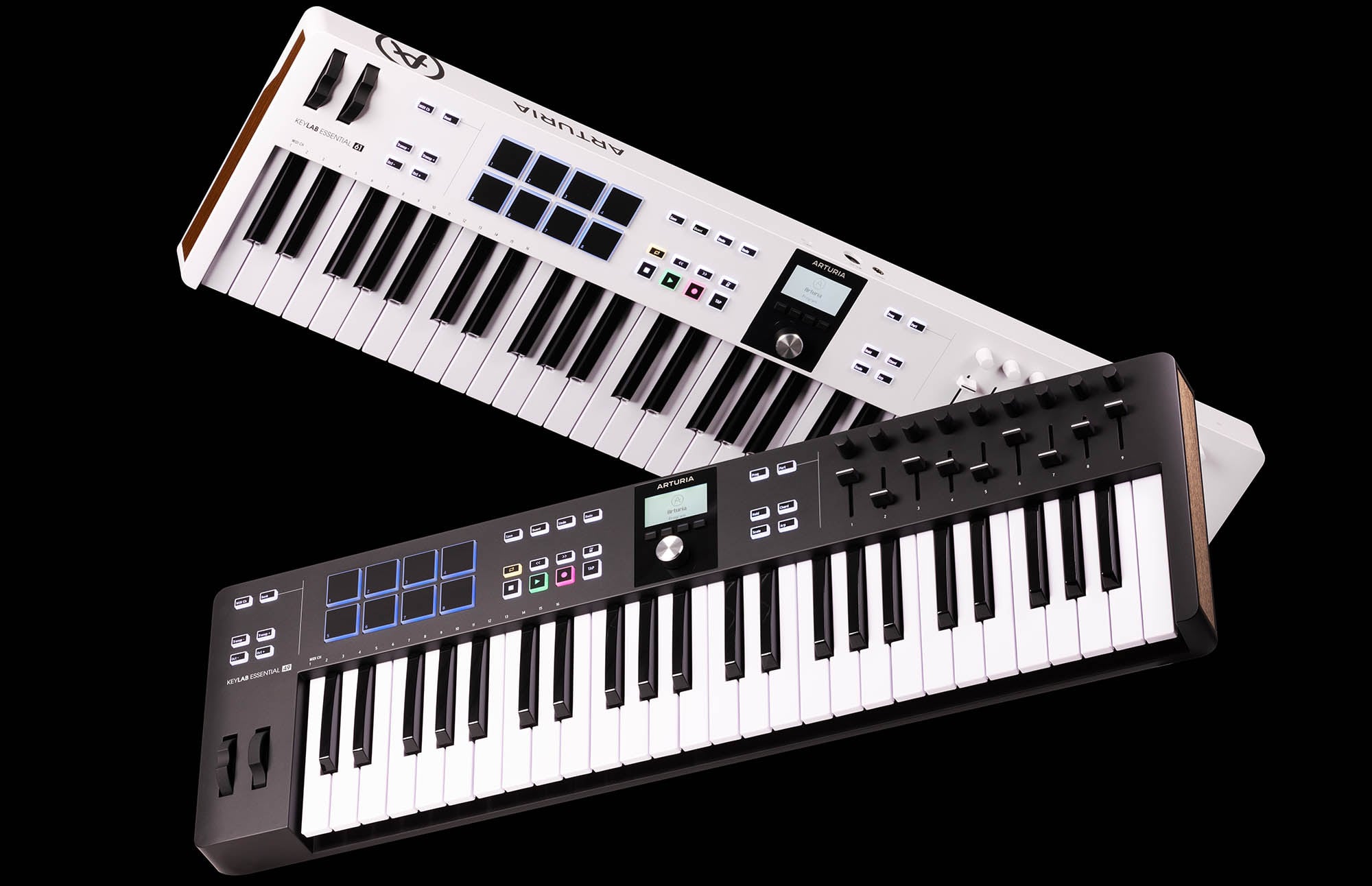
The KeyLab Essential 49 mk3 is a current model released by France's Arturia in 2023. Alongside a velocity-sensitive 49-key bed, it has 8 RGB pads, 9 encoders, 9 faders and a 2.5-inch display. With composition aids such as chord mode, scale mode and an arpeggiator, it's built to cover "everything from programming to mixer control on one board."
The bundle is the real draw here. According to Arturia, it's led by Analog Lab V — over 2,000 presets spanning vintage synths to modern sounds — plus Ableton Live Lite, Native Instruments' Komplete Select, UVI Model D (a grand piano instrument), a two-month Loopcloud subscription and lessons in the practice app Melodics (per published information as of July 7, 2026). The board streets around ¥25,000, and what comes with it is essentially a full starter set: instruments, DAW, sample service.
It also ships custom scripts for major DAWs including Ableton Live, Logic Pro, FL Studio, Cubase and Bitwig, so transport and mixer controls map the moment you plug in. NKS compatibility keeps things smooth with Komplete-series instruments.
Our take: if you don't own any instruments yet, this single purchase lands you tens of thousands of yen worth of software at once. Analog Lab V in particular stays useful long after you've moved on to other hardware, so the less gear you have, the more you get out of it. Flip that around, though: if you already own Komplete or a decent piano library, much of the bundle's value evaporates and the price stops making the same kind of sense.
Novation Launchkey 49 MK4: a 49-key that "can finger-drum too" with 16 pads
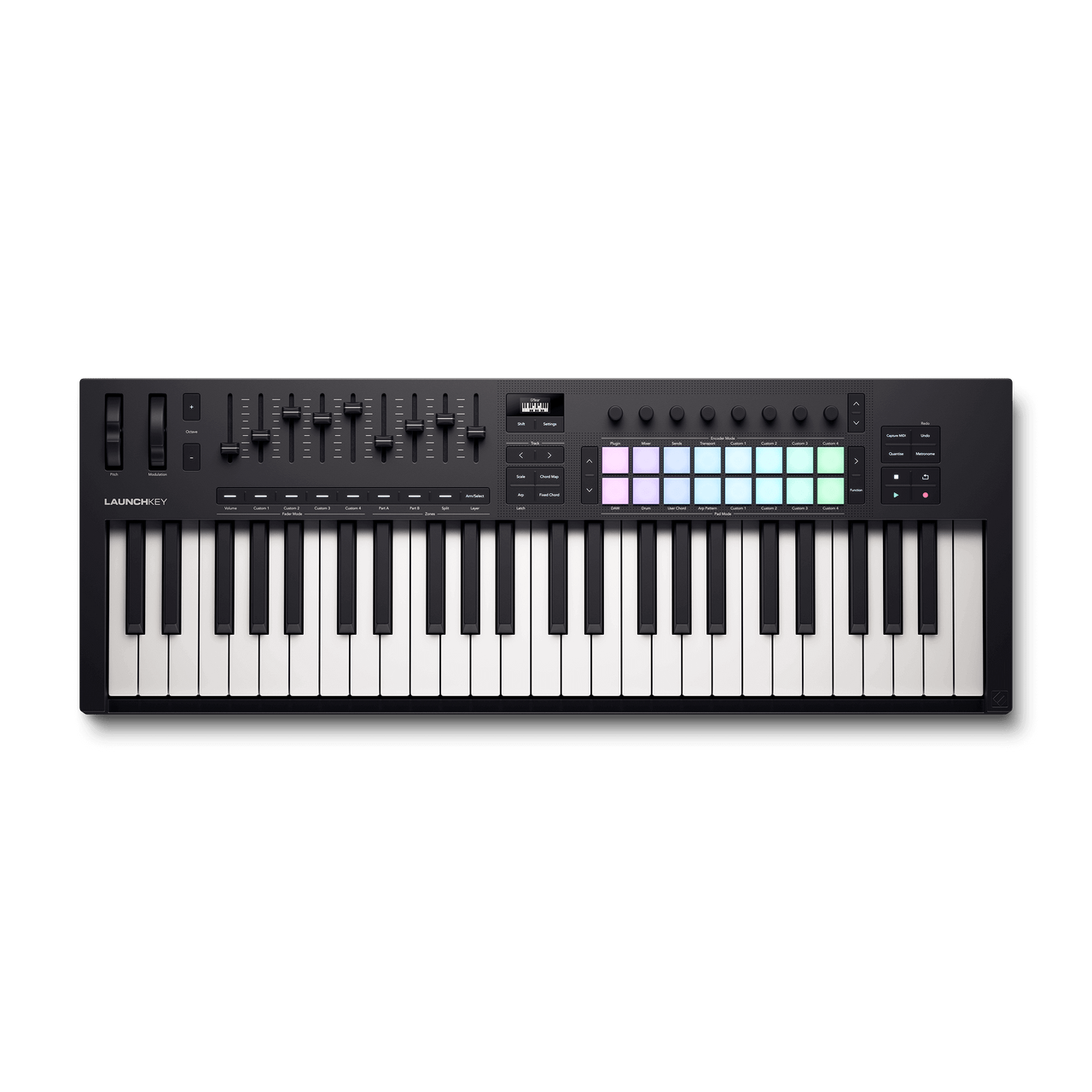
The Launchkey 49 MK4 is the current generation Novation announced in August 2024. The 49-key model uses the same semi-weighted waterfall keybed as the higher-end models in the series, which Novation Japan describes as "the best-quality keybed in Novation's history."
The star of this board is its 16 FSR pads with polyphonic aftertouch. They're velocity-sensitive, of course, but also let you express with downward pressure, so among the three boards here it's a clear step ahead for finger-drumming comfort. It suits people who want to finish everything on one board—drums on pads, melody on keys. If you want to make those pad-programmed kicks and snares even fatter, see our guide on how to mix 808s and bass.
Integration with Ableton Live runs deep — clip launching plus a dedicated Ableton Live step sequencer. It also drives Cubase, Logic Pro, FL Studio, Reaper and Reason with no setup. The bundle includes Ableton Live 12 Lite plus Klevgrand (LUXE, R0verb, Slammer), a four-synth GForce bundle, an Orchestral Tools instrument and Melodics lessons (per Novation Japan's official news, confirmed July 7, 2026). USB-C also connects it to an iPhone or iPad.
Our take: if Ableton is in your plans, this board's workflow is a clear step ahead of the other two. Hitting pads to launch clips and then building them out on the step sequencer, all without touching the mouse, is something neither of the others can do. Take Ableton out of the picture, though, and some of that advantage goes unused. At around ¥36,000 it's also the most expensive of the three, so the real question is simply whether 16 pads and Ableton integration are worth that to you.
Alternative: the M-Audio Oxygen 49 MKV
If you prefer an AKAI-style workflow, M-Audio's current Oxygen 49 MKV is also a candidate. According to the official site, it has 8 velocity pads across 2 banks (with Note Repeat), 8 assignable knobs and 9 faders, plus Smart Chord/Scale features and an arpeggiator. The bundle adds AKAI's free DAW "MPC Beats" and an expansion pack, plus AIR Music Technology's Hybrid and Mini Grand, on top of Ableton Live Lite. It's a good match for people who want to build around MPC Beats. Domestic street prices swing widely with supply, so check the sales page before buying.
Conclusion: which one is for you
- You want keybed feel above all / pads are covered by other gear → Roland A-49. By dropping extras, it's a board you choose for keybed quality relative to its price.
- You're assembling a DAW and instruments from scratch and want your first board to cover it all → KeyLab Essential 49 mk3. Its bundle, including Analog Lab V, lets you start producing with no extra spend.
- Finger drums and melody on one board, with Ableton as your main DAW → Launchkey 49 MK4. Its 16 poly-aftertouch pads and Live integration are the deciding factors.
If you later decide you want to get serious about hardware pad performance, the classic path is to consider a dedicated pad controller like the Maschine MK3 separately from your MIDI keyboard. If you haven't lined up instruments or a DAW yet, build your setup first with our roundup of free plugins, then move on to hardware without waste.
To check the BPM and key of a beat you've programmed, our free browser tool BPM & Key Detector (free) comes in handy.
Frequently asked questions
Q1. Why is a 49-key MIDI keyboard recommended?
A 49-key is the smallest class that lets you play chords and melody with both hands at once. A 25-key forces frequent octave switching, while 61 keys and up need more desk space. For beatmaking and getting started with a DAW, 49 keys is the go-to for its balance of playability and desktop footprint.
Q2. Is it okay to choose the pad-less Roland A-49?
Absolutely. Plenty of people program drums with the mouse or in the piano roll — pads aren't a requirement. If finger-drumming appeals to you, the KeyLab Essential 49 mk3 (8 pads) or Launchkey 49 MK4 (16 pads) are your candidates. But if you already own a pad controller like Maschine, putting your money into the keybed instead makes more sense.
Q3. Can I start making music with the bundled software alone?
You can. The KeyLab Essential 49 mk3 includes Analog Lab V (2,000+ sounds), Ableton Live Lite and NI Komplete Select. The Launchkey 49 MK4 bundles Ableton Live 12 Lite plus plugins from Klevgrand, GForce and Orchestral Tools (per each maker's published information as of July 2026). The A-49 includes an Ableton Live Lite license too, so any of the three gets you going from a standing start with no DAW.
Q4. Do they work with iPad or iPhone?
Novation states the Launchkey MK4 works with iPhone and iPad over USB-C. The Roland A-49 requires a separate Apple Camera Connection Kit and a powered USB hub (per the official site). If mobile use matters to you, check each maker's official requirements in advance.
Summary
All three are standards you'd struggle to go badly wrong with — but how satisfied you end up depends heavily on what you're optimizing for.
Keybed feel: the A-49. Bundled software: the KeyLab Essential. Finger drums too: the Launchkey. Keep those three lines in mind and picking the right one gets a lot easier.
To narrow it further, settle two questions first: how you program drums, and whether you already own a DAW and instruments. Once those are clear, which of the three fits your workflow tends to answer itself. Prices do move, so confirm the current street price before you buy.