Novation Launchpad X Review (2026): The Glowing 64-Pad Grid for Finger Drumming — and Does It Work Beyond Ableton?
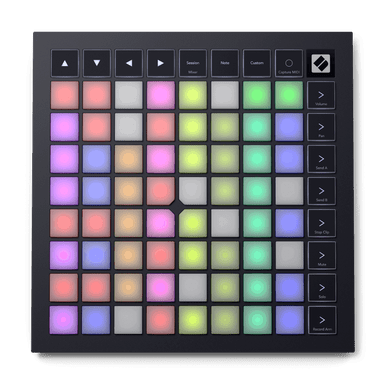
Image: Novation (official site)
"I want to play on that glowing pad grid I keep seeing in videos. But should I buy this, or a keyboard-equipped controller like the MPK Mini?"
Those performance videos of fingers dancing across a colorful 8×8 grid — most of them feature Novation's Launchpad series. The current standard-bearer is the Launchpad X, released in 2019. It remains the go-to clip-launching controller for Ableton Live, and in recent years it has also settled in as a favorite practice surface for finger drumming.
The short version: if you produce or perform in Ableton Live, or you want to get serious about finger drumming on a full 64-pad grid, the Launchpad X is still a top pick in 2026. If you also want to play chords on keys, or your workflow lives entirely in a DAW other than Ableton, another option may suit you better.
In this article we assess the glowing 64-pad grid from a beatmaker's perspective, look at how usable it is outside Ableton, and lay out a pad-controller buyer's chart covering the Launchpad Mini/Pro, Akai's APC mini and MPK Mini — all based on primary sources. For the full picture on keyboard-style controllers, see our 49-key MIDI keyboard comparison; this article is the deep dive on pad-focused gear.
What the Launchpad X is: the definitive glowing grid, current edition
The Launchpad X is a USB-C, bus-powered MIDI grid controller with 64 velocity- and pressure-sensitive RGB pads (8×8) and 16 function buttons. At 241 × 241 × 17.5 mm and roughly 0.82 kg, the slim square slips into a bag alongside a laptop.
The Launchpad line debuted in 2009 with a simple idea: mirror Ableton Live's Session View (the grid where you fire off clips) on physical pads. Through YouTube light shows and finger-drumming videos it became the glowing-pad icon. The Launchpad X is the third-generation successor to the original Launchpad, and with larger pads plus velocity and polyphonic aftertouch it evolved from a "clip-firing switchboard" into an expressive instrument.
Years after launch it keeps receiving updates — firmware 2.0 expanded Custom Modes to 8 slots — and it remains the core of Novation's current lineup (checked July 2026).
Spec sheet at a glance (checked July 2026)
| Pads | 64 velocity-sensitive RGB pads (8×8) with polyphonic aftertouch |
|---|---|
| Buttons / LEDs | 16 function buttons, 81 RGB LEDs |
| Main modes | Session mode (Ableton Live clip/scene launching and mixer control), Note/Scale modes (in-key playing and drum mode), Custom Modes (up to 8 slots since firmware 2.0) |
| Other features | One-press Capture MIDI for Ableton Live; Stop/Solo/Mute/record arm; volume, pan and send mixer control |
| Connectivity | USB-C (bus-powered, no drivers required), Kensington MiniSaver slot |
| Size / weight | 241 × 241 × 17.5 mm / approx. 0.82 kg |
| Bundled software | Ableton Live Lite, Cubase LE, AAS Session Bundle (3 synths), XLN Audio Addictive Keys Studio Grand, Klevgrand R0Verb / DAW Cassette, 40 Melodics finger-drumming lessons |
| Ableton Live support | Official integration with Live 10 or later (Live Lite included). Works as a standard MIDI controller in other DAWs |
| Price (reference) | $229.99 direct from Novation (Japan street around ¥26,800) |
Specs and bundle per Novation's official site; pricing per the Novation online store (US) and kakaku.com Japan street listings, checked July 21, 2026. Prices fluctuate.
How it performs for beatmaking: putting 64 pads to work
🚀 Session mode: clip launching you won't want to give up
This is the day job. Ableton Live's Session View clip layout appears in color across the 64 pads, and hitting a pad fires the clip or scene. Load up drum, bass and melody loops, then swap combinations on the fly to find where the track wants to go — the classic Ableton workflow, entirely under your hands with no screen-staring.
Mixer duties are pre-mapped too: Stop/Solo/Mute and record arm per track, plus volume, pan and sends, all from the pad surface. And Capture MIDI — Live's feature that retrieves the phrase you just played even if you forgot to hit record — is one button away, which noticeably cuts down on "that take was great and I didn't record it" accidents.
🥁 Note/Scale modes: finger drumming and playing that never lands off-key
Switch to Note mode and the 64 pads become an instrument. The drum mode links to Ableton's Drum Rack, arranging kits in 4×4 blocks, and the velocity-sensitive pads carry the dynamics of every hit. With 64 pads to spend, you can play a drum kit and still have real estate left for bass notes or sample one-shots at the same time — freedom that 8- and 16-pad units simply don't have.
Scale mode restricts the grid to the notes of your chosen scale, so nothing you press lands out of key. Even without keyboard skills, basslines and chord parts are entirely playable on pads. Polyphonic aftertouch (per-pad pressure sensing) lets you add movement to held notes — rare at this price.
If you want to learn finger drumming from the ground up, the bundled Melodics lessons (40 for Launchpad) are an excellent on-ramp. For how to build the drums themselves, see our guide to drum layering.
🎛️ Custom Modes: 8 slots since firmware 2.0
With Novation Components, the free browser-based editor, you can design your own note and CC layouts, and even turn rows or columns into virtual faders. Firmware 2.0 doubled the slots to eight and added a keystroke widget for sending DAW shortcuts. A layout like "left half drums, right half sample one-shots" can live on the hardware itself.
The pad-controller buyer's chart (save this)
Search for "glowing pad controller" and the options multiply fast — three Launchpads alone, plus strong rivals from other brands. Here is the editorial team's beatmaking-first breakdown of the five key models.
| Model | Pad grid | Expressiveness | Highlights | Price guide (checked July 2026) | Best for |
|---|---|---|---|---|---|
| Novation Launchpad X | 64 (8×8) RGB | Velocity + poly aftertouch | Note/Scale modes, Capture MIDI, 8 Custom Modes | $229.99 (Novation direct) | Ableton users who also want serious finger drumming |
| Novation Launchpad Mini MK3 | 64 (8×8) RGB | No velocity | Small, light entry model focused on clip launching | About half the Launchpad X | Trying clip launching on a budget |
| Novation Launchpad Pro MK3 | 64 (8×8) RGB | Velocity + poly aftertouch | Standalone 32-step sequencer, MIDI ports for hardware | About double the Launchpad X | Live performers mixing in hardware synths |
| Akai APC mini MK2 | 64 (8×8) RGB | — | Compact clip launcher with 9 physical faders | Around £77 street (Thomann UK) | Ableton users who want hands-on mixer faders |
| Akai MPK Mini MK3 | 8 pads + 25 keys | Velocity pads | Keys, knobs and pads in one mini unit (→ review) | Around $99 street | Beginners who also want to play chords on keys |
Specs per each manufacturer's official site and authorized retailers. Price guide: Launchpad X per the Novation online store (US); MPK Mini MK3 per US street listings; APC mini MK2 per Thomann UK; Launchpad Mini/Pro relative guide per Japan street prices (kakaku.com). Checked July 21, 2026 — prices fluctuate.
Three questions decide it. 1) Only launching clips? The Mini MK3 is enough. 2) Want to actually play the pads? Velocity sensitivity — Launchpad X or above — is non-negotiable. 3) Want to play drums and melodies on keys? Go MPK Mini. The Launchpad X is the sweet spot on expressiveness × clip launching × price. Feel free to cite or share this chart with a link to beats.coastlinkglobal.com/blog-launchpadx-en.
Does it work outside Ableton? (Yes — but it shines in Live)
The Launchpad X gets typecast as an "Ableton-only device," but the reality is more flexible.
- Logic Pro — Novation officially supports Live Loops (Logic's clip-launching grid): you can trigger cells and record performances from the pads (checked July 2026).
- Other DAWs (FL Studio, Cubase, Bitwig, etc.) — it shows up as a class-compliant standard MIDI controller, so Note/Scale-mode playing and Custom Mode mappings work fine — the bundled Cubase LE is a hint of that intent. But the color-synced, Session-mode clip launching is fundamentally a Live (and Logic Live Loops) experience.
In short: as a playing surface it is DAW-agnostic; as a clip launcher it comes alive in Ableton Live and Logic Pro. Still choosing your DAW? Work backwards from how you like to make music with our DAW comparison guide.
Launchpad X vs. MPK Mini MK3: keys or pure pads?
Plenty of buyers agonize between this and the classic entry controller, the Akai MPK Mini MK3. The decision rule is clear-cut.
- Choose the Launchpad X if you use Ableton Live, want to pursue finger drumming on a full 64-pad grid, and love building tracks by combining and mutating loops.
- Choose the MPK Mini MK3 if you want to play chords and melodies on keys, haven't settled on a DAW yet, or want an all-in-one starter for roughly $99 — around half the price of the Launchpad X.
To put it bluntly: players pick the MPK Mini; hitters and launchers pick the Launchpad X. Want both? Starting on an MPK Mini and adding a Launchpad X once Ableton hooks you is the order least likely to backfire.
The software bundle covers the basics (checked July 2026)
The Launchpad X has no internal sounds, but the bundled software assembles a complete starter studio (per Novation's official site):
- Ableton Live Lite / Cubase LE — two DAWs in the box. With a Launchpad, starting in Live Lite is the natural move.
- AAS Session Bundle — three synths covering staple track sounds.
- XLN Audio Addictive Keys Studio Grand — a Steinway Model D piano instrument (available when you register your first Novation/Focusrite hardware).
- Klevgrand R0Verb / DAW Cassette — reverb plus cassette-flavored lo-fi effects.
- Melodics — 40 finger-drumming lessons designed for Launchpad.
Want more sounds without spending? Browse our roundup of free plugins for beatmaking.
▼ Launchpad X performance by Sandunes, from Novation's official channel
Honest downsides
- No sound on its own — no internal sounds or speaker; a computer and DAW are required.
- No physical knobs or faders — twisting synth parameters isn't its thing. Mixer moves work on the pad surface, but fader devotees should look at the APC mini MK2 or a dedicated controller.
- Less at home outside Ableton — it works as a standard MIDI controller anywhere, but Session mode's comfort assumes Live.
- No keys — Scale mode handles melodies, but it won't replace a keyboard. If you want to play, see our MIDI keyboard guide.
Who should buy it — and who shouldn't
✅ Buy it if you…
- Produce in Ableton Live and want clip launching under your fingers
- Want to start or level up finger drumming on a 64-pad grid (Melodics included)
- Are a trackmaker heading toward live sets or DJ performance
- Want a slim controller that travels with a laptop
❌ Skip it if you…
- Want to play chords and melodies on keys (→ the MPK Mini MK3 or a 49-key board)
- Want a computer-free standalone sequencer (→ consider the Launchpad Pro MK3 or a hardware sampler)
- Only want to try clip launching (→ the Launchpad Mini MK3 is plenty to start)
FAQ
Q1. Does the Launchpad X work with DAWs other than Ableton Live?
A. Yes. Novation officially supports Live Loops in Logic Pro, and in any other DAW it works as a class-compliant standard MIDI controller. With Custom Modes built in Novation Components (up to 8 slots since firmware 2.0) you can map notes and CCs to the pads freely (checked July 2026). That said, the tight Session View clip-launching experience is still at its best in Ableton Live.
Q2. Is the Launchpad X good for finger drumming?
A. Yes. The 64 pads are velocity-sensitive with polyphonic aftertouch, and the Drum Rack-linked drum mode captures the nuance of how hard you hit. The bundle also includes 40 free Melodics finger-drumming lessons designed for Launchpad (checked July 2026).
Q3. How does it differ from the Launchpad Mini MK3 and Launchpad Pro MK3?
A. The Mini MK3 has the same 64-pad grid but no velocity sensitivity — a budget clip-launching entry point. The Pro MK3 adds a standalone step sequencer and MIDI ports on top of velocity and aftertouch. The Launchpad X is the middle option for people who want expressive playing and clip launching in one unit. See the buyer's chart above.
Q4. Does the Launchpad X make sound on its own?
A. No. It is a MIDI controller with no internal sounds or speaker, so a computer and a DAW are required. It is USB-C bus-powered and class-compliant with no drivers needed, and the bundled Ableton Live Lite or Cubase LE gets you producing right away (checked July 2026).
Verdict: the Ableton user's second unit, the finger drummer's first
The Launchpad X pulls Ableton Live's workflow off the screen and under your hands, and at the same time it's a genuinely playable instrument — 64 pads with velocity and polyphonic aftertouch. Clip launcher, finger-drumming surface and custom controller in one box for $229.99 direct is a balance no rival pad controller quite matches in 2026.
Still undecided? Run yourself through the buyer's chart above: do you want to launch, hit, or play? And once your beats are rolling, check their tempo and key with our free browser tool, the BPM & Key detector.