Zoom H1essential Review (2026): A $99 32-Bit Float Recorder for Field Sampling
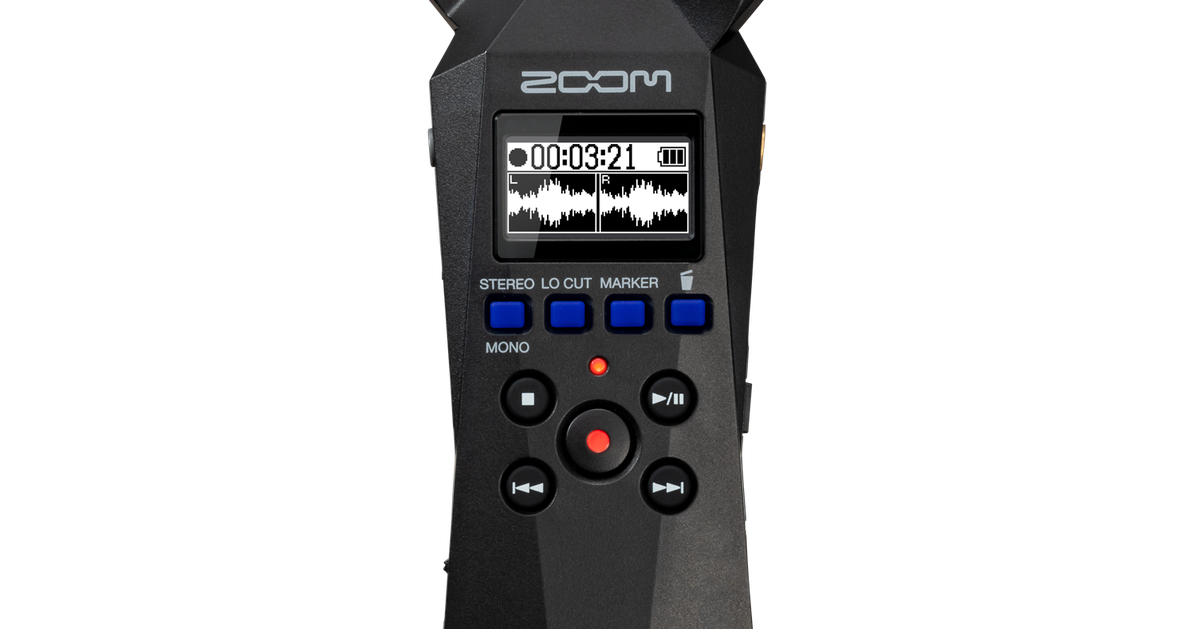
Image: ZOOM Corporation (official product page)
Rain on a window. Train brakes. The hum of a café. A coin hitting the floor. When everyone is digging through the same Splice and Loopcloud folders, a sound you recorded yourself is the one sample nobody else can have.
The problem is that most people try it once on a phone, get a clipped, noisy, flat mono file, and quietly give up before the sound ever reaches a sampler.
That is exactly the gap the Zoom H1essential fills. Thanks to 32-bit float recording there is no gain to set and nothing clips, no matter how loud it gets — a recorder that is structurally hard to fail with, at $99.99 in the US / €99 at Thomann (checked July 2026).
This review looks at the H1essential specifically as an entry ticket into field sampling for beatmakers: what the specs mean in practice, a step-by-step workflow for turning street noise into a beat, and the rights rules you need to know before you sell anything built on it.
What the Zoom H1essential is: the specs that matter
The H1essential is the current model in Zoom's long-running H1 line of pocket recorders. It is the first in the series with 32-bit float recording, built around a simple promise: press REC and you get a usable high-quality stereo file.
| Built-in mics | 90° XY stereo pair (unidirectional), max input 120 dB SPL |
|---|---|
| Recording format | WAV 44.1 / 48 / 96 kHz, 32-bit float (stereo or mono, BWF and iXML supported). Firmware v2.0 and later also record MP3 |
| Media | microSDHC (4–32 GB) / microSDXC (64 GB–1 TB), sold separately |
| I/O | MIC/LINE IN (3.5 mm, 2.5 V plug-in power) / PHONE/LINE OUT (3.5 mm) / built-in speaker |
| USB | USB Type-C. USB mic mode (2-in/2-out, 48 kHz/16-bit) and file transfer |
| Display | 128×64 OLED with real-time waveform during recording |
| Power | 2× AAA batteries (approx. 10 h alkaline / 18 h lithium), USB bus power or power bank |
| Size / weight | 53.9 × 136.6 × 29.0 mm, 92 g with batteries |
| Street price | $99.99 US / €99 EU |
Specs from the official ZOOM website; pricing from Sweetwater ($99.99) and Thomann (€99), checked July 2026. Street prices move with sales.
At 92 g it genuinely disappears into a bag, which is the point: the recorder you actually have with you is the one that catches the sound. For field sampling, that beats every spec on the sheet.
Why 32-bit float changes the game versus a phone
"Isn't the voice memo app good enough?" For listening back, sure. For material you intend to chop and process, it is a different category of file.
🎚️ No gain setting means failed takes basically stop happening
Traditional recorders and phones flatten the top of the waveform the moment the input exceeds the record level, and that damage is permanent. 32-bit float gives you an enormously wider usable dynamic range, so a loud club room and a barely-there room tone both survive, and you set the level afterwards in the DAW. For field recording — where the loudest moment is always the one you did not expect — that is the whole ballgame.
🎙️ The 90° XY stereo image becomes depth in your beat
The built-in pair is a coincident XY array, so phase behaviour is tidy and the image stays focused. Compared with the flat, near-mono capture of a phone, crowd noise and rain open up across the stereo field — which is why a low-level bed of your own ambience makes a beat feel like it exists in a room.
| Situation | Phone recording | H1essential |
|---|---|---|
| Loud sources | Clips, unrecoverable | 32-bit float, no clipping, level set later |
| Quiet sources | Noise rises when you push the gain | Plenty of headroom to lift |
| Stereo image | Tends to sound flat | 90° XY, three-dimensional |
| File | Mostly compressed formats | Uncompressed WAV up to 96 kHz / 32-bit float |
| Monitoring | Hard to see what you captured | Real-time waveform on the OLED |
The field-sampling-to-beat workflow, step by step
Here is the part that matters. This is the Beat Lab editorial workflow for taking a sound off the street and landing it in a beat — save it, print it, use it as a checklist.
| Step | What you do | H1essential features & tips |
|---|---|---|
| 1. Record | Roll long at 48 kHz / 32-bit float | Pre-record (2 s look-back) and auto-record stop you missing the moment. Use a windscreen outdoors |
| 2. Mark | Flag the moments worth keeping | Hit the mark button while recording so you are not hunting through a 20-minute file later |
| 3. Transfer | USB-C to computer or phone | The unit acts as a card reader. For hardware samplers, normalize and export 24/16-bit WAV on the device itself |
| 4. Clean | Trim, then high-pass | Rolling off the low rumble from wind and handling tightens the sample immediately |
| 5. Chop | Split into one-shots and loops | A door becomes a kick, a coin becomes a hat. See our sample chopping guide |
| 6. Process | Pitch, reverse, reverb | Down 2–3 semitones plus reverb turns ambience into an instrument fast |
| 7. Build | Arrange in the DAW or sampler | Load into something like the SP-404MKII and it is stage-ready |
🎧 What to record: a starter list of sounds that work
- Percussive: doors, turnstiles, a can from a vending machine, coins, footsteps, a lighter striking
- Texture: rain, rivers, wind in trees, café and market chatter, level crossings, cicadas
- One-shots: struck glass and metal, keys, a shutter opening
For lo-fi, tuck texture beds under the loop. For boom bap, layer metallic hits under the snare to build a transient nobody can identify. Since no sample pack on earth contains these, you get the best possible question from listeners: "what is that drum?"
The rights question: your own recordings are the safest sample there is
Sampling always drags the clearance question behind it. Field recording is unusually strong here.
Rain, crowd noise, a door you recorded yourself make you the owner of that recording. No label, no sample clearance, no publisher — and no sample-pack licence terms to read either. You can put it in a beat you sell without asking anyone.
Three things to leave out of the final beat even if they end up on the card:
- Music playing in a shop or on the street: that is somebody else's recording, and it needs the same clearance as any other sample
- Broadcasts and PA announcements: copyright and neighbouring rights may apply
- Conversation where an individual is identifiable: privacy and personality rights. If you want a voice, get permission from the person
Aim for ambience without music and without identifiable speech, and field sampling is the cleanest source of material you can get.
Official video: size and one-touch operation
Zoom's official channel shows the actual size in the hand and how little there is to operate.
Pros and cons
✅ Pros
- 32-bit float makes a failed take structurally unlikely — ideal for a first recorder
- $99.99 / €99 puts it among the cheapest 32-bit float recorders on the market
- 92 g and pocket-sized, so "always carry it" is realistic rather than aspirational
- Pre-record, auto-record and marks are exactly the features field sampling needs
- On-device normalize and 24/16-bit export means hardware samplers are easy to feed without a computer
- Doubles as a USB mic, and firmware v2.0 added gain control, AI noise reduction and MP3 recording free of charge
⚠️ Cons and caveats
- No XLR input — for serious external mics, step up to the H4essential or H6essential
- Wind noise is a real weakness outdoors; a windscreen (Zoom's WSH-1e or similar) is close to mandatory
- The microSD card is not included, and USB mic mode is fixed at 48 kHz/16-bit (32-bit float is on-device recording only)
Who it is for — and who should skip it
👍 Buy it if you are…
- A beatmaker who is bored of pack sounds and wants material nobody else has
- Starting field recording from zero and want the option with the fewest ways to fail
- Someone who has already been burned by clipped, noisy phone recordings
👋 Skip it if you…
- Need multitrack capture from several XLR mics (look at higher-end Zoom models or an audio interface)
- Mainly record vocals for songs (a condenser mic plus an interface is the better spend)
FAQ
Q1. Is it really that different from recording on my phone?
A. The decisive difference is 32-bit float recording. A phone clips the moment the sound exceeds its record level, and that take is unusable as source material. The H1essential needs no gain setting at all and captures everything from a loud train to a quiet room tone without clipping, so you can push the level up freely later in your DAW. The 90° XY stereo mics (120 dB SPL max input) also give you a three-dimensional image that matters a lot once you start processing the sound.
Q2. Can DAWs and samplers load 32-bit float WAV files directly?
A. Yes. Major DAWs including Ableton Live, FL Studio and Logic Pro read 32-bit float WAV natively. If your hardware sampler does not, the H1essential can normalize and export to 24-bit or 16-bit WAV on the device itself, so you can convert without a computer.
Q3. Can I sell beats that use sounds I recorded on the street?
A. Environmental sounds you recorded yourself — rain, crowd noise, a door — make you the owner of that recording, so no clearance is needed and you can use them in beats you sell. Avoid recordings that contain music playing in a store or on the street, broadcasts and PA announcements, or conversation in which an individual is identifiable, since those raise copyright, publicity and privacy issues.
Q4. How long does the battery last for a full day outdoors?
A. Roughly 10 hours on two AAA alkaline batteries and about 18 hours on lithium cells (official figures; actual runtime varies with use). It also runs on USB bus power or a USB power bank, so a full day of field recording is not a problem.
Verdict: a $99 camera for sound
The Zoom H1essential removes the concept of a failed recording. You press REC the way you press a shutter — which is why "a camera for sound" is the most useful way to think about it in a beatmaker's bag.
Anyone on earth can buy the same sample pack. Nobody else has the station noise you recorded this morning. For around a hundred dollars, that is an unusually cheap route to sounding like yourself.
Put it in your bag and start with the walk to work.