Baby Audio Crystalline Review: BPM-Synced Reverb, Features & Price (2026)
You add reverb to a vocal or a melody loop, the depth appears — and so does the mud. It's the most common dilemma in beatmaking, and it usually comes down to two things: the tail isn't lined up with the grid, and the reverb's low end and harsh frequencies aren't being cleaned up. Baby Audio's Crystalline is a reverb designed to solve both problems out of the box, with BPM sync and built-in clean-up tools.
In this article, the Beat Lab editorial team checked the official Baby Audio site (babyaud.io) and Plugin Boutique as of July 21, 2026, and breaks down what's inside Crystalline, a reverb cheat sheet for vocals, drums and melodies, how it differs from free reverbs, and the price ($99 regular). For the brand as a whole — including the TAIP tape saturator — see our Baby Audio review.
What is Crystalline? A "pristine" modern algorithmic reverb
Crystalline is a reverb plugin that Baby Audio positions as a "Pristine Algorithmic Reverb." It takes the algorithmic approach popularized by the digital studio reverbs of the '70s and '80s — synthesizing a space from a network of delays, feedback and filtering — and rebuilds it in a modern package based on an allpass loop algorithm, which the company says gives it its own distinctive sonic fingerprint. This is not a realistic hall emulation; it aims for a lush, deliberately synthetic kind of beauty.
It's also free from the laws of physics: you can dial in huge spaces with ultra-short tails, or tiny rooms with epic decay times. According to the official page, it ships with more than 300 presets, and its accolades include Plugin Boutique's "Reverb Plugin Of The Year" and a Future Music "Gear Of The Year" pick.
▶ Official tutorial video (Baby Audio official channel)
Key features from a beatmaker's perspective
1. BPM-synced pre-delay and decay: a tail that lands on the grid
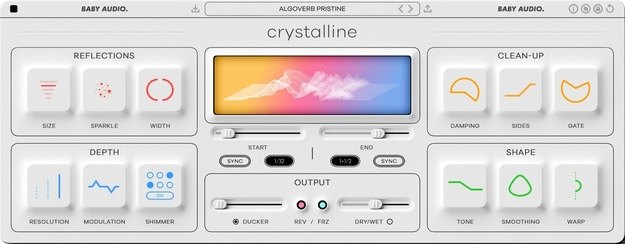
Crystalline's headline feature is that pre-delay (Start) and decay (End) can be synced to your DAW's tempo. Because the reverb's onset and tail line up with musical note values, the reflections stop stepping on the next beat and the mix stays cleaner, as the company explains. Prefer the classic way? A Sync/MS switch lets you set times in milliseconds instead. Not having to calculate pre-delay from BPM by hand is a perfect match for tempo-driven beatmaking.
2. Built-in ducker: go wet without drowning the dry signal
The Ducker in the output section automatically lowers the reverb while the dry signal is playing. The vocal stays up front, and the tail blooms in the gaps — a classic vocal mixing technique reduced to a single knob, with a slower, more natural "Gentle" mode available. It's especially effective on vocal chops and lead melodies where you want plenty of reverb without losing clarity.
3. Clean-up tools: Damping, Sides, Smoothing and Gate
Damping trims highs and lows from the tail, Sides removes stereo information from the reverb's low end while keeping it mono-intact (protecting your 808s), and Smoothing applies a custom EQ curve to the frequency areas that tend to turn resonant and sharp. Jobs you'd normally do with an EQ after the reverb are handled inside the plugin. There's also a Gate for instant 1980s gated-reverb snares.
4. Shimmer, Reverse and Freeze: the creative toolkit
Shimmer lets the tail's high frequencies decay slower than the rest for an "angelic halo," Reverse plays the reverb backwards, and Freeze takes a granular snapshot of the tail and holds it — all useful for ambient textures and transitions. Practical touches like an Eco Mode for lower CPU load and a Wet Lock that keeps your dry/wet balance while browsing presets round out the design.
Reverb cheat sheet: vocals, drums and melodies
Here's our editorial one-page guide to "which reverb, how long, on which part." It applies to any reverb you own, not just Crystalline (adjust to your tempo and genre).
| Part | Type & length (starting point) | Pre-delay | How to do it in Crystalline |
|---|---|---|---|
| Lead vocal | Plate/room, short to medium (0.8–1.6 s) | 1/16–1/8 (keep the words clear) | Sync Start/End to BPM + Ducker to prioritize the dry vocal. Sparkle for shine, Sides for low-end control |
| Vocal chops / backing vocals | Hall, medium to long (1.5–3 s), wide | Short (fine to bloom early) | Wider Width + a touch of Shimmer. Damping to tame harsh highs |
| Snare / clap | Room/plate, short (0.4–1.2 s) | 0–1/32 (right after the attack) | Warp toward the attack. For an '80s sound, use Gate for gated reverb |
| Kick / 808 | Dry by default (if any, a very short room, subtle) | — | If used, always combine Sides (mono low end) with Damping (cut reverb lows) |
| Melody / top loops | Hall/ambience, medium (1–2.5 s) | Around 1/8 (lock to the grid) | BPM-sync Start/End to the beat. Modulation for thickness, Smoothing against mud |
| Pads / ambience | Long hall (3 s and up) | Free (blur is welcome) | Freeze/Reverse for transitions. Eco Mode to save CPU |
*Times and note values are general mixing starting points compiled by the editorial team. If you share or quote this table, please link back to this page.
Two principles run through the whole table: "low-end reverb is where mud comes from — cut it or mono it" and "match the tail length to the grid." Sharing one reverb across tracks via a send also glues everything into the same space. Bake these routines into your session once and you'll never have to rethink them — see our guide to building a mix template.
How it differs from free and stock reverbs
Let's be honest: if all you need is "some reverb," your DAW's stock plugin or a free reverb will do. Crystalline's value is that the things you'd normally add around a reverb — EQ for cleaning up the tail, sidechain routing for ducking, and tempo math for pre-delay — are integrated into one window.
- Free is enough when: you're adding a subtle short room, or a slightly lo-fi, blurry tail is part of the aesthetic. Start with our free plugin recommendations first
- Crystalline earns its price when: your beats are vocal- or melody-driven and you want reverb that's deep but never muddy. The ducking + clean-up + BPM-sync combination is hard to get from a single free plugin
Baby Audio's Freebies page also offers completely free plugins (free account required), including Magic Dice, which generates random delay/reverb effects — a zero-cost way to hear the company's sonic character.
Price and how to get it (as of July 21, 2026)
| Option | Price | Notes |
|---|---|---|
| One-time purchase | $99 | Perpetual license. Verified at Baby Audio's official store and Plugin Boutique (regular price) |
| Free trial | Free | Available from the official Trials (Downloads) page; runs in trial mode until activation |
| Sub to Own (official subscription) | Monthly | Full access to all Baby Audio and Denise Audio products; pick one plugin to own forever every 6 months. Cancel anytime and keep what you've collected, per the official page |
*Verified by the editorial team on July 21, 2026 at the official Baby Audio store (babyaud.io) and the Plugin Boutique product page (USD). Prices change with sales and exchange rates.
Baby Audio is known for frequent sales, and the official store permanently advertises a "Buy 2 Get 1 Free" cart promotion. If you're not in a hurry, the low-risk route is to audition the trial on your own tracks and then buy on a sale.
Pairing with TAIP: texture plus space from one brand
Crystalline divides labor neatly with Baby Audio's tape saturator TAIP ($99 regular): TAIP adds density and analog glue to drums and 808s up front, while Crystalline adds depth and width to melodies and vocals behind them. "Drums and 808s dry and thick through TAIP; melodies and vocals deep and wide through Crystalline" is a simple, repeatable recipe for a three-dimensional beat. We cover TAIP and the rest of the lineup in our Baby Audio review.
The wetter your mix, the more the final loudness check matters — run your bounce through our free dynamics analyzer, and if the reverb's low end is fighting your 808, see how to mix 808s and bass.
Who it's for — and who can skip it
Crystalline is a good fit if you:
- Make vocal- or melody-driven beats and want deep reverb with clean separation
- Don't want to hand-build pre-delay math and sidechain ducking every session
- Want shimmer, reverse and freeze textures for ambient work in the same plugin
Probably not for you if you:
- Need realistic emulations of actual halls or springs (Crystalline is proudly modern and synthetic)
- Only ever use a subtle short room and are happy with free reverbs — there's no urgent reason to buy
FAQ
Q1. Can I try Crystalline for free?
A. Yes. You can download a trial from the official Trials (Downloads) page, and the plugin runs in trial mode until you activate a license. Baby Audio's Freebies page also offers completely free plugins such as Magic Dice, which generates random delay/reverb effects (official information as of July 21, 2026).
Q2. What are the system requirements and formats?
A. According to the official product page, Crystalline comes in VST, VST3, AU and AAX formats (64-bit), supports macOS 10.11 and up (native Apple Silicon compatibility) and Windows 10 and newer, and works in all major DAWs including Ableton Live, Pro Tools, Logic Pro, FL Studio, Cubase, Studio One, Bitwig, Reaper and Reason (as of July 21, 2026).
Q3. How is it different from free or stock reverbs?
A. Beyond the quality of the tail itself, the practical difference is that BPM-synced pre-delay/decay, ducking, and clean-up tools like Damping, Sides and Smoothing all live in one window. You can recreate these with a free reverb plus extra EQ and sidechain compression, but Crystalline removes that setup work and makes it easy to keep a wet mix from getting muddy.
Q4. Should I wait for a sale?
A. Baby Audio is known for frequent sales, and the official store also runs promotions such as "add 3 products to the cart and get the cheapest one free." If you're not in a hurry, waiting is a reasonable option. Discount rates and timing vary, so this article uses the regular price ($99) as the baseline. Check the official store or Plugin Boutique for current pricing.
Conclusion
Crystalline attacks the two problems that make reverb frustrating — mud and off-grid tails — at the system level, with ducking and BPM sync. On vocal- and melody-driven beats, that's exactly where the gap between it and a free reverb shows most clearly. With a $99 regular price, frequent sales and a free trial, the sensible move is to load the trial on your own track, use the cheat sheet above, and hear what a tail that lands on the grid does for your mix before deciding.