XLN Audio XO Review: The Beat Maker That Fixes Your Messy Drum Sample Folders (2026)
"Kick_final_v2.wav". "snare (3).wav". That sample pack you can't even remember downloading. Every beatmaker's drive eventually turns into a warehouse of thousands of scattered one-shots — and picking a single kick means bouncing between dozens of folders until your focus is gone before the beat even starts. XLN Audio's XO was built to solve exactly that problem.
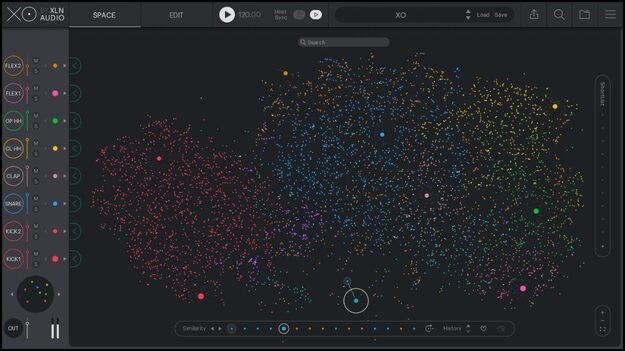
XO analyzes the drum samples on your computer and automatically arranges "similar-sounding" one-shots on a star-map-like display, so you choose sounds by listening, not by reading file names. In this article, the Beat Lab editorial team reviews the official information from XLN Audio and Plugin Boutique as of July 21, 2026: how it works, pricing, which expansion bundle makes sense, and how it fits alongside workflows like drum layering.
What is XO? A tool that turns "searching time" into "listening time"
XO is a drum sampler / beat maker from XLN Audio, the Swedish developer known for Addictive Drums 2 and RC-20 Retro Color. Its headline feature is the XO Space: it analyzes your one-shot samples and places them on a map by sonic similarity, regardless of where they are stored or what they are called. Kicks cluster near kicks, snares near snares — so if you like a sound, "look around it; something even better might be close by," as the official pitch puts it.
- Works across folders and drives: samples spread over internal and external drives are analyzed together (officially stated)
- Duplicates and vague file names are fine: XO sorts by sound, not by name, so you never need a naming convention again
- Ready out of the box: ships with 8,700+ one-shot samples and 240+ fully editable beat presets (confirmed July 2026)
Feature review: organize, create, export
1. XO Space: sample hunting gets dramatically faster
The old routine — open folder, audition one file, go back, open the next folder — becomes sweeping across a map with continuous audition. Powerful filters and search narrow the scope, and XLN describes the goal as focusing you "on listening instead of folder-diving." Against the 8-slot drum kit, any sound you don't like is swapped for a similar one with a single click — one sample at a time, or the entire kit at once.
2. The sequencer: Groove Templates and the Accentuator
XO is not just an organizer — it takes you all the way to a sketched beat. The step sequencer includes curated Groove Templates, a Nudge control to push timing ahead or behind the grid, and the Accentuator for dynamic velocity shaping. Hi-hat sway and ghost-note dynamics — the "human" stuff — can be dialed in with a few knobs.
3. Playground Mode: manufacture happy accidents
In Playground Mode you can swap or randomize patterns and sounds track by track, or all at once. XLN calls it "an endless source of happy accidents," and that is accurate: when you're stuck, one click turns your beat into something completely different.
4. Export: stems as WAV, MIDI, or single samples via drag & drop
Finished beats go straight into your DAW via drag & drop — raw or processed single samples, the whole kit, or the whole beat as audio or MIDI. XO 1.1 added per-track stem export as WAV, expanded format support beyond wav/aiff to flac, mp3, ogg and wma, plus a Live File System Monitor that flags changes in your sample folders and Playlists for organizing presets by genre or project.
Cheat sheet: the drum sample management workflow
"Organizing samples" always comes down to the same steps. Here is how each one changes between manual folder management and XO. The XO philosophy: stop spending time on organizing itself, and reinvest it in choosing and building.
| Step | Manual (folder management) | With XO |
|---|---|---|
| 1. Collect | Sort into folders per pack, rename files | Drop into a parent folder and add it to XO (external drives OK) |
| 2. Organize | Manually sort by type, tag files | Automatic analysis maps everything by similarity. No naming or tagging |
| 3. Explore | Bounce between folders, audition one by one | Sweep the map with continuous audition, narrow with search & filters |
| 4. Choose & swap | Note down candidates, re-compare later | Assign to the 8 slots instantly; one-click swap to similar sounds |
| 5. Build | Re-program everything in the DAW | Built-in sequencer with Groove Templates and the Accentuator |
| 6. Export | Copy files by hand | Drag & drop stems (WAV), MIDI or single samples into your DAW |
*Based on the XLN Audio official site and the Plugin Boutique product page (confirmed July 21, 2026).
Sketch with a free tool, then finish in XO
XO also pairs beautifully with drum layering techniques: because the XO Space places "similar but spectrally different" sounds next to each other, finding layer candidates for your kick or snare becomes part of the same sweep. Before release, run your bounce through our free dynamics analysis to check loudness.
Pricing and how to buy (as of July 21, 2026)
| Edition | Regular price | What's included |
|---|---|---|
| XO (base) | $149 | Plugin & standalone + core content (8,700+ one-shots, 240+ beat presets) |
| XO + 4 expansions | $189 | Base + your choice of any 4 expansions. Worth $305 separately (38% off per official display) |
| XO Complete | $439 | Base + all 29 expansions. Worth $1,280 separately (65% off per official display). Officially excluded from sales campaigns |
*Confirmed by our editorial team on July 21, 2026 on the official XLN Audio site. Also $149 at Plugin Boutique on the same day. Prices may vary with sales and exchange rates.
Want to try before you buy? XLN Audio offers a 10-day free trial on its official site. System requirements are macOS 10.13+ / Windows 10 & 11 (64-bit only), with VST/AU/AAX formats plus a standalone application — so you can organize samples and sketch beats without ever opening a DAW.
Who it's for / who should think twice
- Producers drowning in sample packs: forgotten sounds come back to life on the map. The more packs you own, the bigger the payoff
- Anyone who wants faster beat starts: sound selection, pattern and export all happen inside XO, so sketches come together quickly
- One-shot-driven genres like lo-fi, trap and house: XO is built precisely for the "build drums from one-shots" way of working
- Who should think twice: if you mainly program acoustic kits, a dedicated instrument like Addictive Drums 2 is the better fit. XO's kit is an 8-slot design, so massive percussion arrangements may feel tight in a single instance, and it's aimed at drum one-shots — not melodic sample organization
Frequently asked questions
Q1. Can I try XO for free?
A. Yes — a 10-day free trial is available on XLN Audio's official site (confirmed July 2026). Load your own sample folders first; the mapping is the part worth experiencing.
Q2. Can I use my own samples?
A. Yes. Alongside wav and aiff, XO 1.1+ supports flac, mp3, ogg and wma. Just add folders — wherever they are stored — and XO analyzes them.
Q3. Does it work without a DAW?
A. Yes. In addition to VST/AU/AAX (64-bit), a standalone app for Windows and macOS is included.
Q4. Should I buy the expansions?
A. The base version is plenty to start (8,700+ samples included). If your genre is already clear, the $189 pick-any-4-expansions bundle is far cheaper than buying them separately and is the rational choice.
Summary
XO is currently the smartest answer to a problem every beatmaker shares: "I own great sounds, but I can't use them because I can't find them." It shrinks sample-organizing time to nearly zero and puts all of it back into listening, choosing and building — that alone justifies the price if your sample collection keeps growing. Grab the 10-day free trial and see what your own sample warehouse looks like as a star map.