Focusrite Scarlett 2i2 (4th Gen) Review 2026: Is It Enough?
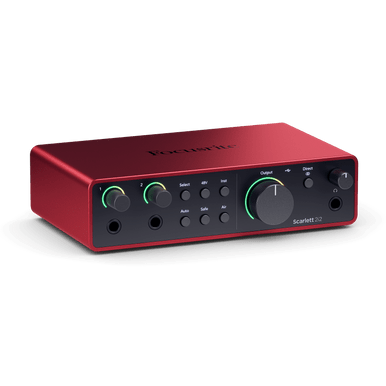
Image: Focusrite (official product page)
"Which audio interface should I actually buy?" The world's collective answer to that question is the Focusrite Scarlett 2i2. Focusrite bills the Scarlett range as the world's best-selling audio interface line, and the 2i2 has been the default first interface for home studios, beatmakers and streamers for over a decade.
But "everyone buys it" is not a spec. In this article, the Beat Lab editorial team breaks down what the current 4th Generation actually changed over Gen 3, how Air, Auto Gain and Clip Safe work in real sessions, and — most importantly — who the 2i2 is enough for, and who should pay extra for the 4i4. We also built a connection cheat sheet for every input source, so you can use this page as a setup reference after you buy.
If this is your very first interface, our overview guide "Audio Interfaces for Beatmakers: How to Choose" explains the basics that this review builds on.
What Is the Scarlett 2i2 (4th Gen), and Why Is It the Default Pick?
The Scarlett 2i2 is a USB-C interface with two mic preamps and two line outputs. The familiar red box is now in its 4th generation, and its appeal is simple: it covers the entire "plug in a mic → record into your DAW → monitor the result" workflow for around $200, with almost nothing left to configure.
- Two ins, two outs — enough for most people: vocals plus guitar simultaneously, or a stereo synth recording
- Mistake-proof recording: Auto Gain and Clip Safe stop ruined takes at the hardware level
- Serious software bundle: Ableton Live Lite, Pro Tools Intro+, Cubase LE, plus the Hitmaker Expansion instrument and FX collection
- Three-year warranty: unusually long for an entry-level interface
Specs at a Glance
| Inputs | 2× mic (XLR, rear) / 2× line-instrument (6.35mm, front), 48V phantom power |
|---|---|
| Outputs | 2× balanced TRS line outs, 1× headphone out |
| Resolution | Up to 24-bit/192kHz |
| Mic preamps | 69dB gain range, EIN -127dBu (A-weighted), remote-controllable |
| Dynamic range | Up to 120dB (line output) |
| Features | Two Air modes (Presence / Harmonic Drive), Auto Gain, Clip Safe, Direct Monitor, loopback |
| Connection / power | USB-C (USB 2.0), bus powered (900mA) |
| Size / weight | 180 × 117 × 47.5mm / 595g |
| Bundled software | Hitmaker Expansion, Ableton Live Lite, Pro Tools Intro+, Cubase LE, Focusrite Control 2 (free) |
| Warranty | 3 years |
| Price (reference) | $239.99 on the official US store; street prices vary by region |
Specs from the official Focusrite site; pricing checked July 2026 and subject to change with sales.
What Actually Changed in the 4th Gen?
It looks like the same red box, but the internals were overhauled. Four upgrades matter when deciding between generations.
1. New preamps with a 69dB gain range
Up from 56dB in Gen 3 — a big jump. Gain-hungry dynamic mics like the SM7B reach usable levels in most cases without an inline booster, and noise performance (EIN -127dBu) rivals interfaces a class above.
2. Converters derived from Focusrite's flagship RedNet line
The AD/DA stage now delivers up to 120dB of dynamic range. In practical terms, the 2i2 moved from "fine for demos" to "release-ready capture" territory.
3. Air is now two modes: Presence and Harmonic Drive
The classic high-end lift is joined by a Harmonic Drive mode that adds mid-range harmonics (details in the next section).
4. Remote-controlled preamps + Auto Gain / Clip Safe
Gain is now digitally controlled, so the free Focusrite Control 2 app can adjust your levels from your computer or phone — you can sit at the mic and never reach for the knob. This remote control is also what makes Auto Gain and Clip Safe possible.
Official Scarlett 4th Gen introduction from Focusrite's YouTube channel
Air, Auto Gain and Clip Safe in Practice
The headline features are not spec-sheet decoration — they exist to reduce failed takes. Here is how to actually use them.
Auto Gain: sing for ten seconds, levels are done
Press Auto Gain, perform normally for about ten seconds, and the 2i2 sets an optimal input level. It removes the single most common beginner failure — takes that come back too quiet or clipped. Once you know your way around, treat the automatic setting as a starting point and fine-tune by hand.
Clip Safe: insurance against ruined takes
With Clip Safe engaged, the interface automatically pulls the gain down the moment your input is about to clip. A rapper suddenly shouting an ad-lib, a vocalist getting louder as the take heats up — Clip Safe quietly saves the one take you could not repeat. There is essentially no downside to leaving it on.
Air modes: Presence pushes vocals forward, Harmonic Drive fattens them
- Presence: lifts the high end, moving vocals and acoustic guitars to the front of the mix. Try it first if your home-recorded vocals sound boxy.
- Harmonic Drive: adds mid-range harmonics for a console-style thickness — good on rap vocals and electric guitars.
Both are printed to the recording (you cannot remove them later), so when in doubt, record clean and use Air only when you deliberately want the color. If you later want serious analog tone-shaping in front of the interface, a channel strip like the dbx 286s is the classic upgrade path.
Connection Cheat Sheet: Every Input Source
The 2i2 is foolproof once you know where each source plugs in and which button to press. Bookmark this table for setup day.
| Source | Where to plug in | INST | 48V | Tip |
|---|---|---|---|---|
| Condenser mic | Rear XLR | — | On | Engage 48V after connecting; let Auto Gain set the level |
| Dynamic mic (SM58 / SM7B) | Rear XLR | — | Off | 69dB of gain handles an SM7B; add gain before reaching for Air |
| Electric guitar / bass | Front 6.35mm | On | — | INST switches to Hi-Z — plays nicely with amp sims |
| Acoustic-electric (piezo pickup) | Front 6.35mm | On | — | If it has an onboard preamp, use INST off (line) to avoid distortion |
| Synth / drum machine (stereo) | Front 6.35mm ×2 (L/R) | Off | — | Input 1 = L, input 2 = R; set a stereo pair in your DAW |
| DJ mixer / line-level gear | Front 6.35mm ×2 (L/R) | Off | — | Keep the mixer output moderate (max input +22dBu) |
| Computer playback (streaming) | Loopback (virtual input) | — | — | Set up in Focusrite Control 2, select as input in OBS |
Note: on the 4th Gen the XLR inputs are on the rear and the 6.35mm jacks on the front (a change from the 3rd Gen's combo jacks).
No monitoring headphones yet? A studio standard like the ATH-M50x plugged into the headphone out completes the recording chain.
Who the 2i2 Is Enough For — and Who Needs the 4i4
The 4th Gen range also includes the cheaper Solo and the bigger 4i4. Whether the 2i2 is enough comes down to how many sources you record at once and how much gear you want to leave plugged in.
The 2i2 is enough if you…
- Record vocals or rap with one or two mics
- Record a mic and a guitar simultaneously (singer-songwriter setups)
- Record synths or grooveboxes in stereo, one at a time
- Stream or podcast with one or two people
Get the 4i4 instead if you…
- Need three or more simultaneous channels — e.g. two mics plus a stereo synth (the 4i4 adds two dedicated line inputs)
- Want hardware synths or drum machines permanently connected instead of re-plugging for every session
- Need MIDI in/out ports to sync hardware with your DAW — the 2i2 has none
- Want four line outputs for external effects sends or multiple monitor pairs
And if you only ever record your own voice with a single mic, the Solo is all you need. For a cross-brand comparison including the MOTU M2, see our audio interface buying guide.
Limitations to Know Before You Buy
- Only two simultaneous channels: not enough for live band recording or multi-mic drums.
- No MIDI ports, no ADAT expansion: hardware-synth-centric studios should look at the 4i4 or above.
- Single headphone output: two-person monitoring needs a splitter or a bigger interface.
- XLR on the rear: slightly less convenient if you swap mics often.
- Bus powered (900mA): weak USB hubs can cause instability — connect directly to your computer or use a powered hub.
Pricing: Standalone or the Studio Bundle?
The official US store lists the 2i2 at $239.99 (checked July 2026); street pricing in Europe via Thomann is typically lower, and the interface goes on sale regularly. If you own neither a mic nor headphones, the "Scarlett 2i2 Studio" bundle adds a CM25 MkIII condenser mic and SH-450 headphones — compare the bundle premium against buying separately.
FAQ
Q1. Is it worth upgrading from the 3rd Gen Scarlett 2i2?
A. It is worth it if you struggle with setting recording levels or run out of gain. The 4th Gen preamps jump to a 69dB gain range, and Auto Gain plus Clip Safe prevent level-setting mistakes at the hardware level. If you are happy with your 3rd Gen's sound and workflow, there is no urgent need to upgrade.
Q2. Can I use condenser mics or gain-hungry dynamics like the SM7B?
A. Yes. Connect the mic to the rear XLR input and press the 48V button to send phantom power to condenser mics. Gain-hungry dynamic mics also work: with a 69dB gain range, the 4th Gen brings an SM7B to a usable level in most cases without an inline booster.
Q3. Does the Scarlett 2i2 have loopback for streaming?
A. Yes. Using the loopback (virtual input) in the free Focusrite Control 2 app, you can mix your computer's playback audio with your mic input and route it to OBS or any recording software — handy for beatmaking streams and type beat preview videos.
Q4. Who should choose the 2i2 over the cheaper Scarlett Solo?
A. Choose the 2i2 if you record with two mics, record a mic and a guitar at the same time, or need a stereo line input for synths or a DJ mixer. If you only record your own vocals with a single mic, the cheaper Scarlett Solo is enough.
Verdict: The Safest First Interface — Just Count Your Channels
The Scarlett 2i2 (4th Gen) pairs genuinely upgraded audio (69dB gain range, up to 120dB dynamic range) with features that prevent failed takes rather than just decorate a spec sheet. It is not the default because of marketing — it stays the default because it is hard to fail with.
If you never record more than two mics or one stereo line source at a time, buy it and forget about interfaces for years. Need three or more channels or MIDI? Step up to the 4i4. One mic only? Save money with the Solo. Get that one decision right and the 2i2 is the least risky purchase in the entry-level market.