Cableguys HalfTime Review: The Half-Speed Effect, Controls and Price (2026)

Image: Cableguys
The melody loop is done. The chords are fine. But when you play it back, it sounds a little too bright, a little too much like everyone else's.
Now imagine the same phrase playing at half the speed, one octave lower. Suddenly it is darker, slower, and sounds like material from a different song.
Cableguys HalfTime does exactly that the moment you insert it. The list price is $12 (checked November 19, 2026).
Short answer: HalfTime does one thing, and you hear the result the second you load it. And no, it is not part of ShaperBox 3.
This review covers how the half-speed effect works, every HalfTime control, the price, how it relates to ShaperBox 3, TimeShaper, and Kickstart, free alternatives, and three techniques for beats, based on Cableguys' website and official manual (checked November 19, 2026).
▲ Every HalfTime control explained (Cableguys official channel). The quickest way to hear what it does
What is HalfTime, and is it part of ShaperBox?
- A dedicated half-speed effect: Cableguys calls it "the only plugin 100% dedicated to half-speed effects"
- No setup: according to the manual, the default settings give you the classic one-bar half-speed effect as soon as you add it. It works on loops, virtual instruments, and live input
- Not included in ShaperBox 3: ShaperBox 3 contains eleven Shapers, and HalfTime is sold separately. The package that includes HalfTime is the larger Cableguys Bundle
If you own ShaperBox 3, its TimeShaper can get you similar results. We sort out that relationship further down.
What is the half-speed effect, and why is it all over trap?
The mechanism is simple. The official manual explains it this way:
- HalfTime slows audio down like tape, vinyl, or an old-school sampler
- Playback speed is lowered, which stretches the audio in time and transposes it down by a matching amount
- In the default 2x mode, audio plays at half its original speed and one octave lower
Slow a whole song to half speed and three minutes becomes six. So HalfTime resets its reading position at every Loop length, which keeps it in step with your arrangement.
With Loop set to 1 Bar, it samples the first half of each bar and plays it back at half speed to fill the whole bar. The second half is ignored. That is the half-speed effect.
Why it caught on
Cableguys pitches HalfTime at "trap, EDM, hip-hop, techno, house and more", and describes the result like this:
- "Plinky pianos become haunting slow-mo trap melodies"
- "Synths mutate into heavyweight EDM bass monsters"
- "Percussion thickens, revealing new rhythmic possibilities"
The site lists Armin van Buuren, David Guetta, 808 Mafia, and The Chemical Brothers among its users.
Producer C.P Dubb (credited on the site with Tyga, Tory Lanez, and French Montana) is quoted there: "This plugin is an essential for turning your beat from predictable to innovative." The site's video section also features a Cymatics video under the line "It's on basically any record".
Computer Music magazine gave it 10/10 in issue 251. The review quoted on the site ends: "At this price, it's an unmissable creative tool."
Dark, slow, and low is a staple of modern trap, and this gets you there in the fewest moves. The quotes on the official site point to that as the reason people reach for it.
Because it is the same change you get from slowing tape or vinyl, it also suits laid-back lo-fi material. It does not add texture such as noise or wobble, though. That is a job for something like RC-20 Retro Color.
What can you control? HalfTime's controls
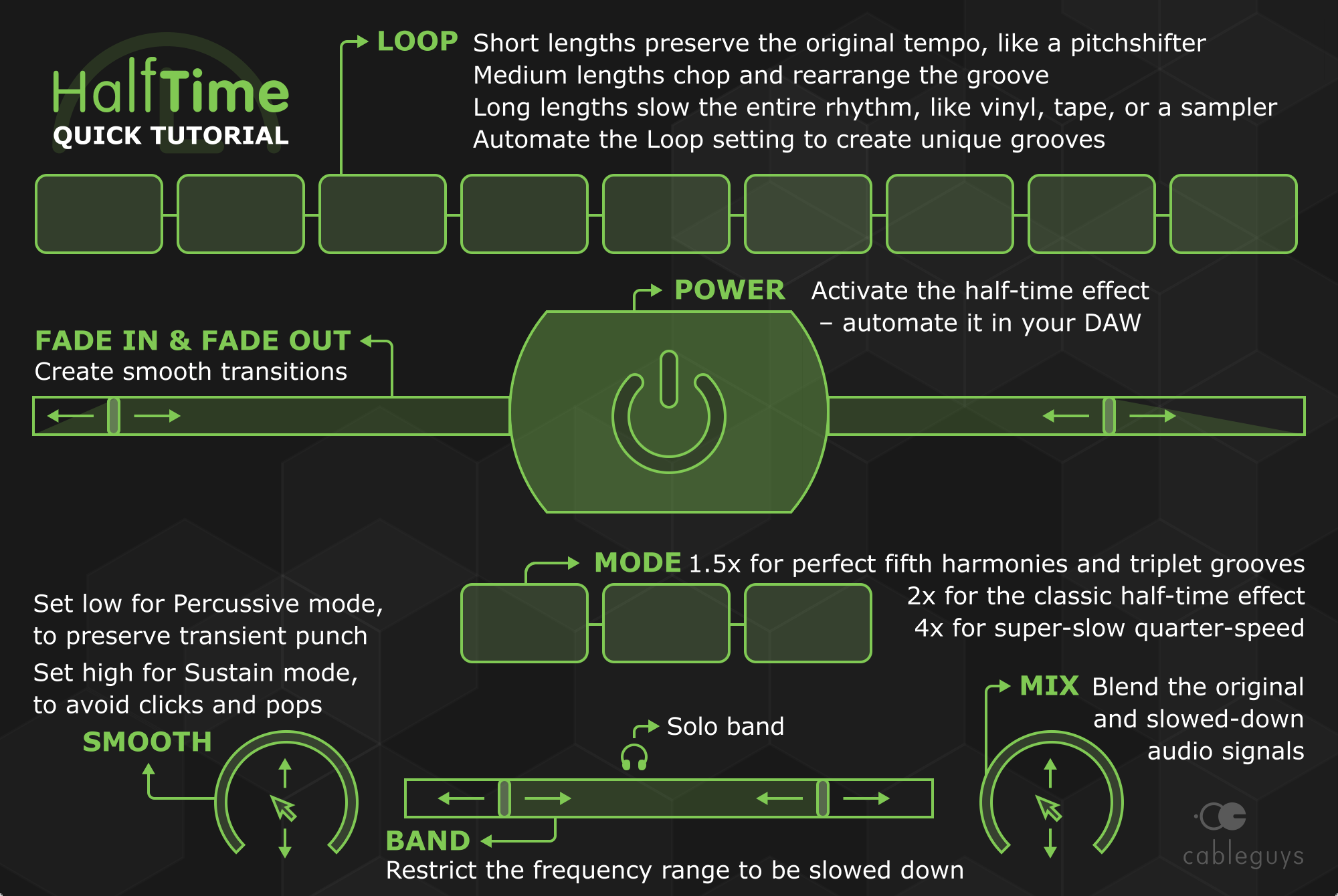
There are not many knobs. This table follows the product page and the manual.
| Control | What it does | Why it helps |
|---|---|---|
| Power | The big central button turns the effect on and off, and can be automated in your DAW | Punching the effect in for one bar before the hook takes a single automation lane |
| Mode | 2x (half speed, one octave down), 1.5x (two-thirds speed), 4x (quarter speed) | Cableguys describes 1.5x as "perfect fifth harmonies and triplet rhythms". 4x is for trippy atmospheres and FX |
| Loop | From 1/16 up to 8 bars | Short values lower the pitch only; long values slow the whole phrase (see the chart below) |
| Smooth | Removes clicks at the loop point. Off, Sustain, Swell, Percussive, and FX ranges | Turn it toward Percussive on drums to keep the attack |
| Band Split | Chooses the frequency range to slow down: lows, mids, or highs | You can leave the kick's low end alone and slow only the melodic layers |
| Band Solo | Plays only the slowed frequencies | Useful while setting the Band Split, and usable as a filter |
| Fade In / Fade Out | How long the effect takes to come in or leave: Instant, Fast, or 1/16 to 16 bars | A slow sink into half speed without drawing automation |
| Mix | Balance between the dry signal and the half-speed signal | Layer an octave-down copy under the original to thicken a sound |
Checked on November 19, 2026 against Cableguys' HalfTime product page and the official manual (v1.1.11). The interface scales from 75% to 200%.
Loop length matters most
Even in the same 2x mode, the Loop length changes the result completely. The manual sorts the settings into three groups.
How do you use it in a beat? Three techniques
All three follow steps described in the official manual and tutorials.
1. Half-speed an entire melody loop
- Insert HalfTime on the melody track and leave Mode at 2x
- Set Loop to double the phrase length. For a 2-bar loop, choose 4 Bars
- Mix at 100% replaces the original; lower values layer the two
Doubling the Loop is the key. The manual explains that HalfTime samples only the first half of the Loop, so if Loop equals the phrase length, the second half of your phrase never plays.
This is the standard move for turning a bright piano or bell loop into darker trap material. For writing the loop in the first place, see our guide to making melody loops.
2. Thicken claps and snares with an octave-down layer
- Insert it on the clap or snare track
- Use a short Loop such as 1/16 or 1/8. The length stays the same and only the pitch drops
- Blend with Mix, so the lower copy sits under the original attack
- If the attack softens, turn Smooth to the left until it reads "Perc."
The manual gives this as a tip: fast Loop times blended in with Mix create an octave-down effect that thickens any sound, drums and percussion included. It is quicker to try than hunting for a sample to layer.
▲ Four HalfTime tips (Cableguys official channel)
3. Use it for transitions (Power, Fade, and Band Split)
- Automate the Power button so the effect is on only for a few bars in a bridge or before a hook
- Set Fade In to 1 or 2 bars and the change sinks in gradually instead of snapping (the maximum is 16 bars)
- Limit Band Split to the mids and highs, so the kick and 808 lows stay untouched while the melodic layers slow down
Even on the full beat bus, that gives you a moment where time seems to slow without disturbing the low end. It is a different kind of transition from a filter sweep, built with three controls.
One extra worth knowing: 1.5x mode. The manual notes that it turns straight rhythms into triplets, and that Loop lengths of 1/4 or 1/8 create a shuffle or swing groove.
- It only works while the DAW is playing: nothing happens when the transport is stopped
- Drums lost their punch? Move Smooth into the Percussive range
- Only half the phrase plays? Set Loop to double the phrase length
- Distorted exports from FL Studio? The manual says to set the Tail option in the render dialog to "Leave remainder"
How much is HalfTime, and where can you buy it? (as of November 19, 2026)
| Option | Price | Details |
|---|---|---|
| HalfTime (Plugin Boutique) | $12 | Perpetual license, priced in dollars |
| HalfTime (Cableguys) | €12 | Perpetual license, priced in euros |
| Cableguys Bundle | See the official site | ShaperBox 3, HalfTime, TimeStop, Snapback, FilterShaper XL, Curve 2, MidiShaper and more: 17 products by Cableguys' count |
| Free trial | $0 | Download from the official site. The demo does not keep settings when you save, and allows one instance per project |
Checked on November 19, 2026 on Plugin Boutique's HalfTime page, Cableguys' website, and the official manual. The displayed Cableguys Bundle price changes with promotions, so check the official site.
- System requirements: Windows 7, 8, 10, or 11 (64-bit); macOS 10.15 or later (Intel or Apple Silicon). VST2, VST3, AU, and AAX
- DAWs: Cableguys lists Ableton Live, Logic Pro, Pro Tools, Cubase, Bitwig Studio, FL Studio, REAPER, Studio One, and others
At $12 it is one of the easier paid plugins to justify. If you are unsure, the free trial on your own loop will settle it.
For current Cableguys promotions, see our deals page.
How does it relate to ShaperBox 3, TimeShaper, and Kickstart?
Cableguys product names overlap, and it is easy to lose track of what includes what. This is how the official site lays it out.
| Product | What it is for | Relation to HalfTime |
|---|---|---|
| HalfTime | Half-speed only | — |
| TimeShaper 3 | Time manipulation with curves you draw: stutter, half-time, reverse, scratch, tape-stop, and more | The bigger tool that can also do half-time. Runs inside ShaperBox 3. Listed at €29 on its own on the official site |
| ShaperBox 3 | One plugin holding eleven Shapers | Includes TimeShaper. Does not include HalfTime |
| Kickstart 2 | Sidechain ducking only | A different job. It moves volume, not speed or pitch |
| Cableguys Bundle | The package that combines ShaperBox 3, HalfTime, and more. Kickstart is not on the official contents list | Includes both ShaperBox 3 and HalfTime |

If you own ShaperBox 3, do you still need HalfTime?
The HalfTime manual answers this directly, in a comparison with TimeShaper 2:
- TimeShaper does almost everything HalfTime can, plus reverses, tape stops, scratching, multiband stutters, and more
- HalfTime is much easier to use and more immediate, because it is dedicated to slowdown effects
- Fade In and Fade Out, and the continuously adjustable Smooth control, are HalfTime features not found in TimeShaper 2
So the split is this: ShaperBox 3 if you want to draw curves and build detailed effects, HalfTime if you want half speed the moment you load it. For the finer differences against the current TimeShaper 3, check the official site.
We cover both in more depth in our ShaperBox 3 review and Kickstart 2 review. For sidechain itself, see the sidechain guide.
Are there free alternatives?
There are ways to get close without paying. These are the ones we could confirm on official pages.
- HalfTime's own free trial: available from the official site. It will not keep your settings, but it is enough to hear what the effect does to your material
- Baby Audio Warp x Andrew Huang: a free plugin from Baby Audio (a free account is required). Baby Audio describes it as varispeed control to speed up or slow down audio, with a Stretch knob that controls pitch independent of time
- Stretching audio in your DAW: bounce the loop to audio, stretch it to twice its length, and let the pitch drop with it. More steps, no plugin needed
A caveat: Baby Audio's page for Warp does not mention equivalents of HalfTime's Loop length, Fade In/Out, or Band Split. Do not assume it is a like-for-like replacement.
We cover Baby Audio's other products in our Baby Audio review, and more no-cost options in our free plugins roundup.
Who should buy it, and who can wait
- You write trap or darker melodies: it turns a bright loop into slow, dark material on insert
- You do not want to spend time reworking loops: no bouncing or re-importing, you hear the result while the track plays
- You need transition ideas: the Power button and Fade are enough for a few bars of drop-down
- This is your first paid plugin: $12 at list price, with only a handful of controls
- You own ShaperBox 3 and know TimeShaper well: you can already build similar effects
- You want reverses and stutters in the same tool: look at ShaperBox 3 from the start
- You only need half speed now and then: stretching audio in your DAW or a free plugin may be enough
- You are after lo-fi texture: adding noise and wobble is another tool's job
HalfTime FAQ
Q1. Is HalfTime included in ShaperBox 3?
No. ShaperBox 3 contains eleven Shapers: Pitch, Reverb, Time, Drive, Noise, Liquid, Filter, Crush, Volume, Pan, and Width. HalfTime is sold separately, and the package that includes both ShaperBox 3 and HalfTime is the Cableguys Bundle (checked on Cableguys' website on November 19, 2026).
Q2. How much does HalfTime cost?
As of November 19, 2026, it is $12 at Plugin Boutique and €12 on Cableguys' website. It is a perpetual license, and a free trial is available from the official site.
Q3. Can I try it for free, and is the demo limited?
Yes, a free trial can be downloaded from the official site. According to the manual, the demo loses its settings when you save your song and allows only one instance in a project.
Q4. My drums lose their attack with HalfTime. How do I fix it?
Turn Smooth to the left of center until the display reads "Perc." According to the manual, this blends the dry signal back in just before the loop point and restores the blunted transients.
Q5. Why does only half of my melody play?
HalfTime samples the first half of the Loop length and plays it back at half speed. To hear a phrase in full, set Loop to double the phrase length: 4 Bars for a 2-bar phrase.
Q6. Does HalfTime work in FL Studio and Ableton Live?
Yes. Cableguys lists Ableton Live, Logic Pro, Pro Tools, Cubase, Bitwig Studio, FL Studio, REAPER, Studio One, and others, in VST2, VST3, AU, and AAX formats. Note that the effect only works while the DAW is in playback.
Summary: one insert, and the same loop becomes new material
- HalfTime is a dedicated half-speed effect: half the speed, one octave down
- Three modes (2x, 1.5x, 4x), shaped with Loop, Smooth, Band Split, Fade, and Mix
- List price is $12 at Plugin Boutique and €12 at Cableguys (checked November 19, 2026)
- It is not part of ShaperBox 3. The Cableguys Bundle includes both
- TimeShaper (in ShaperBox 3) for detailed work, HalfTime for instant results
- To slow a whole phrase, set Loop to twice the phrase length
When a loop feels too bright or a transition will not come, this is a move worth trying.
Start with the free trial on the loop you are working on right now.