Output Arcade Review: The Loop Subscription You Play Like an Instrument — and How It Differs From Splice [2026]
When people say "sample subscription," they usually mean download services like Splice or Loopcloud. Output's Arcade takes a completely different approach: loops live inside a plugin in your DAW, and you play them from a keyboard — switching and transforming them in real time, like an instrument. For producers tired of "everyone uses the same loop" and of losing whole sessions to sample browsing, Arcade has carved out a category of its own.
In this article, the Beat Lab editorial team breaks down how Arcade works, its current pricing and free trial, how it differs from Splice (downloading samples vs performing loops), and the cancellation caveats you should know before subscribing — all verified on Output's official site and help center as of September 17, 2026. For the bigger picture on subscription plugins, see our guide to plugin subscriptions and Rent-to-Own.
What Is Output Arcade? Performing Loops Instead of Downloading Them
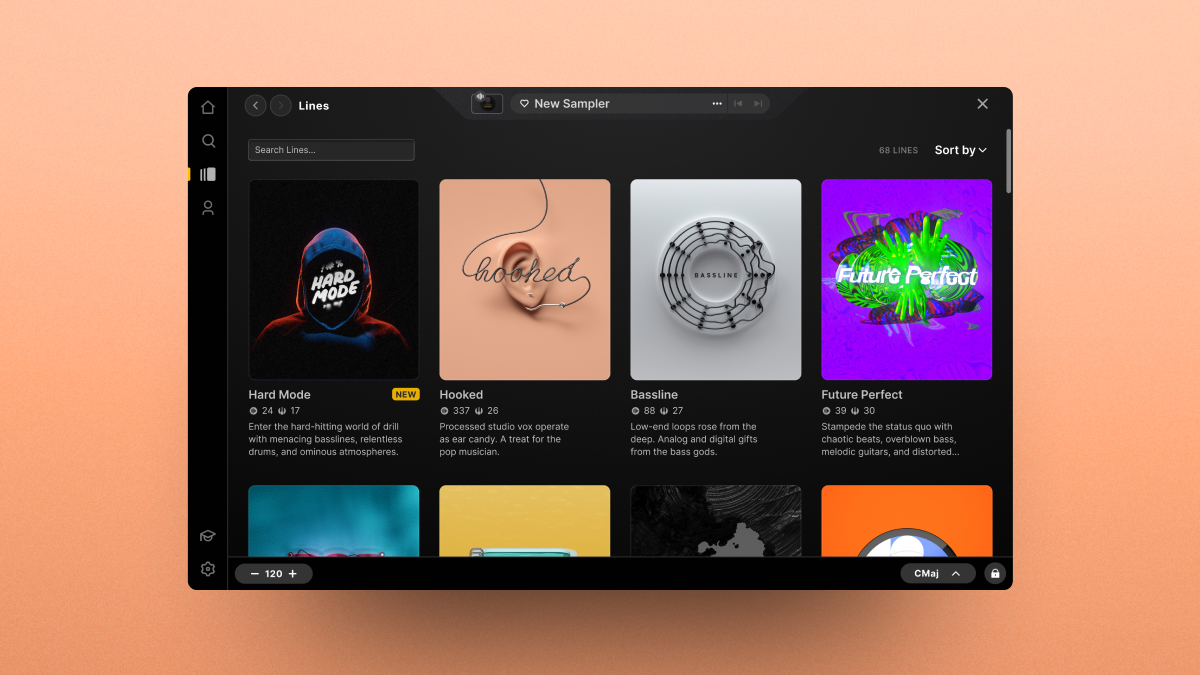
Arcade is a subscription-based sampler instrument from US developer Output. The official tagline is "Perform, shape, and tweak thousands of mix-ready samples" — and that is literally the workflow: a huge catalog of loops and phrases streams into the plugin, and you play them from your keyboard.
Where Splice and Loopcloud are about finding a WAV, downloading it, and dropping it into your DAW, Arcade loads sounds as "kits": each key triggers a different loop variation, and modifier controls mangle the sound in real time — filters, repeats, reverses and more. The same kit produces completely different phrases in different hands, which is exactly the point: it is built to kill that "pasted loop" feeling.
Key features
- Play loops from your keyboard — loop variations mapped across keys, with tempo and key following your project automatically
- Real-time transformation — apply filter, repeat, reverse and other modifiers as you perform
- Import your own samples — load your own material and play it the same way (official help center has a step-by-step guide)
- Constantly growing catalog — new genre-based kits are added continuously, the core appeal of the subscription
- Royalty-free output — music you create while subscribed is yours forever, even after cancelling (per the official help center; details below)
The official demo below shows the workflow well (Output's official YouTube channel).
Pricing and Free Trial (as of September 17, 2026)
In 2026, Output began consolidating its lineup around "Output One" — a bundle of Arcade, the AI assistant Co-Producer, and the three Output FX (Thermal, Portal, Movement). Existing Arcade subscribers were offered a 60-day free loyalty trial of the bundle (official help center, updated April 2026).
| Plan | Monthly | Yearly | Includes |
|---|---|---|---|
| Arcade (standalone) | $12.99 | $99 | Arcade with full content access |
| Output One | $14.99 | $119.99 | Arcade + Co-Producer + Thermal/Portal/Movement (all expansions included) |
| Free trial | 7 days | Offered on Output One (no charge if you cancel during the trial) | |
Verified September 17, 2026 on Output's official help center (Output One article, updated March 2026; loyalty offer article, updated April 2026). New-customer messaging is shifting toward Output One, and plans/prices may change — check the official site for the latest.
At $12.99+/month, Arcade sits at exactly the same price point as Splice Sounds+ ($12.99/mo, 100 credits). But as we cover next, what your money buys is fundamentally different, so a straight price comparison misses the point.
Arcade vs Splice: Downloading Samples vs Performing Loops
Both get filed under "sample subscriptions," but their designs are opposites.
- Splice = own-the-files: you spend credits on WAVs and other files, and downloaded samples remain yours forever, even after cancelling (licensing in perpetuity is officially stated). Processing happens in your own DAW and samplers
- Arcade = play-and-record: sounds stream inside the plugin, and you perform and transform loops into your own phrases before printing them. It is not built to accumulate a file library — browsing and downloads stop when you cancel (the music you made stays yours)
Put another way: Splice is grocery delivery, Arcade is renting a fully equipped kitchen. If you want a permanent sample library, use Splice; if you want to improvise original phrases out of loops on the spot, Arcade is your tool. For the legal basics of using melody loops in released tracks, see our melody loops and copyright guide.
[Comparison Table] Splice vs Arcade vs Loopcloud
Here is how the three major sample subscriptions differ by design, compiled by our editorial team from official sources (verified September 2026). Feel free to quote or share this table with a link back.
| Splice | Output Arcade | Loopcloud | |
|---|---|---|---|
| Type | Download service (credits) | Playable instrument plugin | Download service (points) |
| Cheapest monthly | $12.99 (100 credits) | $12.99 (Arcade) – $14.99 (Output One) | $7.99 (100 points) |
| How you use sounds | Download WAVs, drop into DAW | Perform and transform loops inside the plugin, then record | Audition/edit in desktop app synced to DAW, then download |
| After cancelling | Downloaded samples usable forever | Instrument access ends (music you made stays royalty-free forever) | Downloaded samples usable forever |
| Free trial | Free account (plus seasonal promos) | 7 days (Output One) | 14 days with 100 points |
| Best for | Building a permanent, curated library | Improvising original phrases from loops | Lowest fixed cost, DAW-synced auditioning |
Prices and terms verified on each official site/help center in September 2026. For a deeper plan-by-plan breakdown of the two download services, see Loopcloud vs Splice.
Who Gets Their Money's Worth — and Who Doesn't
Arcade is a good fit if you...
- Treat loops as a starting point, not a final part — switching and mangling variations from the keys quickly turns a stock loop into something unrecognizable. Excellent for cranking out melodic top lines for type beats
- Finish tracks every month — with kits added continuously, the $12.99+ fixed cost is easy to justify if you produce several tracks a month
- Want to stop losing hours to sample browsing — pick a kit by genre or mood and start playing, skipping the download/tempo-match/chop routine entirely
Look elsewhere if you...
- Want samples as permanent assets — access to the instrument ends when you cancel. If you want WAVs on disk, Splice or Loopcloud is the rational choice
- Produce only occasionally — the clock keeps billing in months you don't create. With an on-and-off schedule, Loopcloud's non-expiring points or one-off sample packs make more sense
- Program everything note by note — Arcade is loop-based at heart. If you build parts from scratch, conventional instruments and synths (start with free plugins) remain the main tools
Before You Cancel: What Output's Help Center Says
The most important question for any subscription is "what happens when I quit?" Output's official article "What happens when you cancel your subscription" states the following.
- After cancelling, access runs through the end of the current billing period (the exact date is shown on your account page)
- After that, you can no longer browse, search, download, or access downloaded content. Recorded MIDI in existing projects plays back with the last saved sampler as long as Arcade remains installed
- For that reason, Output officially recommends bouncing MIDI tracks to audio before cancelling
- Everything you created while subscribed stays yours indefinitely, royalty-free
- You can reactivate or renew at any time, and an official pause option also exists
In short, it is a rental model: the songs stay, the instrument goes back. The safe habit is to bounce Arcade parts to audio whenever a track is done. Once you've exported a mix, you can check its loudness with our free dynamics checker.
FAQ
Q1. What happens to my tracks if I cancel?
A. Music created while subscribed remains yours forever, royalty-free. The instrument itself becomes inaccessible, so bounce your MIDI to audio before cancelling — Output's own recommendation.
Q2. Is there a free trial?
A. Yes. As of September 2026, Output offers a 7-day free trial of Output One, which includes Arcade. Cancel within the trial and you pay nothing.
Q3. Arcade or Splice — which should I pick?
A. Splice if you want downloaded files as permanent assets; Arcade if you want to perform and transform loops into original phrases. They solve different problems, and plenty of producers run both.
Q4. Can I release music made with Arcade commercially?
A. Yes. Music made while subscribed is royalty-free and yours indefinitely, including after cancellation, per the official help center. Check Output's copyright article for the exact scope.
Verdict
Output Arcade offers something almost nothing else in the sample-subscription world does: loops you play like an instrument. The trade-off is explicit — no permanent file library — but in exchange you escape the sample-pack sameness that haunts loop-based production. Since it serves a different role than Splice or Loopcloud, the practical move is to take the 7-day free trial and see whether "performable samples" fit the way you work. For budgeting your overall plugin subscriptions, see our subscriptions and Rent-to-Own guide.