EP-133 K.O. II Review (2026): The Beginner Sampler, Now With 128MB
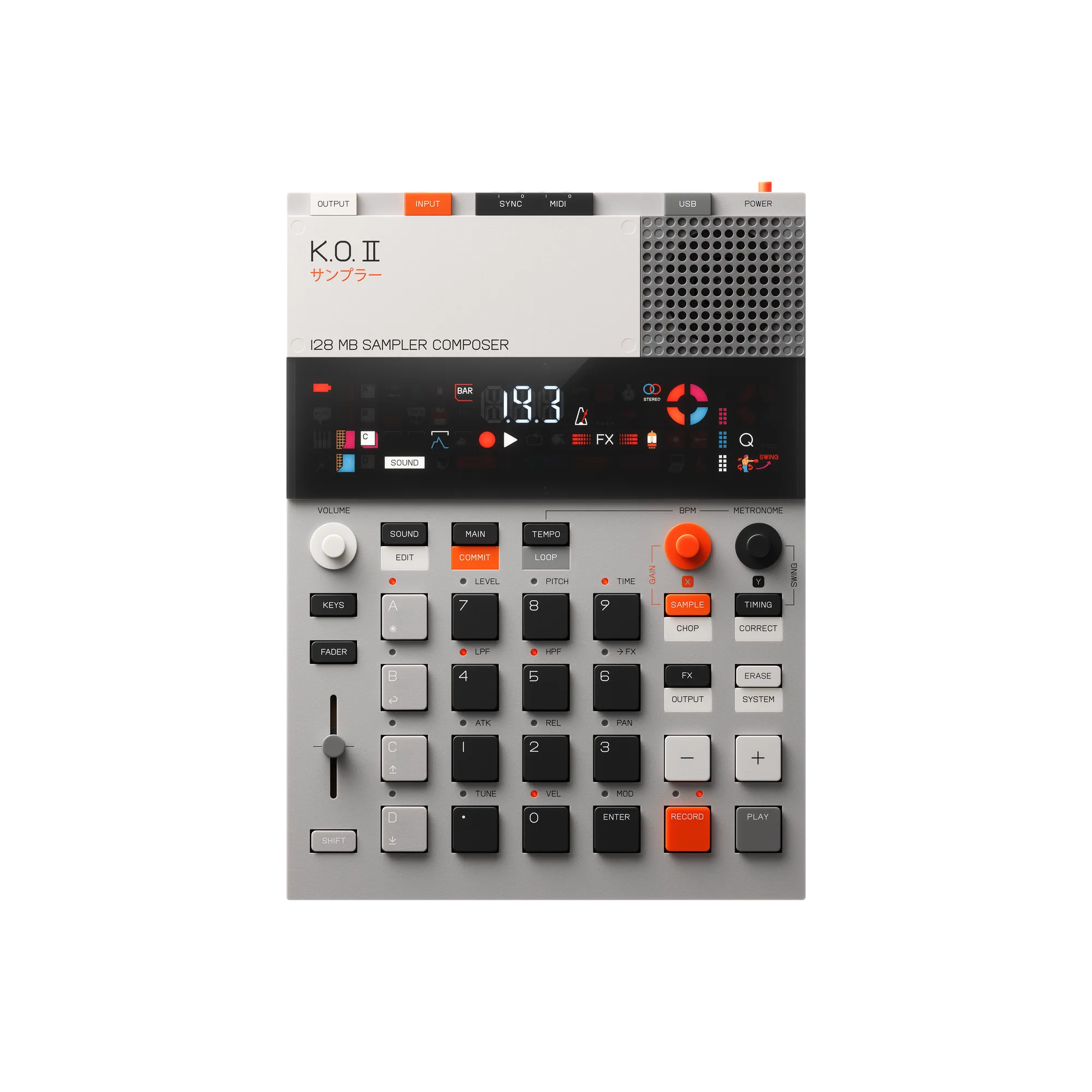
Image: teenage engineering (official website)
"I want a sampler, but the SP-404MKII and MPCs feel like overkill." Since its 2023 launch, the Teenage Engineering EP-133 K.O. II has been the machine that catches exactly those people. The giant-calculator design is instantly recognizable on any store shelf, and it pulled a whole audience of first-time samplers into hardware — less "studio gear," more "gadget you want to touch every day."
Then in 2026 it quietly switched to a new version with 128MB of sample memory — double the original — at the same $329 price (official store, checked July 2026). OS 2.5 added USB audio recording, reverse playback and improved timestretching on top. The "looks like a toy, works like an instrument" formula keeps getting sharper.
Based on teenage engineering's official specs and store pricing (checked July 20, 2026), this review looks at how far the EP-133 K.O. II goes as a first sampler — with a spec quick-reference table, a 7-step guide to your first beat, and how it stacks up against the SP-404MKII and MPC Sample.
Verdict first: who it suits — and who will outgrow it
👍 The EP-133 K.O. II suits you if…
- This is your first sampler and you don't want to stall out: record, place on a pad, play, shape with the fader — the workflow is readable straight off the faceplate.
- Your studio is a train seat, a sofa, or a hotel room: 16mm thin, about 620g, runs on four AAA batteries, with a mic and speaker built in.
- Design and "is it fun to touch" matter to you: the pressure-sensitive keys, the multifunctional fader and the segment-plus-dot hybrid display are finished to a level that makes you want to pick it up.
🤔 You may outgrow it if…
- You want to sculpt lo-fi texture with effects: for Vinyl/Cassette-style coloring, the SP-404MKII is the real answer.
- You want to stockpile long songs and huge libraries: memory is a deliberate 128MB with 999 slots — there is no SD card slot.
- You want detailed waveform editing on the unit itself: fine editing assumes the free ep-sample-tool app on a computer.
Still torn? Jump to "How it differs from the SP-404MKII and MPC Sample" below, or read the full three-way comparison: "SP-404MKII vs MPC Sample vs EP-133: Which to Buy?"
Spec quick-reference: EP-133 K.O. II (checked July 2026)
Here is everything that matters for beatmaking, pulled from the official specs into one table. Bookmark or share as needed.
| Price | $329 US (official store) / 55,000 yen incl. tax in Japan — checked July 2026 |
|---|---|
| Type | Standalone sampler / sequencer / composer with built-in mic and speaker |
| Sample memory | 128MB (2026 version — double the original) / 999 sample slots |
| Sampling | 46kHz / 16-bit (stereo or mono), 32-bit float internal chain, 24-bit ADC/DAC |
| Polyphony | 12 stereo / 16 mono voices |
| Pads | 12 pressure- and velocity-sensitive keys (4 groups A–D) + multifunctional fader |
| Sequencer | 9 projects (80,000 notes each), 4 groups × 99 patterns, 12 tracks per pattern, song mode with 99 positions (up to 9,801 bars) |
| Effects | 6 master FX + master compressor, pressure-sensitive punch-in FX 2.0 (12 types), note-triggered sidechain |
| Connections | Stereo in/out, sync in/out, MIDI in/out (TRS Type A), USB-C (USB audio recording supported) |
| Power | 4x AAA batteries or USB-C |
| Size / weight | 240 × 176 × 16 mm (9.45" × 6.93" × 0.63"), 620 g / 22 oz — 10" EP record format |
| Computer link | Free "ep-sample-tool" app for transferring, trimming and backing up samples and projects |
Specs from the official teenage engineering website; prices from the official store and the Japanese authorized distributor (all checked July 20, 2026).
What the 2026 128MB version actually changes
The change is simple: sample memory doubled from 64MB to 128MB, price unchanged. Apart from the faceplate now reading "128 MB sampler composer," operation and features are identical — and owners of the original 64MB unit get every new feature through free OS updates. The 128MB version is now the standard model in stores.
The bigger story is that free OS updates keep stacking features. The latest OS 2.5 added (per the official release notes):
- USB audio recording and monitoring — sample your phone or computer over a single cable
- Reverse sample playback and adjustable sample-rate recording (which also stretches your memory)
- Longer mono samples and equal-length auto-chop
- A new key/scale shortcut and improved timestretching
More than two years after launch, the machine still grows after you buy it — a real reassurance when choosing a first sampler.
Why it works so well as a first sampler
🎛️ The workflow is readable straight off the hardware
The EP-133's real invention isn't stripping features away — it's that you can always tell what to do next just by looking at it. Twelve big pressure-sensitive keys, one multifunctional fader, mode buttons for sample / sequence / FX. There are no menus to get lost in; even without the manual, the hardware steers you through record → place → play → shape.
📦 Drums, bass and keys come pre-loaded — you can finish a beat on day one
A curated set of drum, bass and keys sounds ships on the unit, so you can start building beats before you've sampled a single thing. The order of "make sound first, then want to record your own" is exactly right for a beginner instrument.
🪶 16mm thin, 620g, battery-powered: the barrier to starting is physically low
A footprint about the size of a 10" EP record, 16mm thick. It slides into a bag more casually than a laptop, runs on four AAA batteries, and plays out of its own speaker. No setup ritual means you can start making the idea the moment it arrives — the single biggest reason people touch it every day.
Your first beat in 7 steps (save this)
To head off the classic "I bought it, now what?" moment, here is the whole journey from zero to a finished loop in seven steps. For exact key combos, see the official guide — use this as the map.
- Play the preset sounds: power on and hit the group A (drums) pads. Get a feel for how the fader changes pitch and level.
- Sample something: record ambience or your voice with the built-in mic, or capture your phone/computer audio via line-in or USB-C (USB audio recording arrived in OS 2.5).
- Trim and chop: clean up the start and end, then split phrases across pads with equal-length auto-chop.
- Assign to groups A–D: a good default is A = drums, B = bass, C = melody/chords, D = one-shots and ear candy. Clear roles prevent chaos later.
- Record a pattern: punch it in live with record + play. Quantize and swing will pull a slightly loose take into a groove.
- Shape with the fader and punch-in FX, then commit: ride filter and pitch on the fader, build drama with the pressure-sensitive punch-in FX, and freeze the good moments with commit.
- Arrange in song mode: chain your scenes across the 99 song positions and the loop becomes a track with an intro, verse and hook.
Before you chop, knowing your source's tempo and key makes placement far easier — the free BPM & key detector helps. For the craft of chopping itself, see "how to make boom bap."
How it differs from the SP-404MKII and MPC Sample
The essentials versus its two same-class rivals, at a glance.
| Item | TE EP-133 K.O. II | Roland SP-404MKII | AKAI MPC Sample |
|---|---|---|---|
| Price guide (US) | $329 (July 2026) | $449–$499 street | $399 (March 2026 launch) |
| Character | The casual, intuitive "serious sampler that plays like a toy" | Lo-fi texture and live performance | MPC-style chopping, fully self-contained |
| Memory / storage | 128MB, 999 slots | 16GB internal + SD card | 8GB internal + microSD |
| Speaker / mic | Both built in | None (mic/guitar inputs) | Both built in |
| Power | 4x AAA batteries / USB-C | AC adapter / USB-C / 6x AA batteries | Built-in li-ion battery (approx. 5 hours) |
| Thickness / weight | 16mm, approx. 620g | 71mm, 1.1kg | Compact, built for backpack carry |
| Best for | A first unit and daily sketching | Texture sculpting and live sets | A doorway into the MPC ecosystem |
In short: ease (EP-133), texture (SP-404MKII), self-containment (MPC Sample). For the full four-axis breakdown, read "SP-404MKII vs MPC Sample vs EP-133: Which to Buy? (2026)" and the standalone "MPC Sample review."
The honest downsides
⚠️ 128MB is a deliberate constraint — not a library drive
At 46kHz/16-bit, 128MB works out to roughly 20+ minutes of mono recording (about half that in stereo). That is plenty for one-shots and chopped phrases, but not for hoarding full songs. OS 2.5's adjustable recording sample rate stretches it further, yet the right mindset is still "a tool for finishing fast inside its limits."
⚠️ 12 keys × 4 groups is not the 16-pad feel
You get 12 keys and switch between groups A–D. MPC-trained fingers may stumble at first. The flip side: the layout is close to a keyboard row, so melodies are easy to play, and the unit doubles as a MIDI controller for your DAW instruments.
⚠️ Fine waveform editing lives in the companion app
The hybrid segment-and-dot display is brilliant at status, not at waveforms. Precise trimming, sample management and backups happen in the free ep-sample-tool — on studio days, expect a computer alongside it.
On a tight budget? Try the $0 route first
At $329 the EP-133 is affordable for hardware, but it is still real money. The core experience — making beats from samples — can be tried for free with a free DAW and free plugins first: see "the complete guide to a $0 beatmaking setup." If, on the other hand, you already know you can't focus in front of a computer, a "one second to power on" instrument like the EP-133 is exactly where money is best spent.
FAQ
Q1. Can the EP-133 K.O. II be used without a computer?
Yes. It is a standalone sampler with a built-in mic and speaker that runs on four AAA batteries or USB-C, so you can go from recording to sequencing to a finished track on the unit alone. You only need the free ep-sample-tool app for Mac/Windows when you want to organize samples or back up projects (official info as of July 2026).
Q2. Is 128MB of sample memory enough?
For beatmaking built on one-shots and chopped phrases, yes. Sampling runs at 46kHz/16-bit, so 128MB works out to roughly 20+ minutes of mono recording, with 999 sample slots. It is not designed for hoarding full-length songs — if that is your workflow, an SD-card machine like the SP-404MKII is a better fit.
Q3. What changed between the old 64MB version and the 128MB version?
Only the sample memory (64MB to 128MB), at the same $329 price (as of July 2026). Apart from the faceplate now reading "128 MB sampler composer", operation and features are identical, and the older 64MB units get the same features via free OS updates. The 128MB version is now the standard model in stores.
Q4. What should I buy when I outgrow the EP-133?
The classic next steps are the Roland SP-404MKII if you want lo-fi texture effects and live performance features, or the AKAI MPC Sample if you want MPC-style chopping that finishes tracks anywhere. Both sit in the $399–$499 street-price class, and the EP-133 stays useful alongside them as a MIDI controller and sketchpad.
Verdict: pick the first machine that makes you want to make things
The essence of the EP-133 K.O. II is not on the spec sheet — it is how little time passes between switching it on and hearing your first sound. The 2026 move to 128MB and the steady OS updates have softened its one real weakness, and the price stayed at $329 (checked July 2026). As an answer to "which sampler first?", it is the easiest recommendation of 2026.
If texture sculpting or live sets are on your horizon, confirm your type in "SP-404MKII vs MPC Sample vs EP-133" before deciding. Whichever you choose, the only step left is to make things and put them out.